WordPress

Top 3 Customer Reviews Plugin For WordPress Website

Are you searching for the best customer reviews plugins for WordPress Websites?

Customer reviews can help you build social proof and boost the trust of your customers, which means more sales for your online business.

In this blog, we’ll share the best customer reviews plugins to help you easily add online customer reviews to your WordPress website.

Why use a customer reviews plugin for WordPress Websites?

customer reviews plugin

A customer reviews plugin makes it easy to add different types of online reviews to WordPress sites. For example, you can add online reviews from social media, let customers submit their own reviews, add engaging product or service reviews, and more.

Best Customer Reviews Plugins for WordPress in 2022

That being said, let’s take a look at some of the best customer reviews plugins for WordPress you can try in 2022

1. Tagembed Reviews Plugin

Tagembed Reviews Plugin

Try this Tagembed Reviews Plugin and collecting online reviews can be made easy as this plugin is very easy to use and provides a hassle-free experience. It provides a dedicated reviews widget that displays the customer reviews, which the tool collects from your account. Also, the plugin is compatible with 20+ social media platforms, so if you are looking to collect reviews from other platforms, the tool helps in that.

You can even personalize the widget according to your preference by using the customization option. It allows you to change the font size, font style, background, themes, and more. Thus, it increases the grace of your website and makes it more professional and pleasing to the eyes.

The plugin is coding-free, and with three simple steps, you can easily display customer reviews on the WordPress website. Moreover, the widget is responsive, which means it adjusts itself according to the size of the screen.

2. Easy Testimonials

Easy Testimonials

Easy Testimonial is a free plugin from WordPress that lets you display online reviews and testimonials across your WordPress website.

Once you’ve collected testimonials and customer reviews with a WP plugin, you’ll want an easy way to add them to WordPress. This user-friendly plugin lets you do just that. You can add customer reviews to your sidebar, widget section, or use the shortcode to embed your online reviews into posts and web pages.

3. Rich Reviews

Rich Reviews

The Rich Review plugin for WordPress lets users display online user reviews anywhere on the website. This WP plugin is specifically designed to boost your sales and SERP rankings in search engines. This WP plugin is built around shortcodes and is fully customizable, and mobile responsive.

This WP plugin features the ability to manage and fully customize three types of reviews: per-page or per-post, category, or global reviews. Another great feature is that the plugin is compatible with translation and has excellent support. It has also integrated with Shopper Approval which is a Google Affiliate, which can expand the reach of the reviews.

Why are customer reviews important for any business?

  • Customer reviews act as free advertising for your products + services
  • Can enhance your website’s appearance in the Google Search Engine Results Pages (SERPS)
  • Allows you to gather feedback to improve your products + services
  • Can highlight features or benefits you missed in your product copy
  • Positive customer reviews act as social proof

Also, Read – Google Reviews Plugin for WordPress Website

Conclusion

This list of top customer reviews WordPress plugins includes good options for both small and large businesses. All of these WP plugins allow users to add online reviews to a specific part of their website and fully moderate each individual post or review.

I wish you find the right fit!

Technology, Website

How To Quickly Add Instagram Feed On Elementor Website – For Free

Do you want to learn how to add an Instagram feed on the Elementor website for free?

If you want to without coding builds beautiful web pages for your Elementor website, Elementor is one of the best options to create engaging pages without touching a single line of code.

And the amazing news is there’s an easy way to make your web pages even more engaging. You can quickly add an Elementor Instagram feed to your WordPress website.

elementor

Add Instagram Feed On Elementor Website For Free (Without-Any-Coding)

Right now, we will show you how to quickly add an Instagram feed on Elementor in just a few easy steps are:

A. Log In & Aggregate The Instagram Feeds 

1. To begin, either create a Tagembed Widget account or log in to an existing one.

free account

2. You will be sent to the Tagembed Widget Dashboard. To begin adding Instagram feeds to your widget, select Add Social Media Feeds from the drop-down menu.

tagembed dashboard

[ Tip: You may combine many feeds from different sources, such as Facebook Widget, Twitter Widget, and Google Review Widget into one widget.]

3. In the new Pick a source dialogue box, pick Instagram Business as your aggregating feed source.

social media

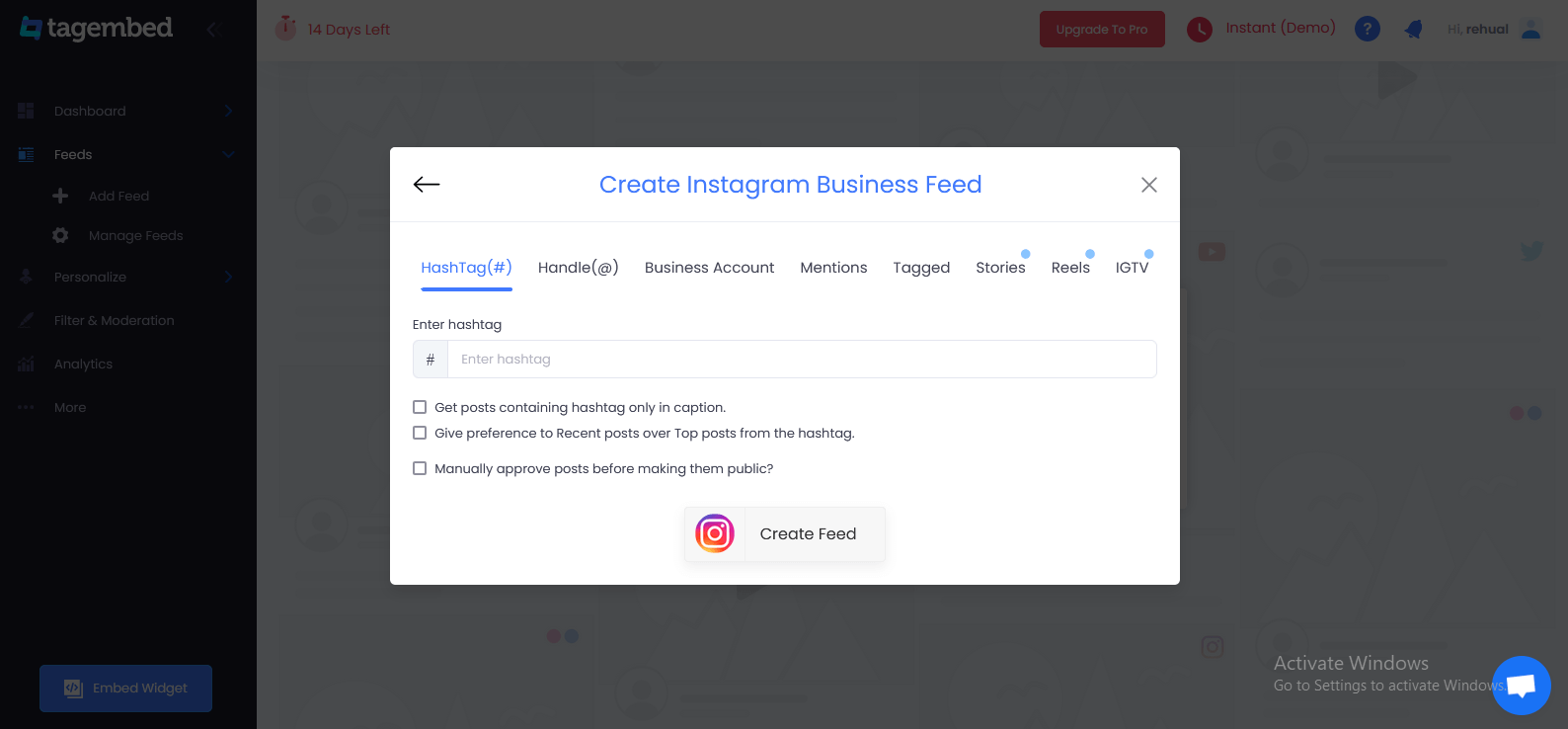
4. A pop-up window titled Create Instagram Business Feed will open, with six choices for fetching Instagram Feed to Elementor website’s Instagram Widget.

create instagram business feed
  • Hashtag (#): Use hashtags (#) to get Instagram feeds.
  • Handle (@): This is used to get feeds from a profile account.
  • Stories & Reels: To get your Instagram Stories and Reels from your profile.
  • Mentions: Get a list of Instagram posts that reference your account.
  • Tagged: See a list of Instagram posts where your profile has been tagged.
  • Videos (IGTV): Use Instagram TV to gather videos.

Select your feed aggregation connection and fill in the required fields. And Complete the needed credentials to fetch the feeds. 

5. Finally, click Create Feed to begin the process of integrating Instagram feeds based on your preferences.

B. Generate & Copy The Embed Code 

The specific steps for generating Instagram feeds embedding code for your Elementor website are given below.

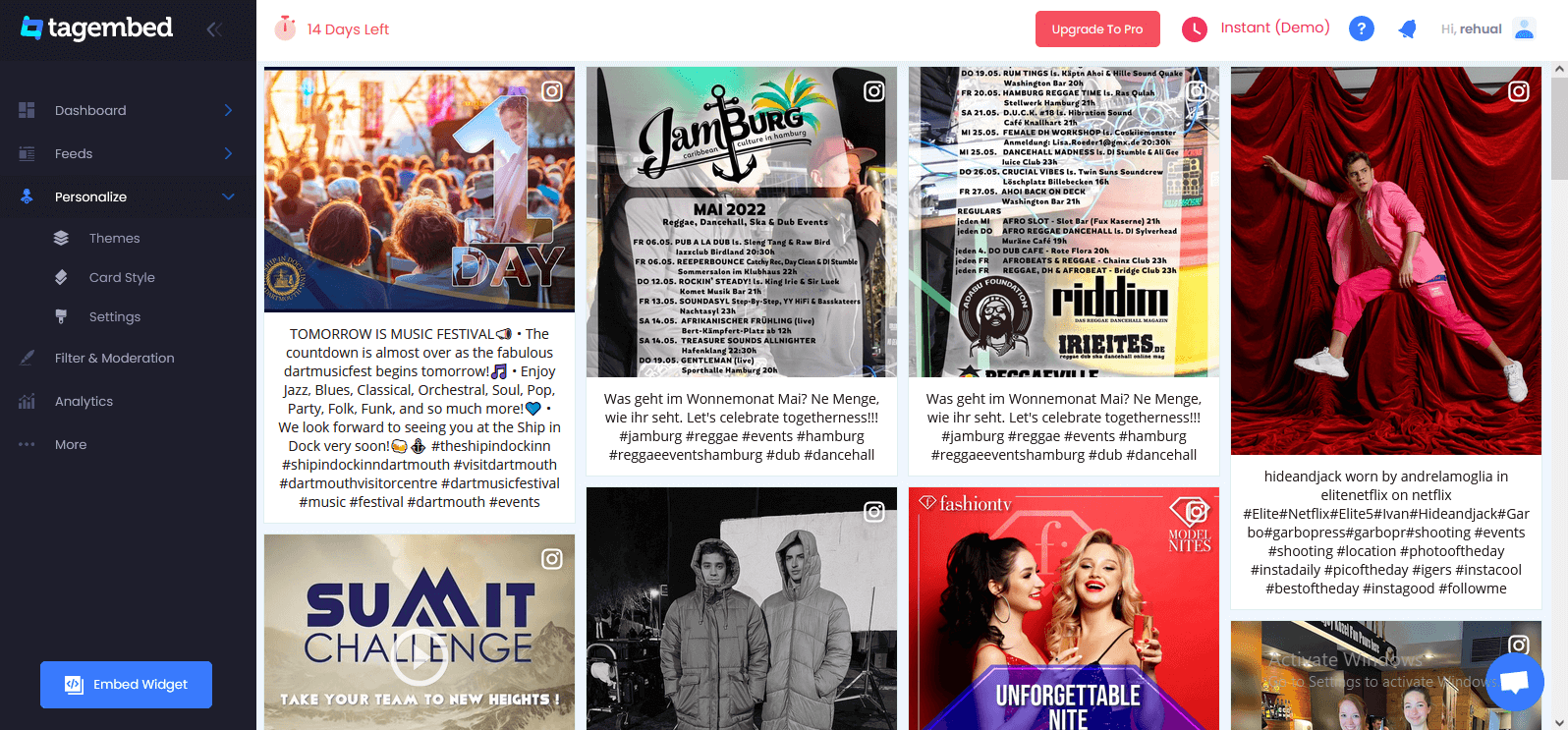
1. Click the Embed Widget button in the bottom-left corner of the screen. You can also view a preview of how your feeds will appear on different devices by clicking the Embed Widget button.

display instagram feed

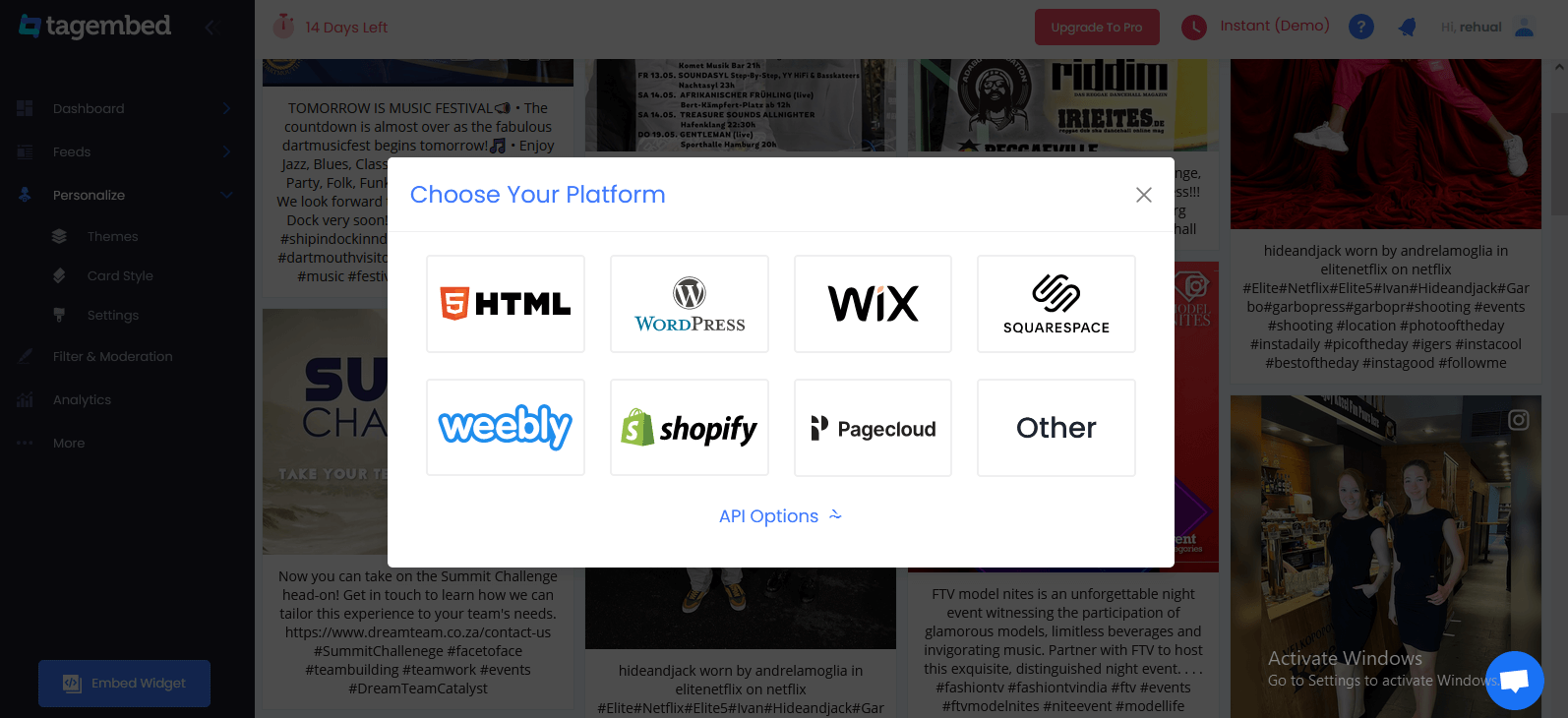
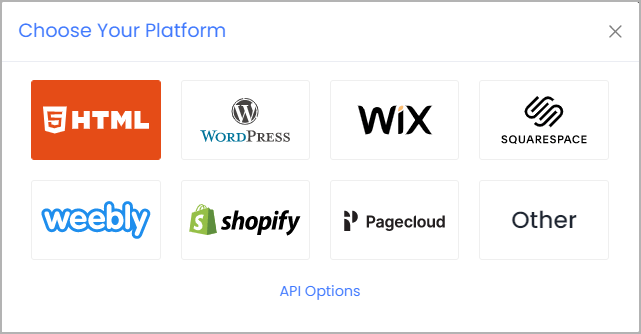
2. Select Other in the new Choose Your Platform dialogue box to produce code for the Other option.

Choose Your Platform

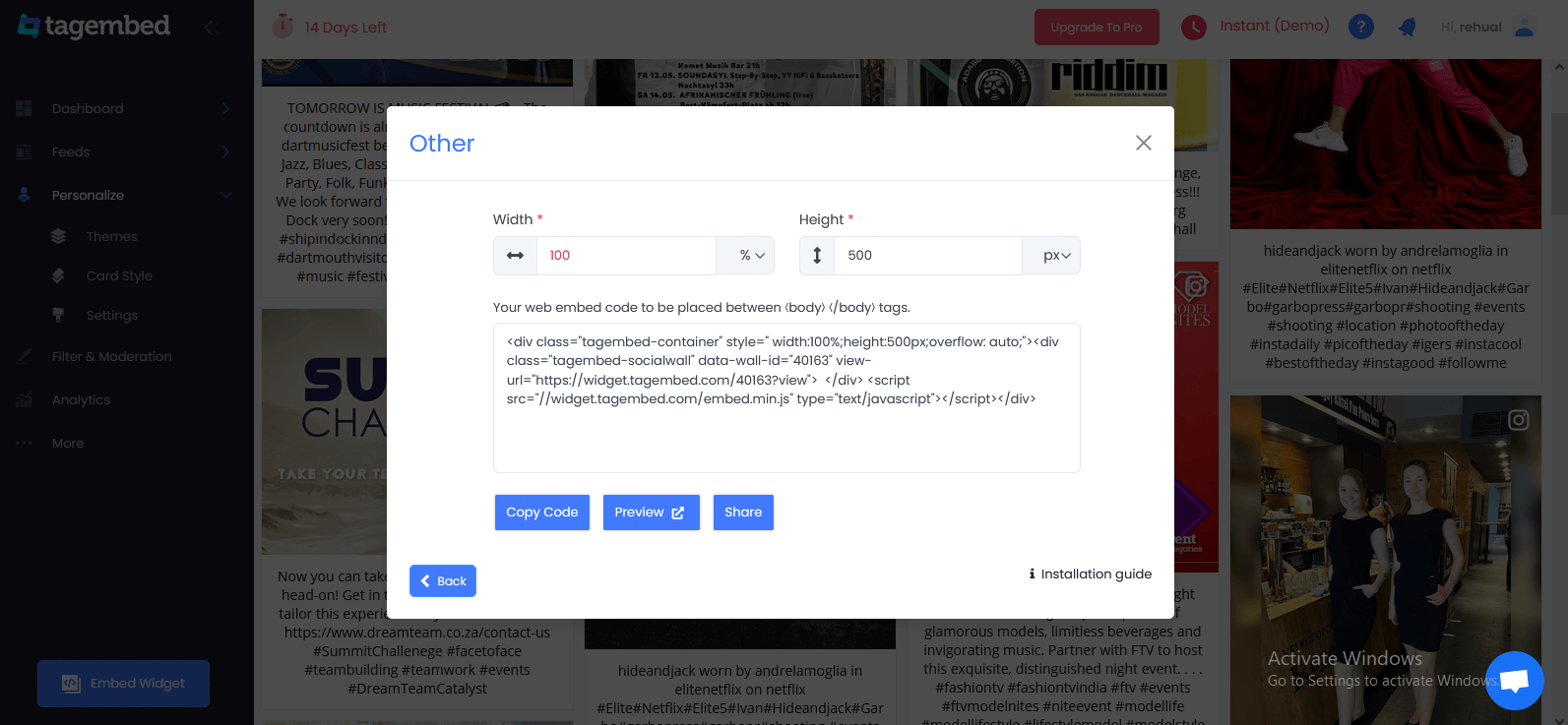
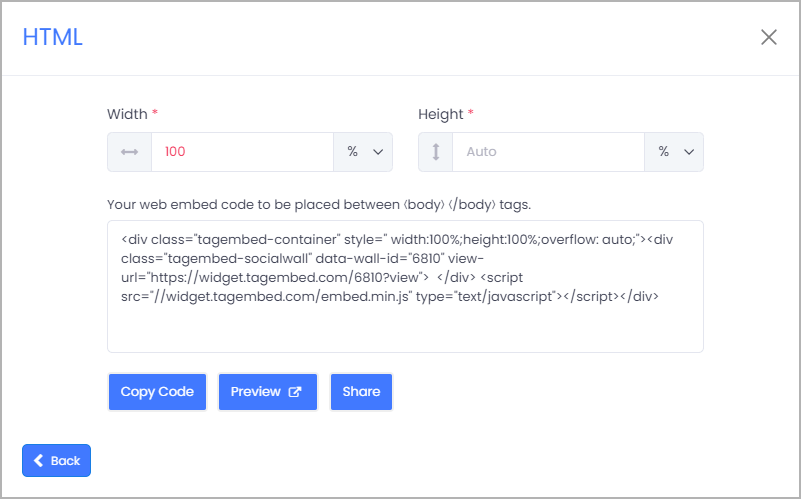
3. A new dialogue box will display. Set the widget’s width and height, then click Get Code and copy the code that appears.

elementor - height weight

C. Embed Instagram Feed On Elementor Website For Free

1. Select the pages to which you wish to embed your Instagram feed by logging into your WordPress Admin account.

Elementor 

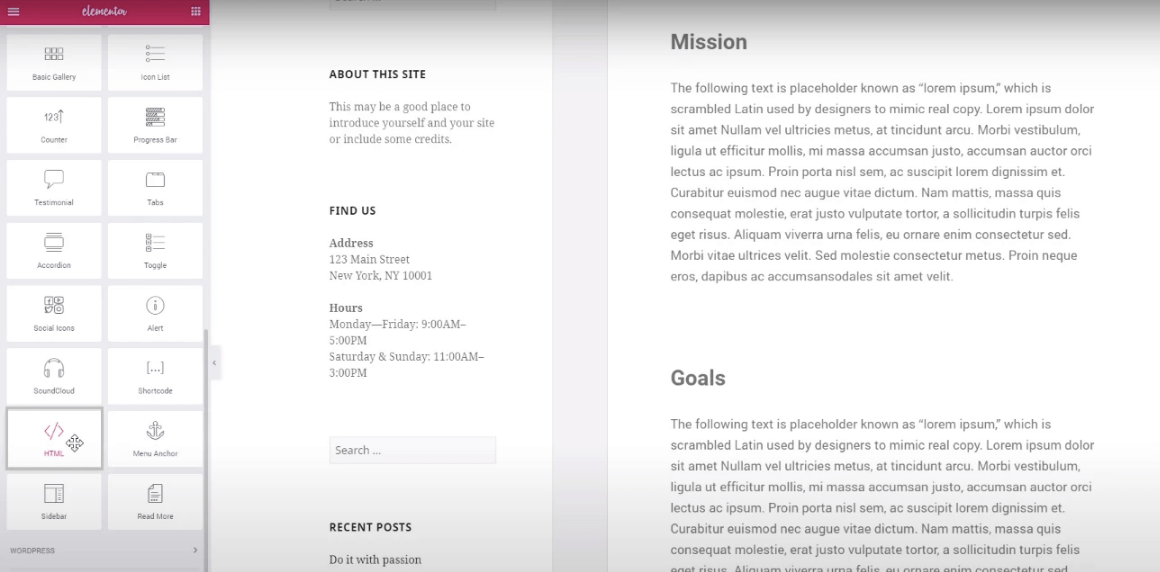
2. Select Edit with Elementor,  then drag and drop the HTML element to the chosen portion of your website page where you want to embed Instagram feed, paste the code, and click Update to finish the process! 

Voila! You will have added the Instagram feed on the Elementor website. 

Why Should Add Instagram Feed to Elementor Website?

Elementor is a most popular website builder plugin for WordPress that comes with an easy-to-use drag and drop editor. With its simple editor, you can create a website to engage your audience even if you’re an Elementor WordPress site.

And you can also quickly add Instagram feeds to the Elementor site to improve them. You can get more Instagram followers, conversions, and boost the sales for your business that way.

Here are a few easy reasons you should add an Instagram feed to the Elementor website:

  1. You can display Instagram posts and videos on your website. When people see others enjoying your products, it works as social proof and makes them more likely to purchase from you.
  2. By adding an Instagram feed, you can display Instagram photos and videos on your website. So, you can make your web pages more engaging even without uploading these images and videos to your website.
  3. Embedding Instagram feeds on site means more people can see them and that can get you more Instagram followers.
  4. Instagram feeds can also give your customers an amazing online shopping experience. You can add shoppable Instagram feeds to your personal website and directly sell out your products.

Now, let’s see Elementor Instagram feeds can help you promote your product/business and get more sales in lots of ways.

Over To You

Elementor is an amazing website platform to add an Instagram feed and efficiently boost your user engagement, brand awareness, and visibility, and eventually increase your sales and conversions.

Display Instagram feed on the Elementor website helps build social proof for your brand, making the Elementor website’s overall look more attractive and appealing.

Apart from this, it helps a great deal in improving your relationship with your customers. If you are a business or a brand and not using the power of social media by embedding Instagram feed on the Elementor website, then you are surely missing out on a lot.

Digital Marketing, Social Media Marketing

How To Twitter Feeds Can Help in Brand Promotion & Sales Generation?

Said to be a goldmine of user-generated content- ‘Twitter’ is one of the most engaging social media platforms displaying the most trustworthy & authentic form of content. Be it images or videos, every content you see on Twitter is termed as Twitter Feed.

These Twitter feeds are curated in such a vibrant manner that the users feel addicted to them and therefore get more engaged. Hence, brands use this as a good marketing strategy to embed Twitter feed on the website to upgrade their business and profits.

In this blog, we will not only discuss the benefits of Twitter posts but also will explain the steps of adding Twitter feeds to your website.

Unbelievable Benefits of Embedding Twitter Feeds For Your Business:

At present, Every online marketing strategy comes with great benefits that make marketers go gaga over them. Just like that, embedding a Twitter widget on the website has some mind-blowing benefits associated with it. So, scroll down to know those benefits!

#1 All Sort of Creative Twitter Content In One Place

As already mentioned above Twitter feeds can be fetched via hashtags, handles mentioned, advance feeds & bookmark feeds, therefore it becomes easier for brands to discover & gather all types of content according to their significance in one place.

#2 UGC + Social Proof

Embedding the user-generated content i.e. Twitter feed on your website not only increases the trust of your brand but also increases the authenticity of the content.

So, when the audience finds the most trustworthy content they start accepting your brand’s social presence.

#3 Make Products + Services Are Completely Visible

By embedding Twitter feeds on your website, you also make your brand’s products & services visible.

Your potential customers can simply find & purchase any of the products by getting redirected to the product page on Twitter.

#4 Boost Audience Engagement

Twitter feeds are basically user-generated content that triggers the emotions of the audience on a personal level.

If you can create a sense of involvement amongst the users, you can also be able to encourage audience interaction & engagement.

#5 Enhance Brand Awareness + Reach

Brands focus on spreading awareness about their products & services along with reaching a large audience.

You if integrate Twitter feeds (which appear to be interesting and attractive to the user) on your website, then you can also increase brand awareness and reach.

#6 Enhances Website Look + Feel

Before embedding the Twitter posts, you can customize and moderate them with the help of a good social media aggregator to make the feeds look more vibrant & appealing.

#7 Amplify Conversion + Increase Sales

Users are induced to stay on your website for longer when Twitter feeds are embedded in it.

When it happens, there are more chances that your site visitor will make a purchase and become your permanent loyal customer. This way you not only enhance conversions but also sales on your website.

5 Easy Steps To Embed Twitter Feed on Your Website By Using the Tagembed:

Here is an easy to follow 5 steps guide to creating and embedding a Twitter feed on any of the website CMS platforms without any technical support:

Step(A)Create a free account on the Tagembed widget and create a widget & rename it.

Step(B) – Now select any social media platform like Twitter and fetch feeds (With the suitable connection type)

Step(C) – Click on “Embed Widget” and select one of the website building platforms (like WordPress, Wix, Weebly, Webflow, Shopify, Squarespace etc.)

Step(D) – Curate and customize the feeds as per the requirements (like height, and width as per your requirement)

Step(E) – So finished now generate the embed code or paste this code at the backend of your website.

After finishing all 5 steps, you will be successful in adding Twitter feeds to your website.

Final Words

By embedding a Twitter feed on the website, you can improve the customer experience to the next level. In short, it helps you stay ahead of your competitors in the digital marketing sphere.

Technology, WordPress

What Is RSS & How To Display RSS Feed On WordPress?

As a blogger, you have likely had come across an orange icon labeled RSS. If you have ever wondered what is RSS and how you can use RSS feed to grow your WordPress website, then you are in the right place.

In this blog, we will describe what is RSS, what are the benefits of RSS, and how to display it to grow your WordPress blog website.

What is RSS?

rss

RSS stands for Really Simple Syndication or Rich Site Summary. RSS is an amazing type of web post that allows users and applications to receive regular updates from any website or blog of their choice. It is an online file containing information on any piece of material published by a website. RSS allows bloggers, publishers, or writers to automatically syndicate their content so that people can read it in their email, feed readers, and other devices.

You can accumulate these materials and showcase them to your audience by opting to display RSS feed on the website. You can even add RSS feed on WordPress and allow your visitors to keep track of their favorite websites without having to manually visit the website each time.

How To Display RSS Feed on WordPress Website?

In this blog, I’ll go over the easy methods of adding RSS feed on WordPress websites. Then, I will suggest the best RSS feed WordPress plugins and social media aggregator tools to accomplish each way.

Let’s get start

First Way – With Tagembed RSS Feed WordPress Plugin
Second Way – With Tagembed RSS Widget Tool

First Way – With Tagembed RSS Feed WordPress Plugin

rss feed wo plugin

If you don’t want to deal with embed codes, you can also turn to an RSS feed WordPress plugin to help you include your RSS widget on WordPress. Tagembed RSS Feeds Plugin provides simple shortcodes to display your RSS Feed on the WordPress website.

Here are a few easy steps to add an RSS feed to WordPress Website using the Tagembed RSS Feeds WordPress Plugin:

  1. Go to the plugin section on your WordPress dashboard and click on Add New.
  2. Search Tagembed RSS feed plugin and install or Upload Tagembed WP Plugin Zip Folder.
  3. Activate the Tagembed Widget.
  4. Register or Sign Up with the Tagembed WordPress plugin.
  5. Click on Add Feed to collect social media feeds from your desired networks like RSS.
  6. Now fetch the RSS as per your preference.
  7. Select from 10+ Layouts, Personalize feed style, and set up moderation.
  8. Click on the display section to preview and copy the shortcode.
  9. Now you can go to the blog and webpage where you can embed code.
  10. To add a new block, search “Tagembed”, select the block and a dialog box appears.
  11. Paste the shortcode and click on “Embed”.
  12. Update the website to see the published content. And congratulations you have successfully displayed an RSS feed on the WordPress website.

Second Way – With Tagembed RSS Widget Tool

tagembed

Right here are a few simple steps to display an RSS feed on the WordPress website by using the Tagembed RSS Widget Tool:

  1. Sign Up for a free Tagembed account or log in if you already have an account
  2. Now open the Tagembed dashboard
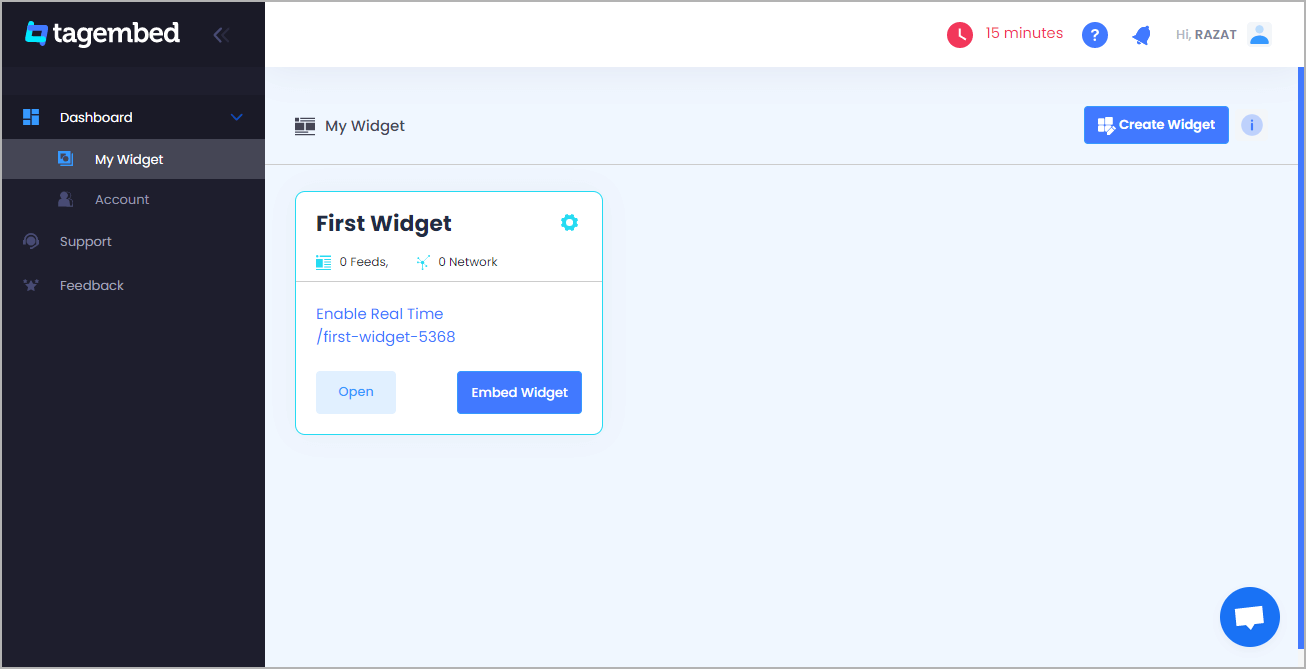
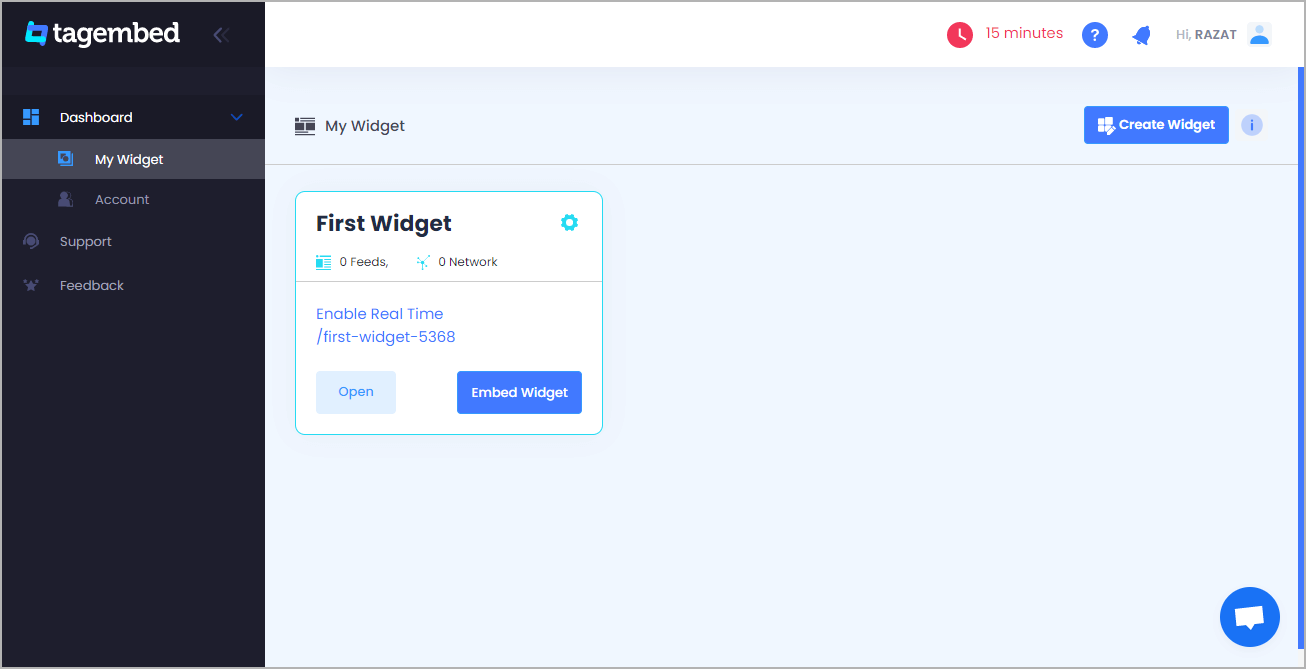
  3. Create the first widget that will be already created, just click on the open button to proceed
  4. A new pop-up opens and “Pick a source” will appear, here Select RSS from the list of networks
  5. Paste the copied RSS feed URL in the box and type the “Display Name” in the input bar. Click on the “Create Feed” button, and all the latest posts will be displayed on the editor screen.
  6. Now, click on the Create feed button to start aggregation. Now display the RSS feed on the website
  7. So, click on the embed widget button at the bottom-left of the menu panel
  8. Now a popup open or choose WordPress
  9. From the WordPress popup screen or adjust the pixel as per your needs.
  10. Now copy the shortcode to embed and visit the admin page of your WordPress website
  11. Congratulations! You have successfully embedded the RSS feed on the WordPress website.

Amazing Advantages of Using The RSS Feeds

  • Readers/subscribers stay informed automatically via feed readers or WP plugins
  • Customers receive news about articles in online stores
  • Links in the RSS feed take readers to the original website
  • RSS feed does not require permanent editing
  • RSS feed software is usually free for any users

Also Read – Add Elementor RSS Feed On the Website

Final Words

RSS is one of the oldest technology. However, the RSS feed is still a valuable, reliable source that can add extra functionality to your WordPress website. So, use it to bring content from any website onto your own, without needing to manually update. And you might just see an increase in engagement and conversions as a result.

So, I hope this blog explained what is RSS and how to display RSS feed on the WordPress website to grow your website’s traffic.

Uncategorized

Top 3 Effective Twitter Hashtag Feed Tracking Tools For 2022

Twitter is one of the most used platforms to celebrate the most trending topics all around the world. A powerful social media platform with 206 million users daily, Twitter and its elements play a major role in marketing.

Talking about elements, Twitter’s prime tool is the hashtag. Twitter is indeed all about hashtags. Twitter hashtags play a crucial role for marketers. They give insights into what topics are trending among the users and what they are sharing and exploring.

Using your brand’s hashtag, users post a variety of content on Twitter. With so many users, just imagine the amount of content being created!

Leveraging the Twitter hashtag feed helps you in boosting the growth of your brand and drive more user engagement. This finally helps in shooting up the sales and conversions.

Hashtags serve multiple benefits to marketers. It is high time to use the hashtag analytics tool to monitor the performance and boost the overall growth of your brand and website page.

Thinking about which tool to use? Don’t worry! This blog will give you an idea of the same.

Below is a list of some of the effective Twitter hashtag feed tracking tools for you. Keep reading to know more.

Top 3 Effective Twitter Hashtag Feed Tracking Tools For Business – 2022

1. Tagembed Widget

tagembed

Tagembed is a smart tool that helps you collect feeds from Twitter hashtags feed and create an interactive engaging social media wall on your website.

The highlighting feature of this tool is that you can display all your hashtags in one place. You can aggregate the UGC around your brand’s hashtag or the hashtag campaigns from social media networks to add to the website using the Twitter widget.

Offering a variety of theme catalogs, designs, layouts, fonts, colors, fonts, and other customization options, Tagembed helps in making your website stand out from the crowd.

You can get detailed insights into how many people viewed and interacted with your hashtag content.

Some more features offered by the Tagembed tool are as follows:-

  • Creative customization
  • No coding required
  • Hashtag highlighter
  • Auto-sync
  • Cost-effective

2. Tweet Binder

Tweet binder

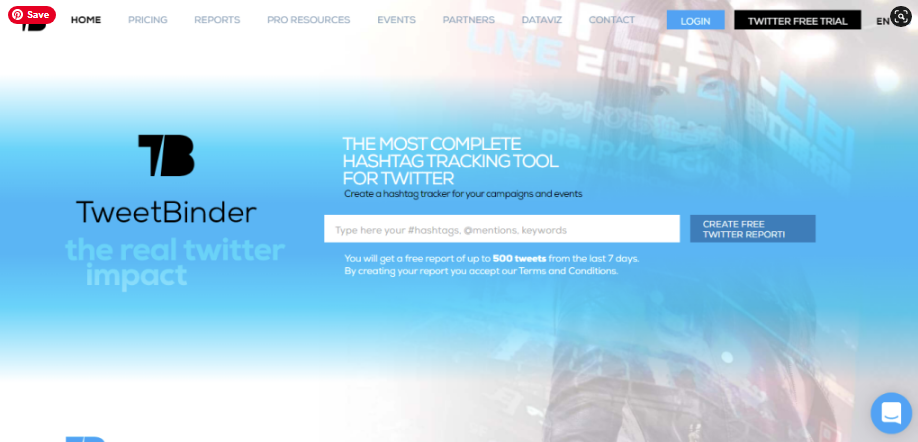
Tweet binder is a wonderful tool that helps in expanding your market reach and magnifying your follower base. It aligns well with your market strategy to give you the desired results.

This tool helps in getting an in-depth Twitter analytics report and even lets you obtain your campaign’s data be it user ranking, impact reach, and so on. You can compare the results with the other campaigns that took place in the past or may have in real-time.

You can easily evaluate the influencer’s activity by their user rankings option. It helps in detecting the most active and popular accounts and most mentioned and retweeted users. This tool lets you easily bind your hashtag tweets according to the parameters you choose to decide.

The best part of all is that you can analyze your Twitter hashtags. You can measure easily how positive or negative or even neutral the messages in your tweets are.

3. Taggbox Widget

taggbox

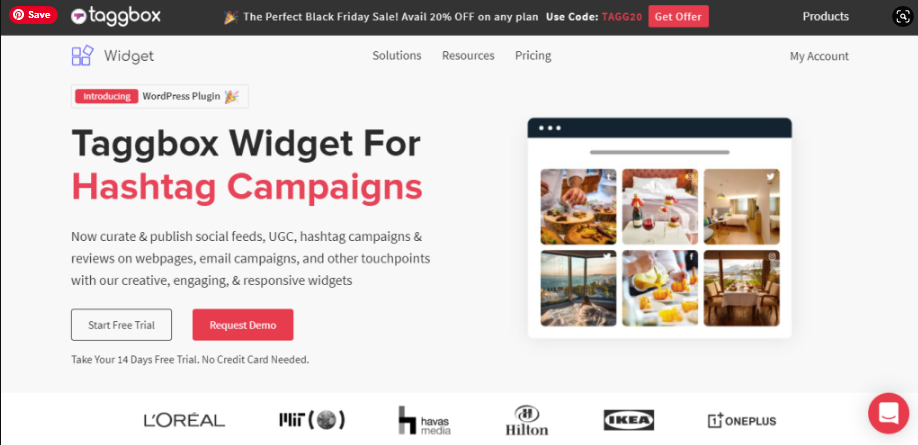
It helps you collect feeds from Twitter hashtags and create an interactive engaging social media wall on your website. This social media aggregator tool helps in collecting content from Twitter using hashtags hassle-free. It also facilitates creating a live Twitter wall to embed on the website or to display at any event or venue.

You can use its live Twitter wall for multiple events to enhance audience engagements and user attraction. You can even embed this wall created by Twitter hashtags feed on your website. What’s better than having a visually enticing website to boost the overall look?

It offers responsive layouts to aesthetically display your Twitter wall on the website & screen. You can creatively display sponsored posts too using this tool and get detail-oriented analytics too.

The best thing about this tool is that it is easy to set up, and has a responsive design to give a seamless experience, instant content updates, and insightful analytics.

Conclusions

So right some of the best Twitter hashtags feed tracking tools for any website. Use these amazing tools and boost the business growth of your website.

Website

How To Embed LinkedIn Feed On Weebly Website?

Want to add a dose of professionalism to your Weebly website? LinkedIn is by far the most popular social media platform for professionals. So if your website is focused on business or other topics professionals concern themselves with, then it’s a good idea to take amazing benefits of this fact and add some of the social media network’s elements to Weebly.

But how can be possible? That’s the issue, and I’ve got the best solution…

In this post, I’ll go over the easy method to Embed LinkedIn feed on Weebly website. Then, I’ll give you the best and most free social media tools to accomplish each method.

Let’s get into it…

Embed LinkedIn Feed on Weebly Website

Wondering! How to Add LinkedIn feed on Weebly? Let us walk you through an easy step guide with Tagembed LinkedIn Widget. Follow the below mentions instructions to embed LinkedIn feed On Weebly Website.

Step A – Add LinkedIn Feeds By Tagembed Widget 

Step B – Generate Embed Code for the Weebly Website

Step C – Embed LinkedIn Feed on the Weebly Website

Step A – Add LinkedIn Feeds By Tagembed Widget 

1. Create a Free Tagembed account or Login if you already have an account.

signup

2. You’ll be redirected towards the Tagembed dashboard.

Embed LinkedIn Feeds on Weebly Website

3. Your First Widget will be already created, just click on the Open button to proceed.

Embed LinkedIn Feeds on Weebly Website

4. A screen “Pick a source” will appear, here select LinkedIn from the list of networks.

social media networks

5. Now you can collect Linkedin Feeds using two simple ways:

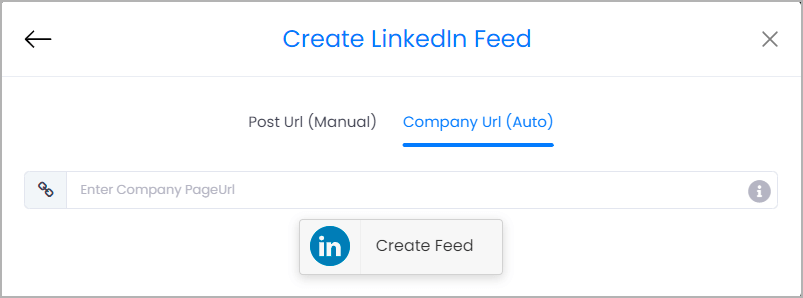
  • Company Page URL (Auto) – To collect all Linkedin feeds automatically in a single click.
  • Post URL (Manual) – Copy and paste the post URL one by one to collect feeds in Linkedin Widget.
embed linkedin feed Automatically on site

However, for auto-update of your Linkedin Posts choose Company URL and paste the URL of your company page. Finally, click on the “Create Feed” button to collect feeds.

Linkedin Feed on website

Kudos! Your LinkedIn feeds are now collected on the Tagembed editor. Now you can proceed to customize and embed your Linkedin Widget on the Weebly website.

Read More – Embed Twitter Feed On Weebly Website

Step B – Generate Embed Code for the Weebly Website

1. Click on the Embed Widget button at the bottom-left of the menu panel.

Embed LinkedIn Feeds

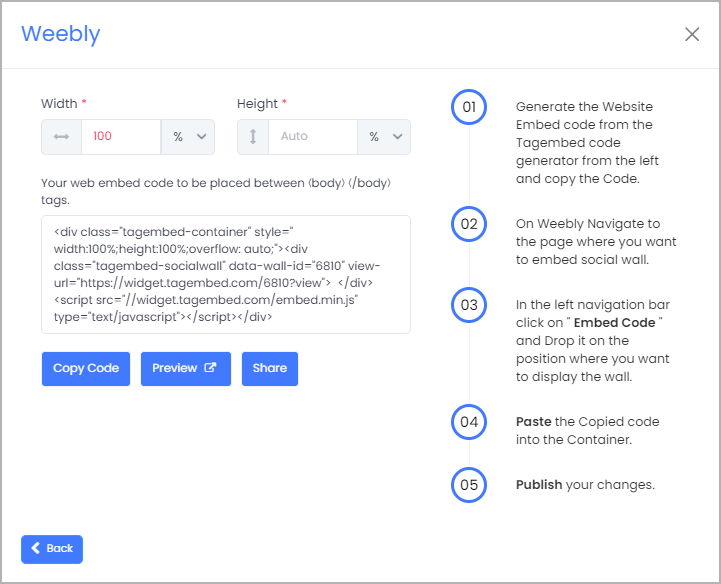
2. A new screen “Choose Your Platform” will appear with the list of different website CMS. So you can choose Weebly as your website CMS and then adjust the height and width of your widget.

Embed LinkedIn Feeds

3. Now click on the Copy Code button and copy the embed code.

Embed LinkedIn Feeds on weebly

Read More – Embed Facebook Feed On Weebly Website

Step C – Embed LinkedIn Feed on the Weebly Website

After copying the embed code follow a few more easy steps to complete the embedding process:

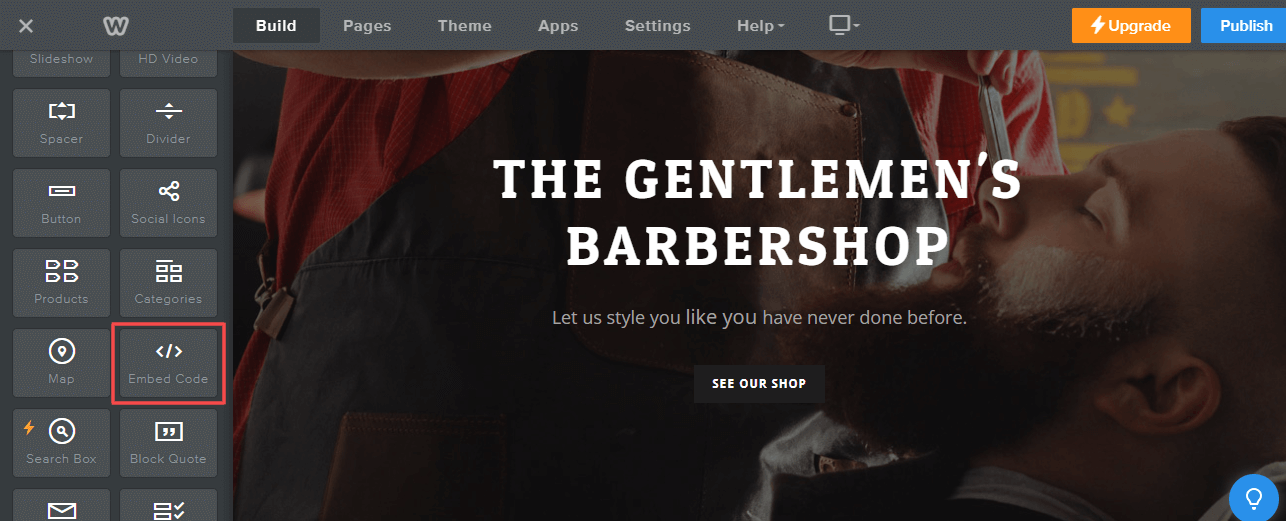
1. Now Login to the admin account of your Weebly website and navigate to the page where you want to add LinkedIn Feeds. And scroll the elements on the left-hand screen to find the Embed Code option. Drag and drop the option on the page where you want to embed LinkedIn Feed on the Weebly website.

add LinkedIn Feeds on Weebly

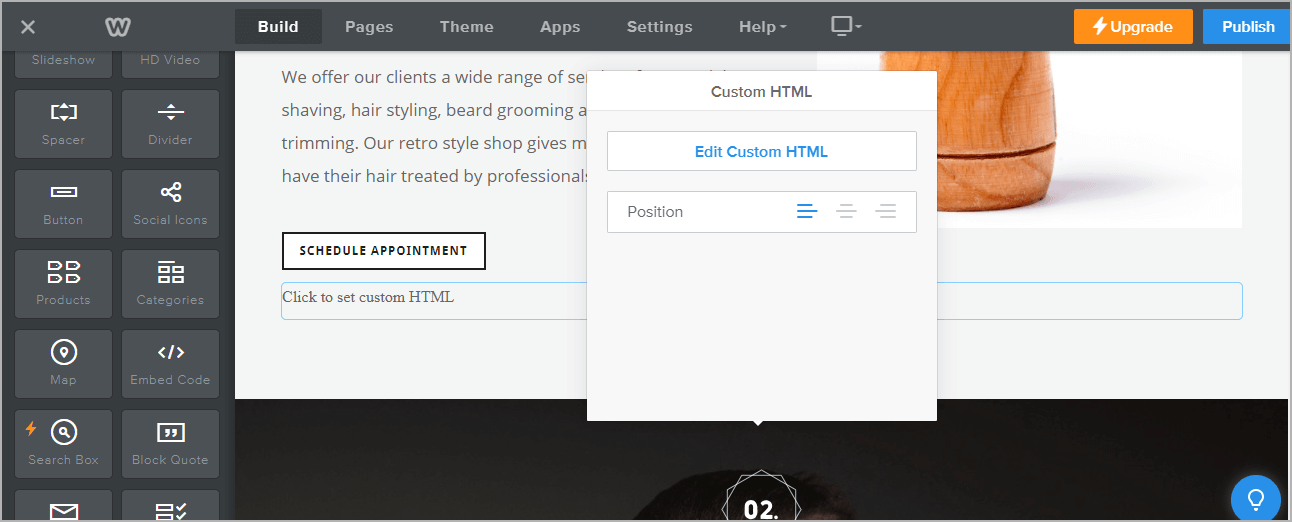
2. A pop-up will appear Edit Custom Weebly click on it and Paste the embed code into it.

add LinkedIn Feeds on Weebly

3. Finally, click on the Publish button at the top-right corner to make the changes effective.

Read More – Embed Google Reviews on Weebly Website

Conclusions

In a nutshell, we have explained to you the best way and using the free of cost tool to embed LinkedIn feed on Weebly Website. And it increases your brand’s visibility and makes your Weebly website more attractive, embedding LinkedIn posts on it. The unbelievable benefits of the visitors spending more time on your Weebly website, and will indirectly help you to improve your SERP.

Digital Marketing, Website

How to Embed Medium Articles On Website?

Medium is a wonderful blogging platform for sharing articles, it provides a great platform for users to reach more audiences. Many brands maintain an account on Medium.com to market their products and brands.

businesses often showcase Medium blogs on their website, by involving some good level coding or time-consuming process. by opting to embed Medium articles on your website you can exhibit Medium articles without any hassle.

Here, you will learn how to embed Medium Article on the website with ease and without any coding.

How to Embed Medium Articles/Blogs on Any Website?

Many social media aggregator tools available on the internet make it easy to embed Medium articles on the website.

Right now so many tools to do it but the Tagembed tool stands as the best. Simply because it helps to aggregate all Medium articles with ease and gives you an unlimited flow of user-generated content on your website. Also, it is a lifetime free tool which means you don’t have to pay anything.

You can quickly add Medium posts on the website using Tagembed, you just need to follow these simple steps:

Step-1. Sign up to create a free Tagembed account or log in to your account if you are an existing user.

signup

Step-2. You’ll be redirected to the Tagembed dashboard. The First Widget will be already created for new users, just click on the Open button to proceed

dashboard

(Note: If you are an existing user, then click on the Create Widget button that appears on the top right corner of the screen. Next, provide the desired name of the widget on the pop-up dialog box and click on Create Widget)

Step-3. Pick a source window will appear on your screen. Select the RSS widget as your source from the grid of platforms.

social media

Step-4. Create Feed dialog box will appear on your screen with 2 input boxes:

  • Display Name – Provide the desired name for your post feeds
  • Feed URL – Enter the URL of your targeted Medium article feeds
Add RSS Feeds

Step-5. Now change the Medium URL into RSS feed URL, you must follow the RSS feed URL scheme mentioned below in this image.

RSS feed examples

Step-6. Click on the Create Feed button to start aggregation. And within a few seconds, your screen will be loaded with all Medium Blog feeds.

medium blogs

(Tip: You can customize the feed according to your preference by clicking on the Personalize option on the left side of your screen. It allows you to change the Theme, Banners, CTA, Moderation Filter, Background, Font style, Font size of the widget and offers more options. Customization helps you to add charm to your widget and makes it appealing.)

Step-7. Click on the Embed Widget button that appears on the bottom-left side of the screen.

Medium Blog feed

Step-8. Choose Your Platform dialog box will appear on the screen with the list of different website CMS. Select HTML from the given options.

Add Feeds On HTML Websites

Step-9. Adjust the height & width of the widget and click on the Copy Code button. Paste this code on the website where you want to embed Medium articles on the website.

adjust height and width

Great! You have successfully embedded Medium posts on your website.

Final Words

The steps mentioned above are the simplest way to embed Medium articles on your website. The method is time-saving, budget-friendly, and hassle-free.

So the ball is on your court now, hurry up use Tagembed now and embed the medium article on the website without breaking any sweat. Enjoy the free forever plan and various features along with it.

Digital Marketing, Technology

How To Display TikTok Hashtag Video Feed On Website?

Display TikTok video feed on your website isn’t easy as embedding an Instagram, Facebook, or Twitter feed, because TikTok doesn’t offer an official API for other developers to easily pull content from your account.

But don’t be sad.

While Tagembed is hard at work developing easier ways for you to embed your entire TikTok video feed on the website. Right here is the easy way that is currently available that allows you to embed TikTok feeds, so you can create your own curated feeds.

We’ll show exactly how to display the TikTok hashtag video feed on the website.

How To Display TikTok Hashtag Video Feed On Website?

To display TikTok video on the website, you need not be a tech-geek. Just follow these easy steps to add a TikTok hashtag video feed on the website by Using the most popular social media aggregator tool Tagembed:

  1. Start by creating an account on Tagembed free tool. If you already have an existing account on the platform, then Log in. 
free account

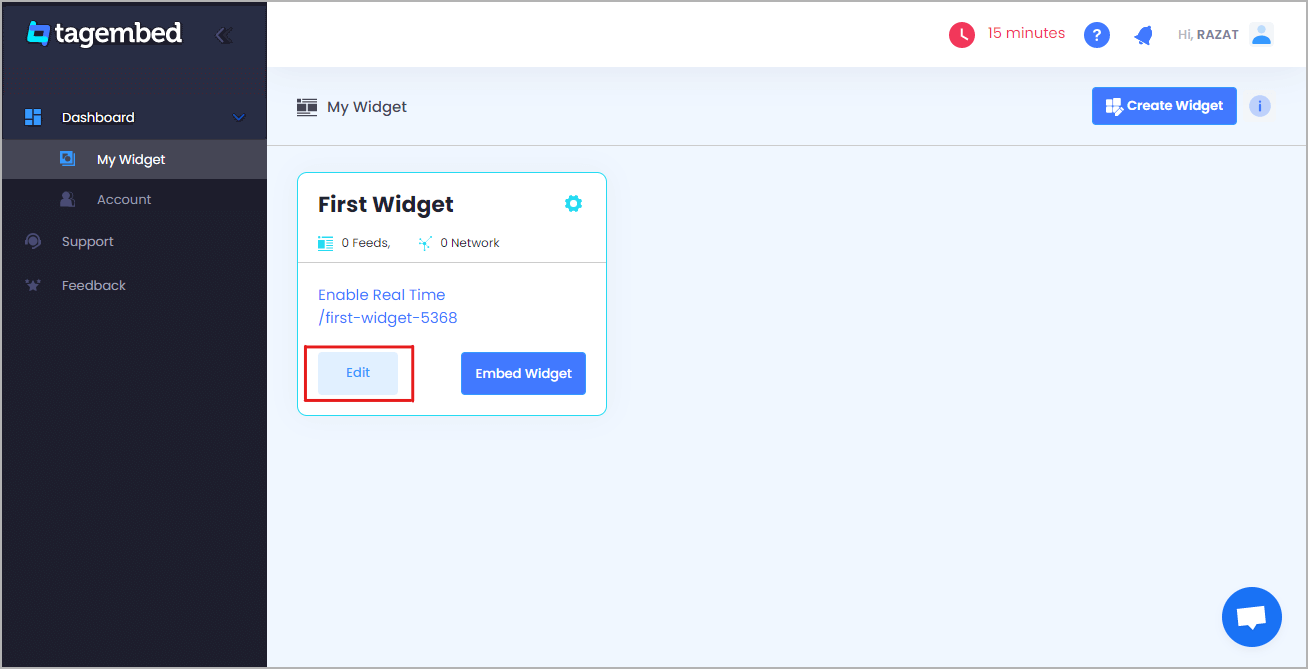
2. If you are a new user then your first widget will be created by default now click on the “Open” button to proceed to collect TikTok video feeds for your website. Or if you are an existing user, then click on the “Create Widget” button present in the top right corner of the screen, and provide the desired name for the widget.

open widget

3. Select TikTok as your content aggregation source from the pop-up menu is available on your screen.

social media sources

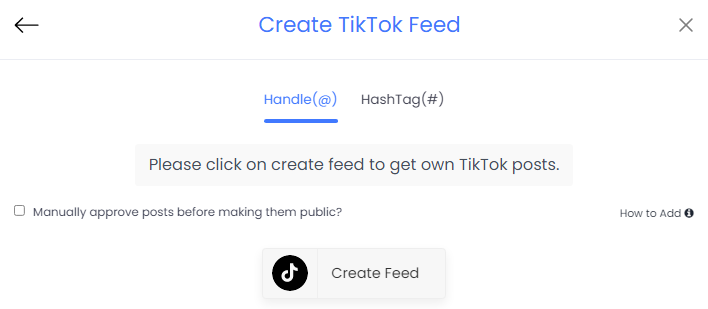
4. Once you are done selecting, you can select from two options – Handle(@) and HashTag(#) feeds as your connection type 

create tiktok feed

5. Next, you need to type your credentials and once you are done you will be able to see TikTok videos on the widget editor in a few seconds. And after that click on the Embed widget button present in the bottom left corner of the widget editor.

TikTok Widget

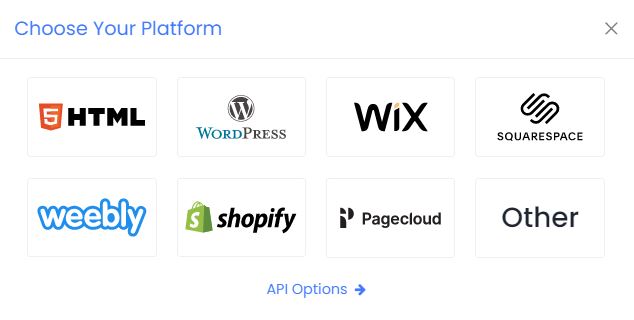
6. Next, you need to select your website building platform from the pop-up menu and you can select from a variety of options available.

website platform

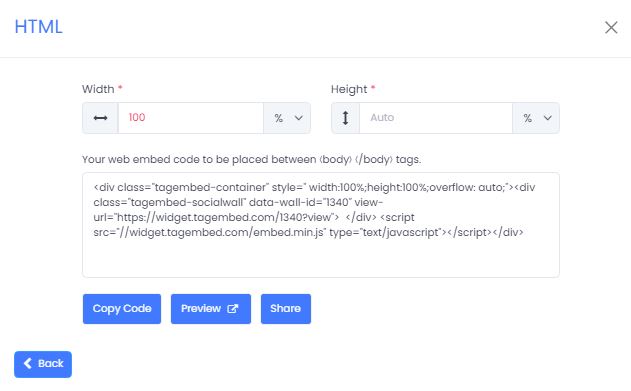
7. You will also have the option to adjust the height and width of the widget to suit the look of your website 

adjust height and width

8. Finally, Click on the Get Code option and copy the generated embed code on a clipboard and paste this embed code onto the backend of your website, webpage, and blog where you wish to embed the TikTok feeds. 

Great, now your TikTok hashtag videos would have successfully been embedded on your website! 

Why should you display TikTok videos on your website?

Why would you display TikTok videos on your website in the first place? Let’s explore some important business and marketing use cases.

1. Boost your website to your audience

Gen Z is still the main visitor of TikTok, with 43% of users between the ages of 15 and 26. However, millennials and baby boomers are the fastest-growing audiences.

So, if your business targets gen Z, or older generations that like to stay up with the times, then you can impress your target audience by displaying your TikTok hashtag feed on your website.

2. Make your website more interactive

TikTok videos are often really funny and easily capture the viewer’s attention right away.

All of the effort you put into making amazing TikTok videos and interesting topics can be maximized by including the content on your website. It’s sort of a “why not?” moment. If you’re making great TikTok videos, why not put them on your website?

Even if you have a great website template are available, you still need to freshen things up sometimes. It gives you website viewers something new to see when they visit your website, and it helps them make an immediate connection with your brand and audience.

3. Grow your TikTok follwers

You might also choose amazing videos to add to your website in order to call attention to the fact that you have a personal TikTok account. How will your customers and fans know that you have an account if you don’t tell them?

And they see your TikTok videos in the footer of your website, webpage, blog, etc. and they have the option to click on one of them, then follow you on TikTok and increase your TikTok followers easily.

Also Read : fibahub

Final Thoughts

Right now TikTok has 800+ million active users, 500+ million of which live in China and 300+ million in the rest of the global. Their total user base is higher than LinkedIn, Pinterest, and Reddit. Clearly, the platform now has every right to be considered one of the most popular social media platforms in the world.

Because the non-Gen-z community is the fastest-growing in marketing, it’s also clear that TikTok isn’t just for kids.

Brands are using TikTok to boost business growth and the business community. And you can extract more benefits from platform by adding TikTok Widget on your website.

So make the most out of this platform and display TikTok videos on your website with ease.

Website

How To Embed Twitter Feed On Weebly Website?

About The Twitter:

The most followed and best source for up-to-date happenings around the world. From celebrities and influencers to brands and everyday people, approximately 6.5k tweets are tweeted every 60 seconds. Woah.

Twitter is where you connect, network, and keep people in the know about your business or blog. For many companies, Twitter is their go-to social media platform for news, announcements, and public communication. Heck, even the President of the United States is all over Twitter!

Nowadays Twitter is one of the most popular social media platforms with millions of active users. There are several ways to display a Twitter feed on the Weebly website, but here I will tell you the easiest way to embed Twitter feeds on a Weebly website.

How To Embed Twitter Feed on Weebly Website With Tagembed Widget

Using Tagembed a social media aggregator tool you can easily embed Twitter feeds on the Weebly website without any hassle. So here are some easy steps to embed the Twitter feed on the Weebly website using By Tagembed

Try now these free social media aggregator tools like the Tagembed widget. Follow these easy step-by-step guide to adding Twitter Feed on the Weebly website successfully:

A: Signup/Login to the Tagembed account.

B: Create a widget and rename it.

C: Select Twitter as a source.

D: Now enter the connection types and fetch the Twitter feeds.

E: Tagembed display fetches feeds from the Twitter account.

F: Click on the “Embed” button.

G: Now display the different website platforms Like HTML, WordPress, Shopify, Wix, Squarespace, Weebly, PageCloud, etc. So choose Weebly.

H: Click on the “Get code” button and copy the unique code.

I: Paste this unique code on the backend page of your website.

So all are finished and all Twitter Feeds will be on your Weebly website screen. Now you can customize, moderate, and embed Twitter Widget on the Weebly website.

Tagembed’s Additional Benefits

Right here are some key benefits of adding a Twitter Feed on your Weebly website – Try Now

  • Twitter hashtag feed + easily gather your social media content by @username or #hashtag and etc.
  • Set up rules & filters to automatically eliminate unwanted content + duplicate posts.
  • Permalinks to each of your social media posts, optimized for SEO.
  • Responsive grid for dynamic layouts and customization.
  • Auto-approve all your user-generated content, or set up auto-moderation filters.
  • Custom CSS + Style it to fit your brand or website.
  • It gives you access to more than 20 more sources.
  • Easily Integrates with the following social media platforms + Always free plan available.

Final Thoughts

As you can see, using a Tagembed widget to embed Twitter feed on your Weebly website doesn’t have to be complicated or expensive. By following our step-by-step instructions, you can have a beautiful Twitter feed displayed on your Weebly website within minutes. Ok, that’s enough out of us, what are you waiting for? Embed your Twitter widget today!

WordPress

Most Fruitful Ways To Embed TikTok Widget On WordPress Website

Within the global of social media marketing, there is perpetual talk of new social media platforms to conquer and find potential users on. As such, this has to leads many website owners to learn how to embed the TikTok widgets on WordPress.

A Brief Introduction About TikTok

TIKTOK WIDGET

TikTok itself is only six years old, although the platform has a long history. It’s known as Douyin in China (TikTok’s ‘home’ country), and although both apps share the same functionality and features, they’re separate from one another platform.

When Douyin’s owners sought to go globally, they acquired the popular Musical.ly service. and it may go shortly popular. This gained popularity through short-form lip-synced videos that are most popular in the world. Once the merger took place, TikTok was born and exploded onto the global stage.

How To Embed TikTok Widget on WordPress Website?

In this article, I’ll go over the different ways of embedding the TikTok Widget on WordPress Websites. Then, I’ll provide you with the best WordPress plugins and social media aggregator tools to accomplish each method.

Let’s get start

FirstWay – Without WordPress Plugin

tagembed

Right here are the few easy steps to embed the TikTok widget on the WordPress website by using the Tagembed Widget:

  • Create Tagembed account or log in if you already have an account
  • Now open the Tagembed dashboard
  • Create the first widget that will be already created, just click on the open button to proceed
  • A new pop-up open and “Pick a source” will appear, here select TikTok from the list of networks
  • Choose the connection type with the hashtag and handle and now Click on the “Create Feed” button
  • Now, click on the create feed button to start aggregation. Now display the TikTok feed on the WordPress website
  • So, click on the embed widget button at the bottom-left of the menu panel
  • Now a popup open or choose WordPress
  • From the WordPress popup screen or adjust the pixel as per your needs.
  • Now copy the shortcode to embed and visit the admin page of your WordPress website

Congratulations! You have successfully embed TikTok videos on the WordPress website.

#SecondWay– Using By WordPress Plugin

tagembed plugin

If you don’t want to deal with embed codes, you can also turn to a WordPress plugin to help you include your TikTok widget on WordPress. So, Social Media Feeds Plugin provides simple shortcodes to display your TikTok videos on the WordPress website.

Here are some easy steps to add TikTok widget to WordPress Website using the Social Media Feeds WordPress Plugin:

  • Go to the plugin section on your WordPress dashboard and click on Add New.
  • Search Tagembed & Install or Upload Tagembed Plugin Zip Folder.
  • Activate the Tagembed Widget.
  • Register or Sign Up with the Tagembed WordPress plugin.
  • Click on Add Feed to collect social media feeds from your desired networks like TikTok.
  • So now fetch the TikTok as per your preference.
  • Select from 10+ Layouts, Personalize feed style, and set up moderation.
  • Click on the display section to preview and copy the shortcode.
  • Now you can go to the blog and webpage where you can embed code.
  • To add a new block, search “Tagembed”, select the block and a dialog box appears.
  • Paste the shortcode and click on “Embed”.
  • Update the website to see the published content.

Voila! You have successfully copied the embed code for the Tiktok widget for your WordPress website.

Why are you waiting for? So Hurry up use now this plugin.

Digital Marketing, Website

How To Add Testimonial Slider Widget On Website?

Getting new customers to trust you enough to spend money on your services is one of the toughest parts of running a website. Therefore, it’s crucial to find easy yet effective ways to prove your brand’s reliability. Fortunately, you can make strides in this area by simply adding a testimonial slider widget to your website.

Testimonials slider widget is the best way to encourage customer trust (as long as they’re positive) since they show potential users that you have a track record for doing good work. Plus, securing a testimonial won’t cost you anything.

Why Should You Add Testimonials Slider Widget To Your Website?

Research shows that 88% of customers read reviews to determine the quality of someone’s business.

Posting customer Google reviews on your website is a perfect way to build trust and credibility. It works not only as strong proof of your product quality or service expertise but also, introduces visitors to the clients (companies) you had a chance to collaborate with.

In this blog, we will learn to add a testimonial slider widget to the website. Here we will be using the social media aggregator tool – Tagembed widget. It is an amazing tool and gives you an unlimited flow of user-generated content on your website. One of the mind-blowing things is that it is a lifetime free tool to add a Testimonial widget on the website and that means you don’t have to pay anything.

Read further and you’ll learn how to add a testimonials slider widget to the website using the Tagembed, So follow these simple steps are:

#Step1 – Create A Testimonial Slider Widget With Tagembed
#Step2 – Add Testimonial Reviews Slider On Website

#Step1 – Create A Testimonial Slider Widget With Tagembed

a). Firstly create a Free Tagembed account or log in if you already have an account.

signup

b). And now you’ll be redirected towards the Tagembed dashboard.

tagembed dashboard

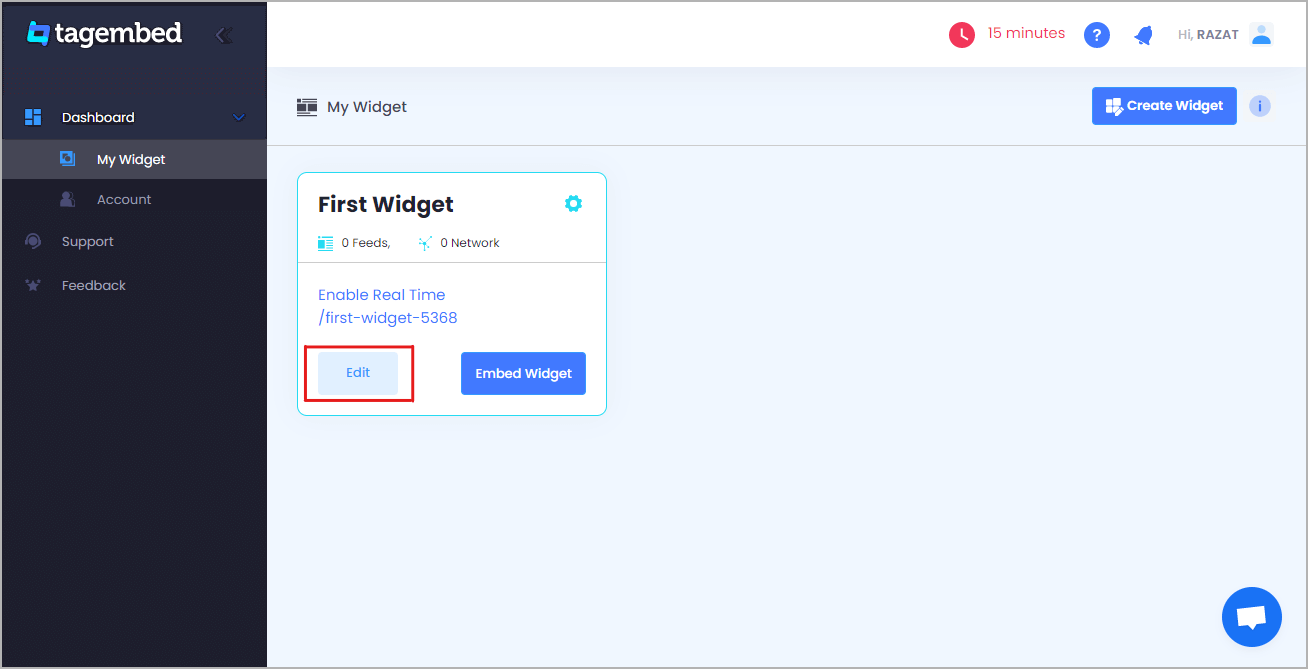
c). Your First Widget will be already created, just click on the Edit button to proceed.

create widget

d). A dialogue box will open to “pick a source”, Choose Google Review now

Google Review

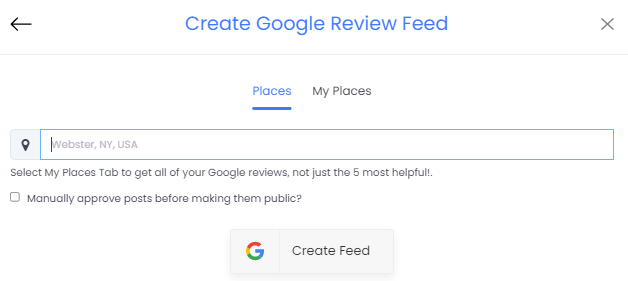
e). So after that, a new dialogue box will open to create a reviews feed. You can choose any type of connection and aggregate all reviews from using the places and my places to fetch all the amazing review feed on the website.

create review feed

f). Now click on the “Personalize & Layouts” button from the dashboard menu.

Personalize & Layouts

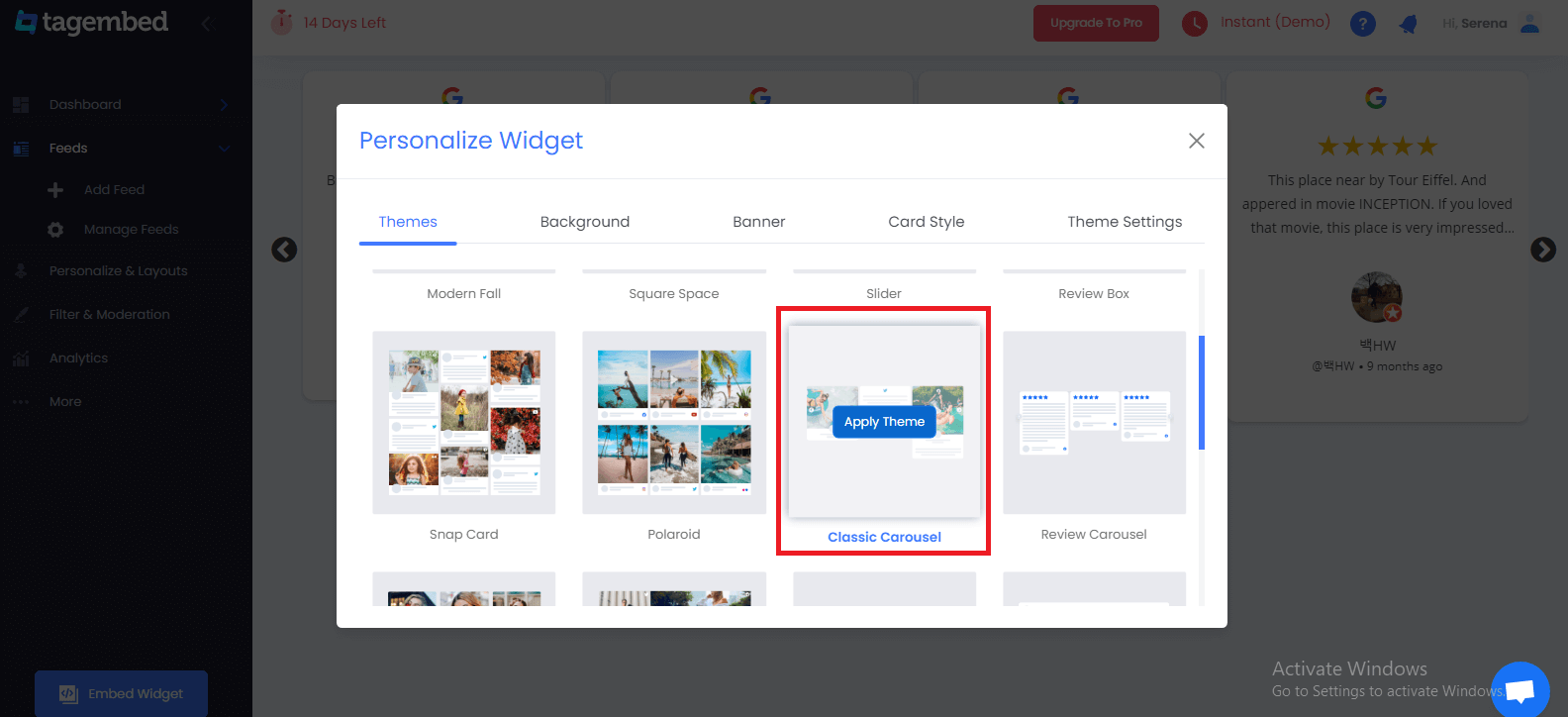
g). Click on the “ Classic Carousel (Testimonial Slider) ” theme and click apply theme. You will see a bunch of different review widget examples.

Slider Widget

#Step2 – Add Testimonial Reviews Slider On Website

a). Once you have selected the testimonial widget and click on the Embed Widget button displayed below the Google review widget feeds.

Embed Widget

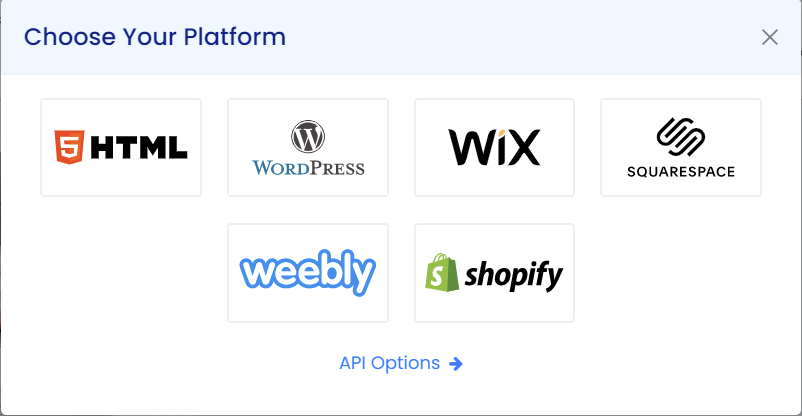
b). Dialogue box will appear with “Choose Any Website Platform” Now choose the WordPress

website platform

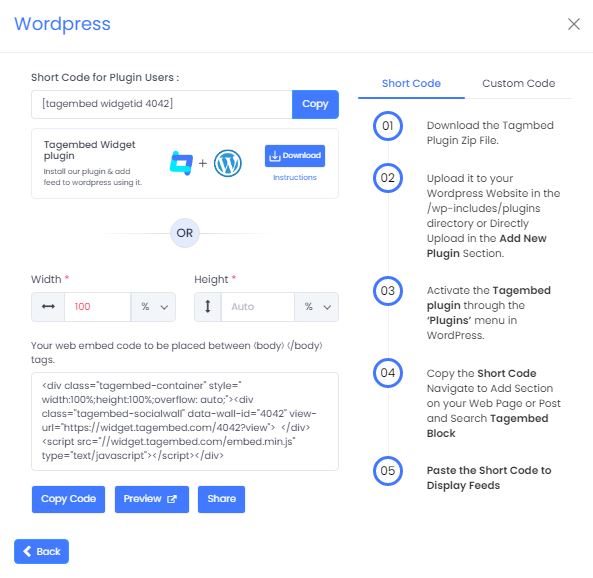
c). Now a new Dialogue box will appear, now adjust the height and widget accordingly to you and click on the get code button & copy this code

adjust-the-width-and-height

d). So now copy the embed code and paste it where you want to display the Testimonial slider widget on the website.

Final Thoughts:

Add a testimonial slider widget to your website to increases your conversion rates, whether you’re selling goods, or providing the best services. Fortunately, anyone can create a testimonial slider section on their websites using by Tagembed – Social Media Aggregator tool. So what are you waiting for? Follow the steps now, and prove your credibility to the world.

Digital Marketing, Social Media Marketing

Why YouTube Videos is Hottest Growth Right Now

In March 2021, YouTube released its new feature that allows users to post vertical videos with a duration of 60-second or less. And since then, it has gained significant traffic. According to the YouTube CEO, YouTube shorts racked up 3.5 billion views in a day during its beta testing in India.

One of the main reasons for such popularity and the vast number of views that we can estimate is: Average time spent on YouTube is 18 minutes, and with shorts that last for a maximum of 60 seconds, viewers can watch more videos.

Marketers wouldn’t miss out on using it as their marketing strategy as they have the hottest growth right now. Want to know why? 

Here is why:

Why YouTube Short Videos Have The Hottest Growth

#1 Videos get more exposure

In recent times, you would have noticed that whenever you log in to your social media account, your feed will show video content within a few seconds of scrolling. And this is because video content works better with most algorithms, and it captures viewers’ attention.

And that is why even Instagram, which started as a photo-sharing app, has more engagement on videos than other content types. 

So, it simply means people prefer videos over other content because videos are visually appealing, provide more details, and engage users. And all these factors add up to make YouTube videos one of the hottest growing content.

#2 Platforms boost new feature 

Every brand tends to promote its new product to encourage adoption. Adoption here means an act where people adapt to the product or service. The same goes for social media platforms as well.

Social media platforms promote their new feature to get used to it and adapt to the new feature. We witnessed that when Instagram launched Reels. And same we are witnessing with YouTube.

If you use YouTube on your mobile devices, you would have noticed the “Shorts” tab on the YouTube phone application. All are the measures to promote the new feature. 

So if you are thinking about posting a video using YouTube Shorts, then my friend, this is the right time. Think of engaging content and upload it on YouTube shorts without any second thought.

#3 Viewers prefer them

A recent study shows that views prefer video content (source) over articles, photos, posts, and podcasts. In short, people consume video content the most. And hence consumers expect that brands provide them video content explaining their business or product.

And as we know, video provides a more pursuable way to engage the audience. Showcase brand’s face or brand’s story humanizes your business and helps create a more profound and emotional connection with the viewer or consumer.

Moreover, videos have more shelf values, which means that video contents get more engagement and stick around longer. They are also rewatchable as people prefer rewatching the video they liked. 

And that is because video content typically generates more interaction and sharing, and people tend to save them for rewatching whenever they want. So these measures keep the videos longer in the ecosystem and hence get more traction.

#4 It appeals to Gen-Z

Gen-Z are much more connected to the internet compared to any other generation. Therefore their opinion matters the most. 

According to research, 71% of Gen-Z teens use their devices to watch videos online (source). And that adds as another factor for such popularity of videos contents, especially from YouTube. Moreover, these short videos require less attention. It means, even if people are in a hurry or want to spend less time on the internet, they still can watch the complete video.

#5 It can be used for cross-promotion marketing

In this digital age, people always share their content all across the platforms to capture more audiences and receive more views.

Short videos can be shared on different social media platforms as they have a perfect format to adjust on different platforms.

Similarly, you can even showcase videos on your websites using social media aggregator tools. These tools ease the process to embed YouTube Videos on WordPress or any website and help you to display content on your different website platforms. It not only promotes your videos but also enhances your website’s beauty. 

#6 Videos are a powerful sales tool

As per the saying, pictures say thousands of words, which might sound cliche, but it is true. Now imagine the videos. They might be worth a million words, which makes them one of the significant reasons why videos are such powerful tools. 

Through videos, you can explain your product better, and even viewers will be able to relate to it as they have social proof. Now talking about duration, shorts have a 60-seconds limit, which is enough for a brand to introduce their product. And as we mentioned earlier, people like to consume video content. So it is a win-win situation.

Summing It Up

Visual-based content has always been the critical ingredient for marketers to promote their brand and product. And the world witnessed modification, the visual content transformed. Staying with the recent trend, these short video formats are gaining a lot of popularity, which is why giants like Instagram and YouTube are trying to make complete use of them. As of now you know why these short videos are trending, we hope you will think about uploading some and providing your business a boost. 

Originally Published at: https://bit.ly/3pDc7pf

Digital Marketing, Social Media Marketing

Simple Ways To Add LinkedIn Posts To Your Website

If given a chance to explain social media as a physical atmosphere, we would like to explain LinkedIn as an office space. We keep everything professional there. In simple words, we can say LinkedIn provides great professional support. 

LinkedIn helps brands grow business connections, connect with industry experts, post job openings, hire managers or employees, and more. If we keep it short and simple, LinkedIn is the social media platform for business professionals.

It has such effect and usage that many businesses often opt to embed LinkedIn feed on website. It helps enhance the website’s visual appeal and brings a different dimension to it. 

Why Should You Embed LinkedIn Widget On Website

No one can deny that a good-looking website will attract more visitors than a dull or flat website. Hence, it is essential to have an attractive website; you can use images, videos, and more. Adding them can be a time-consuming process, or it might hamper the speed of your website. Therefore, we have a great solution: embed LinkedIn feed on a website. Of course, being a marketer, you need reasons or benefits for this process; hence, here are some of the advantages of this strategy that might convince you to use it.

  • Adds vibrancy to your website
  • Make your website informative
  • Creates awareness about your LinkedIn presence
  • Offers a simple way to post job openings on your website

Although the strategy has various benefits, we have handpicked some important ones that might convince you to add LinkedIn posts to your website.

So, if all seems satisfactory, the most important topic for this blog is the different ways to add LinkedIn posts to your website.

Manageable ways to add LinkedIn posts on the website

With the benefits and importance of this strategy, you are highly mistaken if you think this can be a tedious task. Various methods can achieve the task of adding LinkedIn posts to the website. But for your convenience and to save time, we list the three simplest ways to add LinkedIn posts to your website. These techniques are so simple that – Even if you don’t have coding skills or knowledge or belong to a non-technical background, you can still adopt these techniques.

#1 Social Media Aggregators

Social media aggregators are amazing tools that help users collect social feeds from various platforms. Then, users can curate and customize feeds before displaying them on the website. These tools provide a dedicated LinkedIn widget to help collect LinkedIn posts and display them on the website.

Using social media aggregators, all you need to do is collect the LinkedIn feed using the tool, generate the embedding code, and paste it on the backend of your website.

Besides easing the embedding process, the tool offers various features that greatly benefit this strategy. For example, social media aggregators allow you to customize the widget per your needs. You can change font size, style, background, and more and display your artistic side. Also, you have various themes and layouts to showcase LinkedIn posts. Here, you can choose the layout and theme that best suits your website’s style; the matching widget adds grace to your website and provides a professional look. All these measures help improve your website’s visual appeal and make it more impressive.

In addition, it provides a responsive widget that adjusts itself to any screen type. So, no matter what device your visitor uses, your widget’s charm remains the same. 

#2 WordPress Plugins

WordPress is one of the major website-building platforms. It eases the process and offers various plugins that add charm and functionality to the website. If you are using a WordPress website, you can use plugins that offer dedicated LinkedIn widgets. These widgets help you display LinkedIn posts on your website.

All you have to do is install these plugins, get the shortcode for LinkedIn posts, and paste it on the backend of your WordPress website. It offers functionality similar to social media aggregators, like the ability to customize the widget according to your choice.

#3 LinkedIn Embedding Code

If you don’t want to use any tool for your website, you have another option: LinkedIn feed embedding code. For each post, LinkedIn provides an embedding code you can copy and paste on the backend of your website to display to your visitors.

But keep in mind that this technique does not allow you to customize your widget or make the desired changes.

Conclusion

Upgrading the website visual is a smart Linkedin marketing technique. It helps to develop online recognition and helps in enhancing your brand’s reputation. No doubt images, posts, and videos add significant visual appeal to the website, but it might hamper its speed. And hence, embedding a LinkedIn feed on the website is easy, effective, and simple. So, what are you waiting for? Start embedding now and provide a different dimension to your website.

Digital Marketing, Social Media Marketing

The Only Shopify Facebook Feed App You Need

35% of the total populace, 2.8 billion individuals, sign in to Facebook consistently.

Generally similar level of the world’s 400 million dynamic sites show Facebook and other online media feeds.

In some cases, embedding a solitary Facebook post to a blog article is all you want, and Facebook has a helpful device for you to make the embed code. For the feed of your association’s most recent posts, the Facebook Page module is the most famous choice. The module is free and simple to add to most sites.

Be that as it may, the standard Facebook Page feed module accompanies a few drawbacks.

Above all else, you can’t change the standard module’s look and believe and match it to your image styles. The format is a solitary section stream that you can add to the sidebar yet it can’t assume control over the entire page width or, for instance, be a merry go round in the center of the page. Likewise, the tallness should be fixed, which makes a scrollable bar for the embedded FB feed on your site. Particularly with portable and tablet gadgets, scrollable components inside the page can turn into a bad dream for the site guest.

Furthermore, you can’t add other web-based media channels and make an arranged substance feed from numerous sources with the standard Facebook Page feed module. You are permitted to show each Page of the association in turn, and there is no help for client created content missions by the same token. Nowadays, showing social confirmation from your clients has become more significant, and social surveys assist you with standing apart from the opposition.

Third of all, you will not have the option to direct the feed and eliminate posts that are presently not applicable while utilizing FB’s Page module. At times, your association could distribute something pertinent for the Facebook crowd however maybe it isn’t something you might want to be the principal post displayed on the organization landing page.

Taking into account this multitude of impediments, how do brands and associations like Continental, Deutsche Bundesbank, and Harvard University embed Facebook feeds on their sites?

They utilize an social media aggregator tool or dedicated Shopify Facebook Feed App to assemble all their marked web-based media feeds and UGC from clients in a single spot. From that point, they then, at that point, make online media dividers, lattices, merry go rounds, and slideshows and show them on sites and other advanced channels.

Best Shopify Facebook Feed App to Embed Feeds on Shopify

Tagembed Shopify App is one of the best Shopify app that lets users to collect, curate, and embed social media feeds from 15+ social networks. You can simply download the app for free from here.

Add the app in your Shopify Store and proceed to add Facebook Feeds in the widget. Once the widget is ready with all of the customizations you can proceed to add them on your Shopify store.

It is simple to use the app:

  • Add App to your store.
  • Open the app and create a widget.
  • Select Facebook as your source to collect feeds
  • Customize the feed using different themes, banners, background and more.
  • Click Embed Widget button and select Shopify.
  • Choose your page, section, position and placement of the Facebook Feed
  • Finally, click Add to Pages button and you’re done.

Reload your website and Facebook Feeds will be live on your website.

Also Read – How to Add Instagram Widget on a Website

Conclusion

Hence, you can now easily embed Facebook Feed to Shopify website or other social media feeds on your website using the All-in-one Shopify App by Tagembed.

Digital Marketing, Website

Best Examples To Embed Google Reviews On Website By Widget Tool

Around 93% of potential customers go through online reviews while making their buying decision. This is mainly because one customer tends to trust another customer much more than the brand’s promotional content. Hence, by embedding Google reviews, you shall easily be able to gain your potential customers’ trust and be able to convince them to purchase your products.

Google review widget when embedded on a website can add a massive amount of value to your website in the form of traffic, sales, and brand trust.

It’s an easy and quick process. There are many Google reviews widget tools that can serve this purpose. But not many of them are worth your hard-earned money. The one that comes with additional features is ideal for any business.

The Tagembed widget is one of the best Google reviews widget tools. It gives real-time updates of live reviews and analytics features as well as measures the performance of your widget. One of the amazing things is this is a lifetime free tool.

Embed Google Reviews On Website – Best Examples That You Must Try

1. Display Google Reviews On Website Homepage

Your website’s homepage is the first place where your potential customers reach as they click the link. It is after going through the homepage, the customers decide whether they wish to explore the website further or not.

Adding Google reviews examples to the homepage would instantly catch the attention of your website visitors and urge them to go on and have a thorough look at your website and what your business has to offer.

2. Incorporate Google Reviews In The Website Header

Choose the best reviews from the lot and embed them into the header section of your website. Make sure you display it in an attractive way to attract the attention of the audience. If you feel that doing so would be a little over the top, think again! Your customers’ words about your brand and its products need to be flaunted since it can help your potential customers decide on their purchases.

Read More – Benefits of Google Review Widget

3. Display Google Reviews In The Slider Widget

If you are looking for a way to set Google reviews into your website in a visually appealing way, then you can do it by embedding it in a slider form. You can place the content strategically in a section of your websites like the product page or the ‘Our Story’ page for tapping into impulsive buying.

Think about it. Your users are already interested in your products and are surfing through your product pages. Reading Google reviews would give them that extra push to purchase the product right away!

Raed More – Embed Google Reviews on Weebly

4. Display Google Reviews In The Sidebar Widget

Beautifully integrating the voice of your customers in the form of a sidebar widget is an ideal way to motivate them to purchase your products. For example, you can do so by embedding the content on a page dedicated to special discounts or promotions. Doing so would make your customers keen on your products. Ultimately, all customers love good product deals, and leveraging this strategy would further aggravate their need to buy the product immediately.

5. Embed Google Reviews Location Wise

This example is great, especially if you have various business branches across multiple cities, within a particular city, across states, or even countries! Often, users are hesitant to visit another branch of the same business since they are thoroughly convinced with the services of a particular one. Embedding Google reviews location-wise can instill faith and confidence in your potential customers, and they will be confident to visit the brand anywhere!

Read More – Google Reviews Plugin for WordPress

Conclusion

We have reached the conclusion section of the article. We’d like to emphasize that the more trust your customers have, the more sales and conversions you get! More than 90% of customers are not confident to make purchases from a website if they do not see customer reviews, and this is itself a revelation big enough for you to leverage your customer’s reviews, isn’t it? Get going now, choose the tool that works best for you, and set the Google reviews widget for your website.

Digital Marketing, Social Media Marketing

Effective LinkedIn Marketing Strategies for 2024

Social media platforms are constantly evolving and making their market in the digital marketing space. While businesses are spoilt for choice when it comes to social media platforms for promotion, LinkedIn stands out as the perfect platform for companies and professionals.

Why do we say that? LinkedIn is an amazing platform that helps you grow your business circle. It allows you to connect with industry professionals, experts, and your competitors. Moreover, it also assists in hiring office employees or recruiting resources for running the business.

In totality, it is safe to say LinkedIn is made for businesses and professionals. So, if you haven’t yet used the platform for your business, you are missing out on many opportunities to boost your business’s reach and recognition.

If you have made up your mind about using it or are already using the platform, here are some innovative and practical tips that might help you capture a larger audience it.

LinkedIn marketing strategies to capture more audience

As social media platforms have transformed into an essential marketing element, it becomes highly important to have innovative ways to utilize them. For example, if used smartly, LinkedIn can significantly assist in capturing more audiences and achieving business goals. And here are some practical tips that might come in handy for you.

1. Optimise your LinkedIn profile

We cannot stress enough how important it is to have a well-made and optimized LinkedIn profile. This tip can be applied to any social media platform, as these profiles are your representative. People see your profile initially, and then they make all other efforts.

Here, we will be talking about LinkedIn profiles. Creating a LinkedIn profile is a brilliant marketing move, but optimizing the profile can modify this strategy. So here are some of the ways that you can:

Use your brand logo as your display picture. People often recognize brands from their respective logos, so it works as an identification for brands. So, while using your LinkedIn profile, use your brand logo. It has two significant advantages. Firstly, it authenticates the profile, which means people can differentiate between your original and fake profiles.

Secondly, as you attain more reach on the profile, you will be able to develop more brand recognition, and with the help of the logo, more people will be able to identify your brand.

Here’s another tip under this heading: When writing about your brand, make sure you provide all the details to the reader. On LinkedIn, you can mention your brand, employees’ strengths, and more. While explaining the brand, make sure that you mention how your products can make a difference to the user.

2. Post engaging content

There is no alternative to good content. Hence, while staying on any platform, make sure you utilize the facility by the platform. And post the content that suits the style of that platform. So, while talking about LinkedIn, LinkedIn is known for business professionals. Make sure that the content you post is formal and engaging.

For example, you can post about recent studies related to your industry. Or share your insight on an ongoing topic. It helps you draw users’ attention and adds engagement to your profile. Another way to utilize the platform is by posting the job opening, so you can use entertaining and creative ways to post job opening notices.

3. Embed LinkedIn feeds on the website

Posting content on any website is to gather as many views and attention as possible. And the smart of doing it by opting to embed LinkedIn feed on your website. With this technique, people unaware of your LinkedIn presence or who can’t find your LinkedIn profile will view your content.

Viewers/website visitors can follow you there, which might help strengthen your LinkedIn presence.

Another aspect of this strategy is that, on the one hand, it promotes your LinkedIn profile and helps you get more views. At the same time, it improves the visual appeal of your website, as people often determine the quality and reputation of a brand based on its website.

Hence, it is important to have an appealing website. This improves the website and strengthens the LinkedIn presence—it is like hitting two birds with one stone.

There are various methods to obtain this strategy. We recommend using social media aggregators to simplify the embedding process and provide various features that add great significance to this strategy.

Also Read – Best Ways To Embed Facebook Reviews On Website

Key takeaways

Using social media for marketing is bright, but using each platform to its potential needs strategy. LinkedIn is an effective and efficient platform known as a professional and formal platform, so it is essential to apply some innovative strategies to benefit from it. Above mentioned tips are some innovative ways to capture the audience and enhance the brand’s reach.

Originally Published at: https://bit.ly/3GKnW2S

WordPress

Top 3 Google Reviews Plugin for WordPress Website

The easiest way to win the trust of your potential customers is by showcasing them past customers’ reviews and feedback. Therefore, businesses are now showcasing reviews by using Google review widgets on their website.

In this blog, we will be discussing how you can embed Google reviews on your website and why you should do it. So without further ado, let’s dive into it.

Whenever someone mentions about online review platform, Google reviews often come to mind. And that is for a simple reason – Google’s review platform is the most trusted review website. Various review platforms have emerged in recent times but have failed to win trust as there have been cases where they have been showcasing fake or spam reviews. A fake review often misleads the customers or, in some cases, hampers the reputation of a brand. And this is where Google reviews jump in and stand tall as the most trusted review platform.

google reviews

Why is it most trusted? – Because it only allows authenticated users to post their reviews on the platform. Also, it allows users to post images or upload videos on the platform to express them better and provide detailed reviews.

To ease your embedding process, the WordPress website provides various Google review plugins and provides a Google review widget to display reviews on your website. We have listed the top 3 Review plugins in this blog. These plugins are easy to install and you can find them easily on the WordPress website.

Top 3 Google Reviews Plugins for WordPress Website:

A consumer always looks for reviews before making any purchase, on average, consumers read 7 reviews before trusting a business. Hence, you can provide the best reviews plugin for WordPress websites as it saves their time exploring other websites for the reviews. In addition, the following tools also provide various other features, which make them ideal marketing tools.

1. Google Reviews Plugin by Tagembed

google review plugin by tagembed

Try this Google Reviews WordPress Plugin and collecting Google reviews can be made easy as this plugin is very easy to use and provides a hassle-free experience. It provides a dedicated Google reviews widget that displays the Google review, which the tool collects from the Google My Business Account. Also, the plugin is compatible with 19+ social media platforms, so if you are looking to collect reviews from other platforms, the tool helps with that.

You can even personalize the widget according to your preference by using the customization option. It allows you to change the font size, font style, background, themes, and more. Thus, it increases the grace of your website and makes it more professional and pleasing to the eyes.

The plugin is coding-free, and with three simple steps, you can easily display Google reviews widget on WordPress website. Moreover, the widget is responsive, which means it adjusts itself according to the size of the screen.

2. WP Google Review Slider by LJ Apps

WP Google Review Slider by LJ Apps

WP Google Review Slider provides a responsive widget that displays Google reviews on your website without any hassle. Sliders are a popular way to display Google reviews on WordPress websites because you can embed slides anywhere on the website, it takes less time to load and also less space. Therefore your visitor can read about your product and its reviews at the same time.

Other than sliders, it also provides the option to display Google reviews in a responsive grid or list. Also, it is compatible with streaming images without affecting the speed of the website. So even if your customer is using a visual-based medium to express himself, the widget easily displays those posts.

3. Google Places Reviews by Impress.org

Google Places Reviews by Impress.org

If you have multiple stores and are looking to showcase reviews of each location, this is the best tool for you. The plugin allows you to display up to 3 business reviews per location.

It offers versatile widget themes that help you to beautify your website. The plugin is easy to use and displays reviews without any hassle. The active support team adds a great advantage to the plugin.

Conclusion

Google reviews have a huge impact on customers’ buying decisions. Displaying these reviews using the Google review widget is a smart way to win customers’ trust and increase sales. There are enough facts and statistics to show the importance of reviews for the business and embedding them on your website provides more benefits of Google reviews.

Often customers visit different websites looking for reviews and end up buying products from other brands. Hence, by embedding reviews, you can hold your potential Google customers reviews on website and convert them into your customers.

Digital Marketing, Social Media Marketing

Best Ways To Embed Facebook Reviews On Website

In the past few years, we witnessed a sudden rise in the popularity of social media platforms. During this growth, many platforms were introduced and have successfully established themselves. However, even in this tough competition, Facebook still stands as the king of social media platforms. 

Being one of the oldest platforms in the social media landscape, it still holds relevance and popularity. And that is simply because of regular upgrades by the platform. In addition, with such a huge user base, Facebook holds a great impact in the market and reviews provided by the users can make or break a brand.

Reviews over Facebook are very important for a business. It helps the brand with great visibility and increases brand awareness. You can embed Facebook reviews on your website, it is a smart strategy for gathering more audience and enhancing brand recognition.

What are Facebook Reviews?

Facebook provides the freedom to its users to express themselves regarding any topic and by using any medium. Because of this freedom, users often use this platform to share their experiences with a particular brand or provide feedback on a particular product. These Facebook posts containing opinions and feedback are Facebook reviews. 

These reviews are the best example of user-generated content and are very helpful to win the trust in the market. Reviews can be in any form; it can be a written blog, picture or video. Whatever their form is, the main objective of these reviews is to spread awareness about the brand and help people in their buying decisions.
Why should you use Facebook Reviews Widget on website?

As mentioned above, Facebook customer reviews are one of the prime examples of user-generated content. And by featuring them on your website, you enhance the credibility of your brand.

People trust the words and feedback of past customers, as they provide an honest and true opinion about the product and share their unbiased experience with the brand.

You can easily display these reviews on your website by using the Facebook widget. The Facebook widget helps you gather all the content related to your business from Facebook and display them on your website.

By displaying these reviews on your website, you appear transparent to your visitors. In addition, it enhances your reputation as you will appear as a brand that cares about customers and considers their opinions. Various other benefits of embedding Facebook customer reviews on your website are :

  • Enhances your credibility.
  • Makes your website engaging.
  • Brings vibrancy to your website.
  • Increases website traffic.
  • Decreases the bounce rate.

There are many tools in the market that provide you with the feature to embed Facebook review widgets on your website. Here is the list of the best tools that are currently available in the market and provide amazing results.

Best tools to embed Facebook customer review on your website

Tagembed

Tagembed is the best social media aggregator in the market which provides a dedicated Facebook review widget for websites that helps you to gather Facebook posts related to your business, allows you to curate and customize them and then displays them beautifully on your website.

It is a coding-free tool that doesn’t require any coding skills to install or run. You just have to copy the code and paste it into your website’s backend. Thus, it saves your time from searching for all the posts related to your business and saving your money as you do not require any specialist to run this widget. Moreover, the widget automatically provides the latest content on the feed; you don’t have to refresh the feed manually.

Many people misuse the freedom to express themselves on the platform and post abusive or unwanted content about a brand. The moderation feature saves you from displaying these kinds of content. You can keep an eye on the content that goes on for the display and filter out all irrelevant and spam content. Furthermore, you can even use a profanity filter to restrict the content containing the mentioned words or block the posts from a particular Facebook account. All these measures help you to maintain & grow the quality of your website.

Elfsight

The best way to attract people to your website is by providing them with a vibrant and lively looking website. And Elfsight is the perfect tool that offers you various customisation options that makes your website appealing to visitors. Moreover, it is compatible to display all kinds of media. You can even create a photo or video gallery on your website with the help of this tool. It is one of the most popular tools in the markets and provides some amazing features.

It also helps you display the chosen reviews, allowing the visitor to know more about your brand. Moreover, you can even restrict the number of reviews that goes for the display. Thus, it provides complete control over the feed.

EmbedSocial

EmbedSocial is one the most talked-about tool in the market. It provides 10+ Facebook feed templates that can match any website design. You can also moderate the content with the help of the moderation feature. It is an amazing tool that helps to drive the audience to your website and helps you to convert them into your customers.
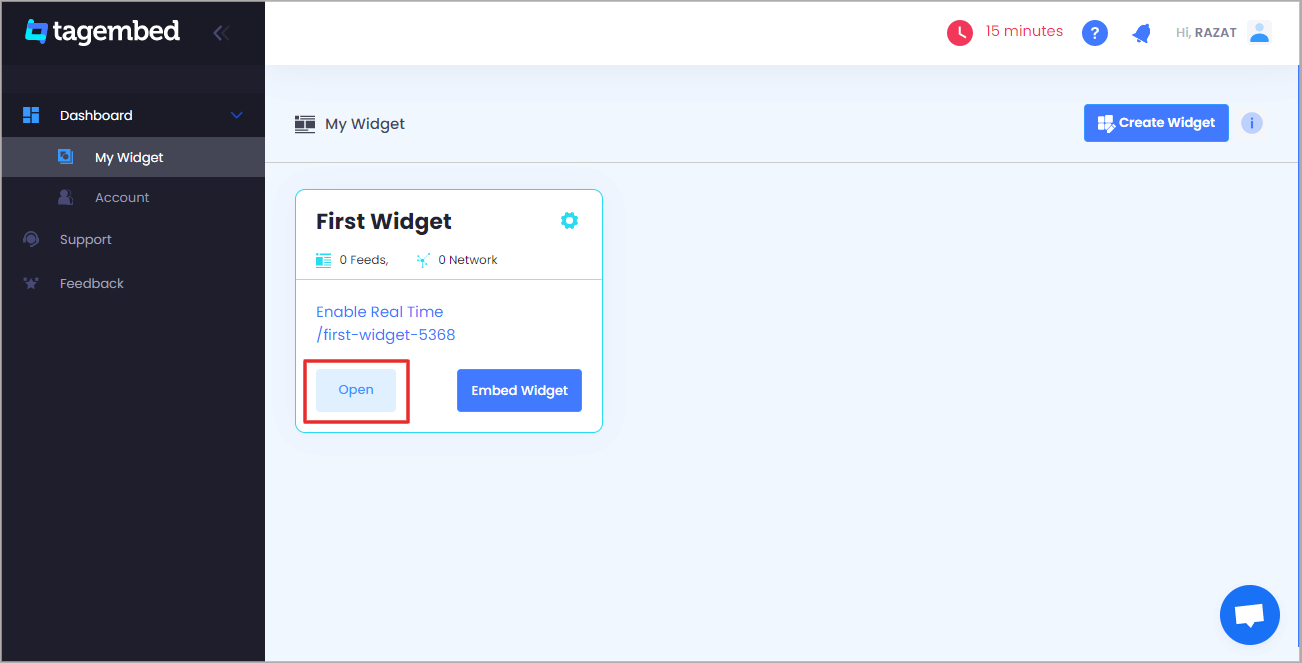
Also Read – How To Add Linkedin Widget On WordPress Website?

SocialKIT

SocialKIT helps you make your website more eye-catching and appealing to visitors by displaying Facebook customer reviews on your website. It showcases a responsive feed compatible with all screen types, so it does not matter whether your visitor uses PC, tablet or mobile. Your feed will be running without any interruptions.

Broadly

A potential customer always looks for reviews & social proof of any product before buying it. You can provide all the needed information to your visitor all at one place, by showcasing the Facebook reviews about your brand. Broadly helps you display these contents smoothly, makes your website more engaging, and increases your chance of attaining more sales.
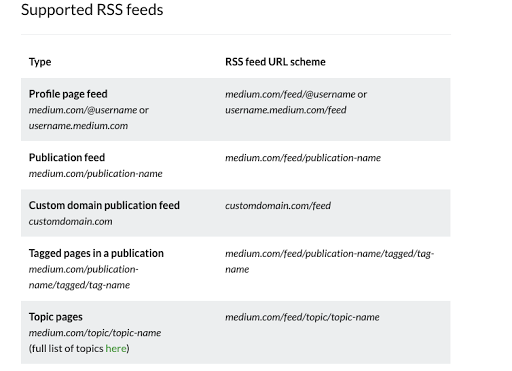
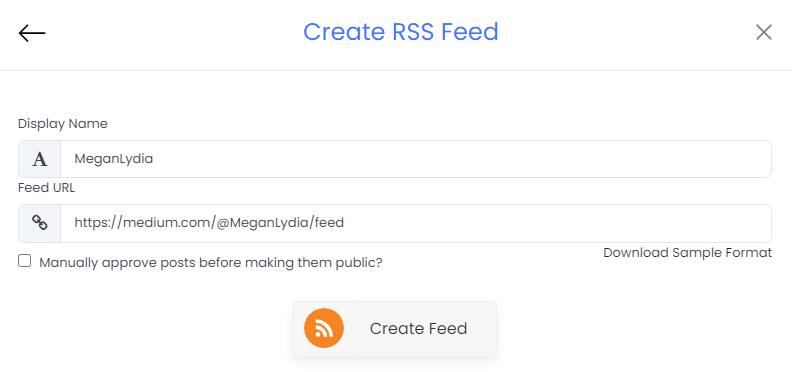
Also Read – Instagram Stories: Don’t Underestimate IG Stories For Business

Conclusion

Reviews are vital for any business, it not only helps you know your market reputation but also helps you win the trust of your potential customers. You can showcase these reviews on your website by using the tools mentioned above and prove your credibility to your visitors. These tools are very easy to use and provide great assistance to your business in obtaining more visitors to your website.

Digital Marketing, Social Media Marketing

7 Authentic Ways to Grow Instagram Followers in 2022

Instagram was officially launched on October 6, 2010. And since there is no going back from a simple photo-sharing app, it has now transformed into a social media giant. With over 500+ million daily active users, it provides a great stage for the users to market content in front of a large audience.

With such a user base, there is huge competition on the platform to attain as much audience as possible. So if you are an Instagram user or thinking about using Instagram to market your product/brand and looking for some simple and effective ways to gain followers, then this blog is just for you. You can also learn from here how to create original Instagram content.

We have listed the 7 most amazing ways to gather followers for your Instagram followers in this blog.

7 Ways to Grow Followers On Instagram

No one can deny that Instagram provides a great opportunity for its users to express themselves and grow their follower base on the platform. However, to stand out from the crowd, you need to have some smart strategies that help you in building an excellent follower base. So, follow these amazing tips as they might help you achieve your desired goals on the platform.

  1. Post engaging content

No matter what platform you use or when you upload, never let this thought skip your mind that content is the real king. If people relate to your content, they are most likely to follow your account to get regular amazing content.

If you are running a business and using Instagram to promote your business, then post regularly about your product or repost content from your customers, post their reviews, social proofs, and images while using the product.

Post images of your products in a creative way to attract more people to your account. You can even post short or IGTV videos that explain your products/brand. You can even use IGTV videos to upload behind the scenes of your advertisement or provide a little sneak into affords that go in while making your product.

  1. Embed Instagram feed & Stories on the website

Posting amazing, lively and engaging content not only helps your Instagram account but can also help your website. Simply embed Instagram Stories on websites, you can add a charm to your website and, at the same time, can create awareness for your Instagram account.

People who are unaware of your Instagram presence would also know about it when they get to view content from your Instagram account, and they even can follow your Instagram handle. So you can consider this a strategy to market your Instagram account and your products simultaneously.

Although Instagram provides you with the option to embed the post on your website, you have to collect each post one by one and continue the same process every time. Hence, we suggest you use social media aggregators for this process as they simplify the embedding process, save your time, and save your efforts. In addition, they automatically refresh the feed as they display the content as soon as it is uploaded on the platform.

Also Read: Answering Paid Surveys

  1. Use appropriate Hashtags!

Hashtags are an important aspect of Instagram, and it helps you categorize your content under one umbrella and capture your target audience. People often search for products or brands using the hashtag, and you can even launch your hashtag campaign to spread brand awareness and recognition. And it might help you to get more followers as people love to post using hashtags.

  1. Follow your target audience

Follow for follow is one of the oldest tricks in the book, and yet it is useful. You can track the people who follow brands from your industry and individually follow their Instagram account. You can even go through the followers’ list of your competitors and follow people individually. It will develop an interest in the mind of those individuals, and they might follow you back as well.

  1. Post entertaining content

No matter what social media platform you are using, there is no alternative to quality content. Remember, content is the king, so as you post better quality content, it enhances your chances to draw people’s attention. There will be more attention, and it might encourage people to follow you to get regular entertaining content.

Also ReadTop 7 Benefits of Embed Facebook Feed On Website

  1. Follow the trend

People love to stay updated with the latest trend and view content that focuses on recent happenings. The Instagram algorithm also supports them as these kinds of posts have more traction and engagement. And when you get support from the Instagram algorithm, it eventually helps you to gain more followers.

  1. Use the power of reels

Instagram recently launched their new feature called Instagram Reels, and it has become an instant hit; even Instagram promotes reels and provides a boost to them. These are bite-sized videos, and hence, they require less attention span; viewers can go through them easily and without investing much time.

Conclusion

In today’s time, social media strength is considered as one of the mediums to measure a brand’s reputation and quality. And as Instagram stands all as one of the most influential social media platforms, it becomes crucial to have a strong Instagram presence. And with some intelligent techniques like mentioned above, you can easily achieve them. While using Instagram, there is another usage of the platform as well. And that is, if you are using Shopify as your eCommerce platform, you can add Instagram feeds to Shopify with the help of Shopify apps. It serves to beautify your store and create a good impression on your consumers.

Originally Published at: https://bit.ly/3AJ6mL9

Digital Marketing, Social Media Marketing

Importance Of Facebook Page Reviews & How To Embed On Website

Facebook Business Reviews are a form of customer feedback shared by the customers or buyers on the Facebook Business Page to share their experience and opinions.

Facebook reviews are great tools for businesses to build authority and a good social media presence to display to potential customers.

Facebook reviews can be in text, star ratings, and recommendations shared by customers on the Facebook Page.

Businesses that have Facebook Business Page receive great responses from their customers as it is easier and effective to place their reviews than through feedback forms, etc. Also, customers find Facebook reviews more transparent and genuine as businesses cannot modify reviews placed by their customers, and it displays to the public. Thus, Facebook reviews are more transparent and hold more power than other types of reviews.

With the advanced tools and applications, you can embed Facebook reviews on your website to offer the same transparency and boost your business with many audiences.

You can embed these powerful Facebook Reviews on your website and leverage the potential of Facebook Reviews through your website.

This blog will brief you about the importance of Facebook reviews for your business and the benefits of embedding them on your website.

Let’s get started with,

Importance Of Facebook Reviews To Business

Facebook reviews are a game-changer for many businesses, and why not when it connects your potential customers with authentic customer reviews and ratings about your business.

Facebook reviews boost the authority of your business through customer reviews and ratings that are displayed on their Facebook Business Page. Customer reviews showcase the quality of your business products and services through the real experience of customers.

Facebook reviews help your potential prospects learn about your business through the customer’s voice, giving them a better idea of the products and services you are providing to your customers.

Facebook is the largest social media platform, with more than half of the global population. Thus when people talk about your business, it turns out to be more authentic and trustworthy than reading the simple testimonials on your website.

Having your business on Facebook is a must in the current online marketing scenario, and building a robust business presence with your business.

4 Benefits Of Embedding Facebook Reviews On Website

#1 Boost Website Authority & Trustworthiness

Facebook reviews display genuine customer feedback in the form of reviews and ratings. By embedding these Facebook reviews and ratings, boost the authority of your business by earning the trust of the prospective audiences as people do not rely on the branded content as everyone is saying the same thing. Thus, displaying authentic customer Facebook reviews builds website authority and credibility among your prospective customers.

#2 Enhance Website Appearance

The creative display of Facebook reviews enhances our website’s looks with a designful and diverse content display on your website. You can create an amazing display of Facebook reviews using the Facebook review widget that provides you with various features and functionalities.

#3 Display Informative & Interactive Content

Embedding Facebook reviews enhances the content quality of your website with more informative, realistic, and authentic content. You can make dynamic website content by integrating Facebook reviews and ratings that keep your audience engrossed.

Customer reviews add more information to your website content and help your visitors to receive a much better understanding of your product & services on your website.

#4 Increase Conversion Rate

You can trigger customer’s actions with interactive and action-deriving Facebook reviews through the social proof factor using social media aggregator tools. Facebook reviews influence your customers with others’ experiences and entice them to make purchase decisions based on the customer reviews and ratings from Facebook Business Page.

How To Embed Facebook Business Reviews On Website

Displaying Facebook reviews can be a powerful tool to market your business and make optimal use of your customer’s feedback by appreciating their valuable reviews showcasing on your website.

But how will display customer reviews on your website is the major task. So if you like to embed customer reviews on your website, you can do so by using any of these two methods mentioned below:

Method 1: Use Embed Feature Of Facebook

You can use Facebook’s Embed Code feature to integrate Facebook Reviews into your website. It is easy, cost-effective, and does not require any technical expertise. But the only drawback is you can only place one Facebook review at a time.

Method 2: Facebook Review Widget Tool

You can use the Facebook review widget to aggregate, design, and display multiple Facebook Reviews on your website. You can find several Facebook widgets on the internet like Tagembed, Taggbox, etc. You can use any of these Facebook review widgets and embed Facebook reviews on website.

Also ReadHow To Add Linkedin Widget On WordPress Website?

Wrapping Up!

Undoubtedly, Facebook reviews are powerful and dynamic to empower your marketing efforts and boost your business through the website.

Hence, leverage Facebook reviews by embedding them on your website to retrieve such exceptional results.

Originally Published at: https://bit.ly/3tGdbvq