Digital Marketing, Social Media Marketing

How To Twitter Feeds Can Help in Brand Promotion & Sales Generation?

Said to be a goldmine of user-generated content- ‘Twitter’ is one of the most engaging social media platforms displaying the most trustworthy & authentic form of content. Be it images or videos, every content you see on Twitter is termed as Twitter Feed.

These Twitter feeds are curated in such a vibrant manner that the users feel addicted to them and therefore get more engaged. Hence, brands use this as a good marketing strategy to embed Twitter feed on the website to upgrade their business and profits.

In this blog, we will not only discuss the benefits of Twitter posts but also will explain the steps of adding Twitter feeds to your website.

Unbelievable Benefits of Embedding Twitter Feeds For Your Business:

At present, Every online marketing strategy comes with great benefits that make marketers go gaga over them. Just like that, embedding a Twitter widget on the website has some mind-blowing benefits associated with it. So, scroll down to know those benefits!

#1 All Sort of Creative Twitter Content In One Place

As already mentioned above Twitter feeds can be fetched via hashtags, handles mentioned, advance feeds & bookmark feeds, therefore it becomes easier for brands to discover & gather all types of content according to their significance in one place.

#2 UGC + Social Proof

Embedding the user-generated content i.e. Twitter feed on your website not only increases the trust of your brand but also increases the authenticity of the content.

So, when the audience finds the most trustworthy content they start accepting your brand’s social presence.

#3 Make Products + Services Are Completely Visible

By embedding Twitter feeds on your website, you also make your brand’s products & services visible.

Your potential customers can simply find & purchase any of the products by getting redirected to the product page on Twitter.

#4 Boost Audience Engagement

Twitter feeds are basically user-generated content that triggers the emotions of the audience on a personal level.

If you can create a sense of involvement amongst the users, you can also be able to encourage audience interaction & engagement.

#5 Enhance Brand Awareness + Reach

Brands focus on spreading awareness about their products & services along with reaching a large audience.

You if integrate Twitter feeds (which appear to be interesting and attractive to the user) on your website, then you can also increase brand awareness and reach.

#6 Enhances Website Look + Feel

Before embedding the Twitter posts, you can customize and moderate them with the help of a good social media aggregator to make the feeds look more vibrant & appealing.

#7 Amplify Conversion + Increase Sales

Users are induced to stay on your website for longer when Twitter feeds are embedded in it.

When it happens, there are more chances that your site visitor will make a purchase and become your permanent loyal customer. This way you not only enhance conversions but also sales on your website.

5 Easy Steps To Embed Twitter Feed on Your Website By Using the Tagembed:

Here is an easy to follow 5 steps guide to creating and embedding a Twitter feed on any of the website CMS platforms without any technical support:

Step(A)Create a free account on the Tagembed widget and create a widget & rename it.

Step(B) – Now select any social media platform like Twitter and fetch feeds (With the suitable connection type)

Step(C) – Click on “Embed Widget” and select one of the website building platforms (like WordPress, Wix, Weebly, Webflow, Shopify, Squarespace etc.)

Step(D) – Curate and customize the feeds as per the requirements (like height, and width as per your requirement)

Step(E) – So finished now generate the embed code or paste this code at the backend of your website.

After finishing all 5 steps, you will be successful in adding Twitter feeds to your website.

Final Words

By embedding a Twitter feed on the website, you can improve the customer experience to the next level. In short, it helps you stay ahead of your competitors in the digital marketing sphere.


Website

Most Fruitful Ways To Embed Twitter Widget On Website 2022

Twitter is a leading social networking platform that has established itself globally as a platform where people express their views on world affairs, industries, and topics of all kinds. It has outgrown itself from just being a social media platform.

Today, brands are consciously using it for marketing purposes, whether it is an MSME or a well-established firms. If you, as a brand are maintaining an active presence on Twitter, then users will probably be talking about you, tweeting their reviews, commenting on your posts and sharing their experiences using your brand-related photos and videos.

Imagine if you could collect and embed these useful user-generated content on your brand’s official website to display social evidence. Wouldn’t it be amazing? Well, what if we tell you, it is possible would it interest you? Well, that is possible and that is with the help of Twitter Widget.

There are various tools that provides you with that widget but in this blog we will be discussing about the tools that efficiently help you to embed Twitter widget.

Easy-To-Use Tools That Helps To Embed Twitter Widget On Website

1. Tagembed Twitter Widget

tagembed widget

Tagembed is a wonderful social media aggregator that helps you to embed Twitter Widget on the website and display Twitter contents. It puts together real-time feeds and keeps your website up to date. It collects the post Via profile posts and pages and more, and displays them on your website without any hassle.

The irrelevant content can be filtered out either manually or automatically, using the powerful moderation function. Moreover, you can also customize the Twitter feeds according to the look and feel of your brand/website. Twitter Widget comes with fabulous themes, background choices, banners, and advanced custom CSS option settings. The robust analytics helps you monitor the output of your Twitter feeds in terms of user engagement, interaction and Twitter feed contribution.

2. Everwall

everwall

Like any other social media aggregator tool, Everwall supports Twitter for displaying event posts and tweets in the form of a visual gallery. The content filtration can be used to curate posts according to the keyword, hashtag, or phrase and helps you restrict the irrelevant trolls, posts, or tweets from showing up on the screen.

Everwall Twitter Widget fits in any screen resolution, be it a laptop, tablet, or iPad. It also allows customization that makes your feeds attractive and appealing, that encourages users to be a part of the campaign.

3. HootFeed

Hootfeed

The customizable HootFeed from Hootsuite is a live Twitter stream that can be presented on the big screens around your events. The HootFeed is an easy-to-customize tool, and also allows your website visitors to engage with the feed.

Along with that, HootFeed uses Twitter Widget to embed tweets containing your default hashtag(s) that can then be seen at your event screen(s). By encouraging people to engage with the show, it proves to be the perfect way to promote audience participation. Without making an account, you can use HootFeed, or you can choose to sign up for a free account or one of the four subscription plans.

4. TwitterFall

twitterfall

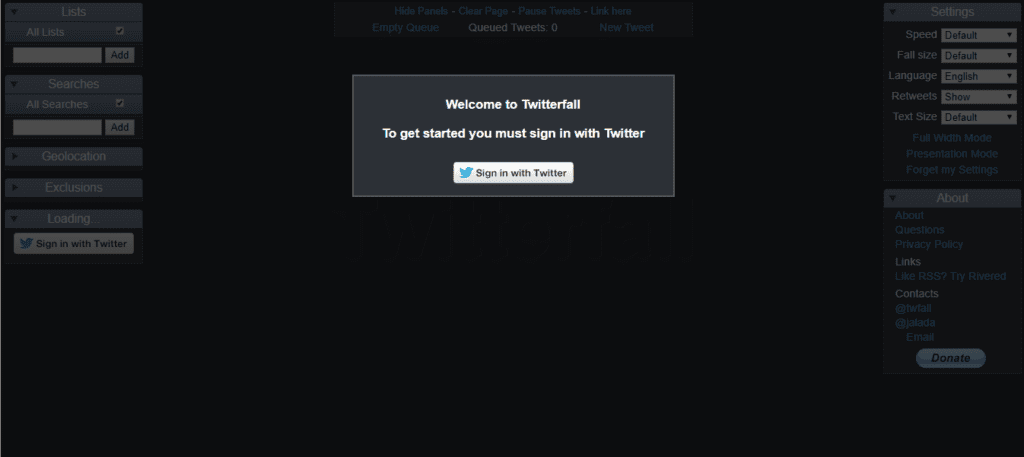
TwitterFall allows you to curate Tweets based on several keywords and hashtags. This Twitter Widget is highly customizable. You can change the text size of your tweet, determine whether to include retweets, set the display speed, set exclusions and geolocations, and more.

It takes advantage of the search patterns of Twitter which are listed on the search page of Twitter and show the most common and most discussed subjects of the time. You can even fetch content based on a particular hashtag relevant to your event and display them live on screens.

5. TweetWally

tweetwally

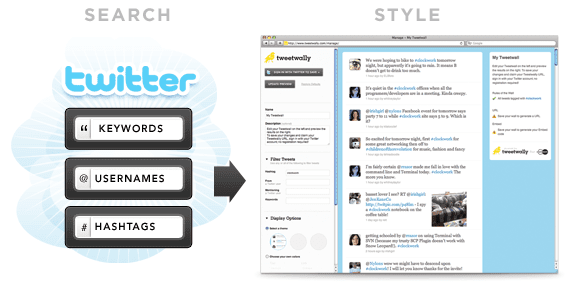
Tweetwally is another Twitter Widget that allows you to search Twitter for posts and tweets based on the hashtag, username, account mention, or keywords to create your own customized live feeds for events. The curated content is then displayed on big screens at events, parties, conferences, and more.

In addition, live streaming, social networking, and virtual reality have started to blur the distinction between being in the event and being digitally present there. Tweetwally Twitter Widget offers an excellent way to offer a seat at the table to your virtual friends as well.

Conclusion

Embedded twitter widget on the website delivers something new and easier to connect with your audience. It gives them real-time insightful and engaging content. It also saves your time and effort to create content when you primarily harness user-generated content.

The future of content marketing is UGC and you need to have a solution to aggregate and incorporate such fruitful content into your business website. Now that you are aware of the simplest tools to embed twitter feed on website that enriches your events and web platforms with engaging content. It is time for you to take steps to see how Twitter Widget operates in real life

Technology, WordPress

How To Embed Twitter Feed On WordPress Website?

With over 330 million active monthly users, Twitter is one of the world’s leading social networks. Displaying your Twitter feed on your website can help you connect with your audience and grow your business.

so if you are looking for an easy way to display your Twitter feed on your WordPress, then this blog is just for you.

Here you can find how to embed Twitter feed on WordPress website without any hassle. Displaying your Twitter feed on your website is a cool way to cross-promote your content on various platforms.

There are various articles that teaches different methods, but in this article you will find the easiest way to embed Twitter Feed on WordPress website. You can use this process with ease – even if you’re not an IT mastermind.

add twitter feed

Read More – 3 Best Facebook Plugins to Grow Your Business on WordPress

Why Should Add Twitter Feed on WordPress Website (Without Any Coding)

Adding a Twitter feed on the website can enhance your brand’s marketing efforts by ensuring better user engagement and boost sales.

  • It can attract website’s users by highlighting your interaction with the target audience
  • Creates a convincing first impression by increasing your visual appeal
  • Twitter generated UGC content will help in decreasing the bounce rate of your WordPress website
  • Gives a push to user engagement and interaction with your audience
  • Works as social proof and generates social trust

Social media channels are proving to be a boon for businesses as they boost a huge following and have the power to influence and turn the targeted sales of brand/business into reality!

Read More – Add Instagram Widget on a Website

How Can You Embed Twitter Feed On WordPress Website?

Tagembed Widget is an effective social media aggregator tool that can help you embed Twitter feed without any limitations and with attractive features that will enhance the look of your website by showing amazing content that is most relevant to your brand/product.

To embed Twitter feed on the WordPress website, you need not be a tech-geek. Just follow these easy steps to add Twitter widget for WordPress website:

  1. Create a Twitter Widget
  2. Generate Twitter Feed Embed Code
  3. Embed Twitter Feed on WordPress

1. Create a Twitter Widget

  • Log in to your Tagembed account, and if you are a new user, sign up to Tagembed.
  • Click on Create Widget button present on the top right corner of your screen.
  • Provide the desired name to your Twitter widget on the pop-up window and click on Create widget button.
  • Select Twitter from the Select your source popup window.
  • Select your connection type; you can choose from HashTag, Handle, Mention, List, Favorites, Advanced. If you want, you can provide added instruction from tick boxes.
  • Click on Create Feed button and provide your Twitter credentials.

2. Generate Twitter Feed Embed Code

  • Click on the Embed Widget button, present on the bottom left side of the screen.
  • Click on WordPress from your pop up.
  • Adjust the width and height of the feed according to your preference and click on Get Code button.
  • Copy the code and paste it on the backend of your website.

Great, you have successfully generated the embedding code from Tagembed; you are only one step away from add Twitter feed on wordpress website.

3. Embed Twitter Feed on WordPress

  • Log in to your WordPress account.
  • Open the website page where you want to display the live twitter feed.
  • Choose Text Mode, from the visual and text options on the page editor.
  • Paste the generated code on the text mode 
  • Apply the changes and Save.

Read More – Embed Google Reviews on Weebly Website

Over To You

Create interactive Twitter widget on WordPress website really helps you a long way in establishing your brand and product dominion, increasing user engagement, and building impression in the minds of your users. So try the best Twitter embedding tool for your websites today and display amazing and beautiful user-generated content to your target audience.

What are you waiting for? Use the tool right now