Technology, WordPress

What Is RSS & How To Display RSS Feed On WordPress?

As a blogger, you have likely had come across an orange icon labeled RSS. If you have ever wondered what is RSS and how you can use RSS feed to grow your WordPress website, then you are in the right place.

In this blog, we will describe what is RSS, what are the benefits of RSS, and how to display it to grow your WordPress blog website.

What is RSS?

rss

RSS stands for Really Simple Syndication or Rich Site Summary. RSS is an amazing type of web post that allows users and applications to receive regular updates from any website or blog of their choice. It is an online file containing information on any piece of material published by a website. RSS allows bloggers, publishers, or writers to automatically syndicate their content so that people can read it in their email, feed readers, and other devices.

You can accumulate these materials and showcase them to your audience by opting to display RSS feed on the website. You can even add RSS feed on WordPress and allow your visitors to keep track of their favorite websites without having to manually visit the website each time.

How To Display RSS Feed on WordPress Website?

In this blog, I’ll go over the easy methods of adding RSS feed on WordPress websites. Then, I will suggest the best RSS feed WordPress plugins and social media aggregator tools to accomplish each way.

Let’s get start

First Way – With Tagembed RSS Feed WordPress Plugin
Second Way – With Tagembed RSS Widget Tool

First Way – With Tagembed RSS Feed WordPress Plugin

rss feed wo plugin

If you don’t want to deal with embed codes, you can also turn to an RSS feed WordPress plugin to help you include your RSS widget on WordPress. Tagembed RSS Feeds Plugin provides simple shortcodes to display your RSS Feed on the WordPress website.

Here are a few easy steps to add an RSS feed to WordPress Website using the Tagembed RSS Feeds WordPress Plugin:

  1. Go to the plugin section on your WordPress dashboard and click on Add New.
  2. Search Tagembed RSS feed plugin and install or Upload Tagembed WP Plugin Zip Folder.
  3. Activate the Tagembed Widget.
  4. Register or Sign Up with the Tagembed WordPress plugin.
  5. Click on Add Feed to collect social media feeds from your desired networks like RSS.
  6. Now fetch the RSS as per your preference.
  7. Select from 10+ Layouts, Personalize feed style, and set up moderation.
  8. Click on the display section to preview and copy the shortcode.
  9. Now you can go to the blog and webpage where you can embed code.
  10. To add a new block, search “Tagembed”, select the block and a dialog box appears.
  11. Paste the shortcode and click on “Embed”.
  12. Update the website to see the published content. And congratulations you have successfully displayed an RSS feed on the WordPress website.

Second Way – With Tagembed RSS Widget Tool

tagembed

Right here are a few simple steps to display an RSS feed on the WordPress website by using the Tagembed RSS Widget Tool:

  1. Sign Up for a free Tagembed account or log in if you already have an account
  2. Now open the Tagembed dashboard
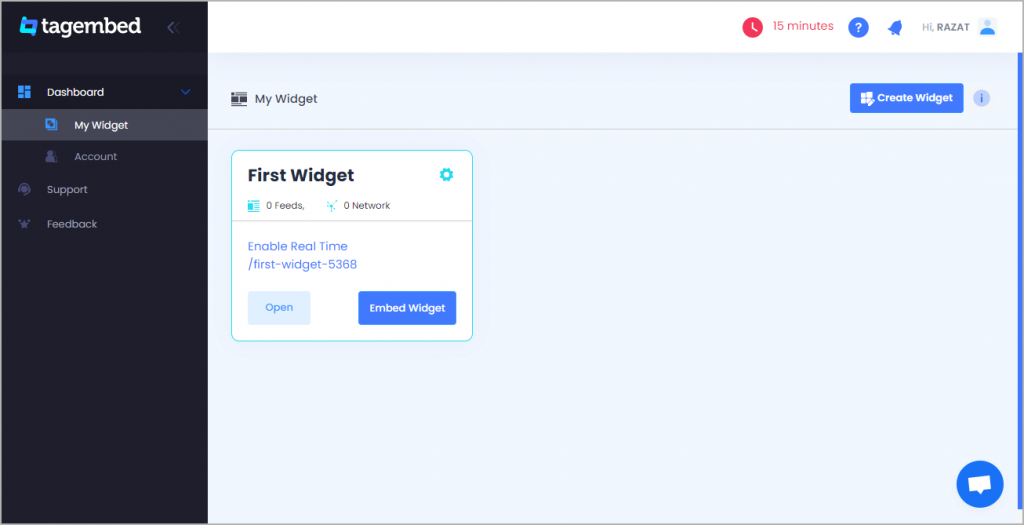
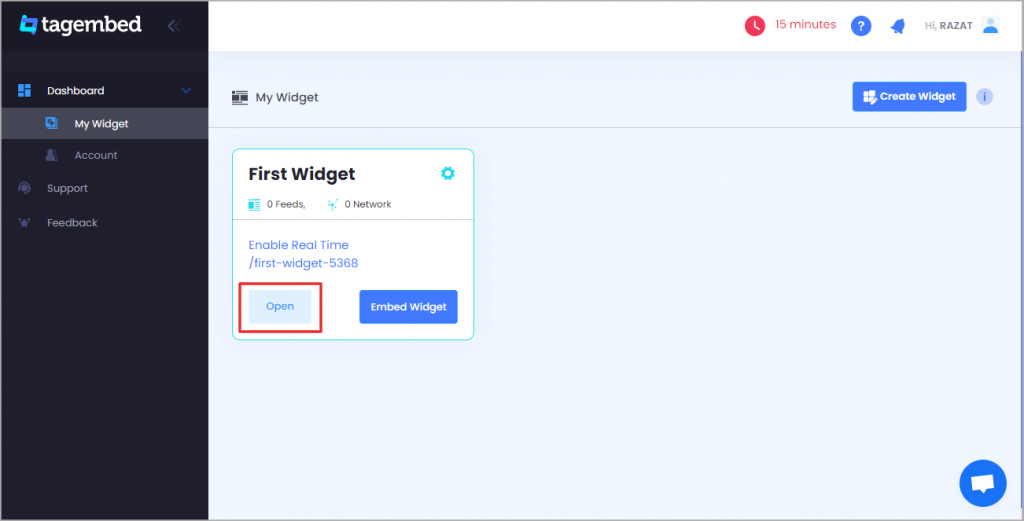
  3. Create the first widget that will be already created, just click on the open button to proceed
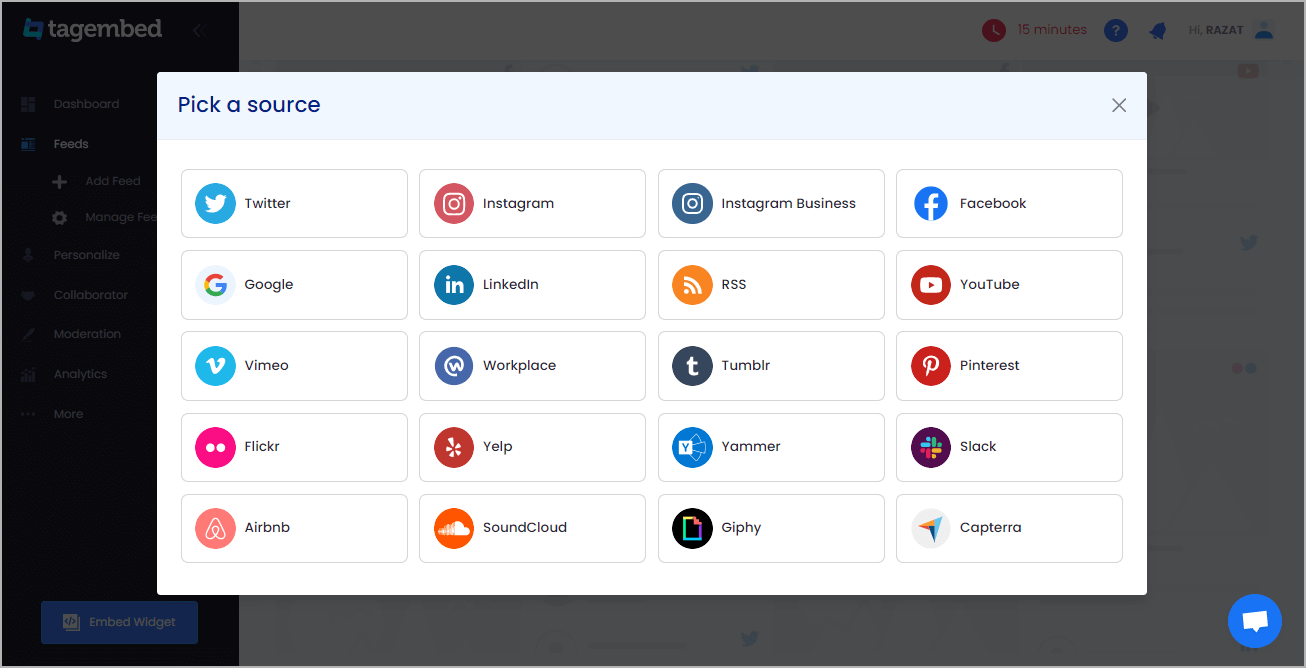
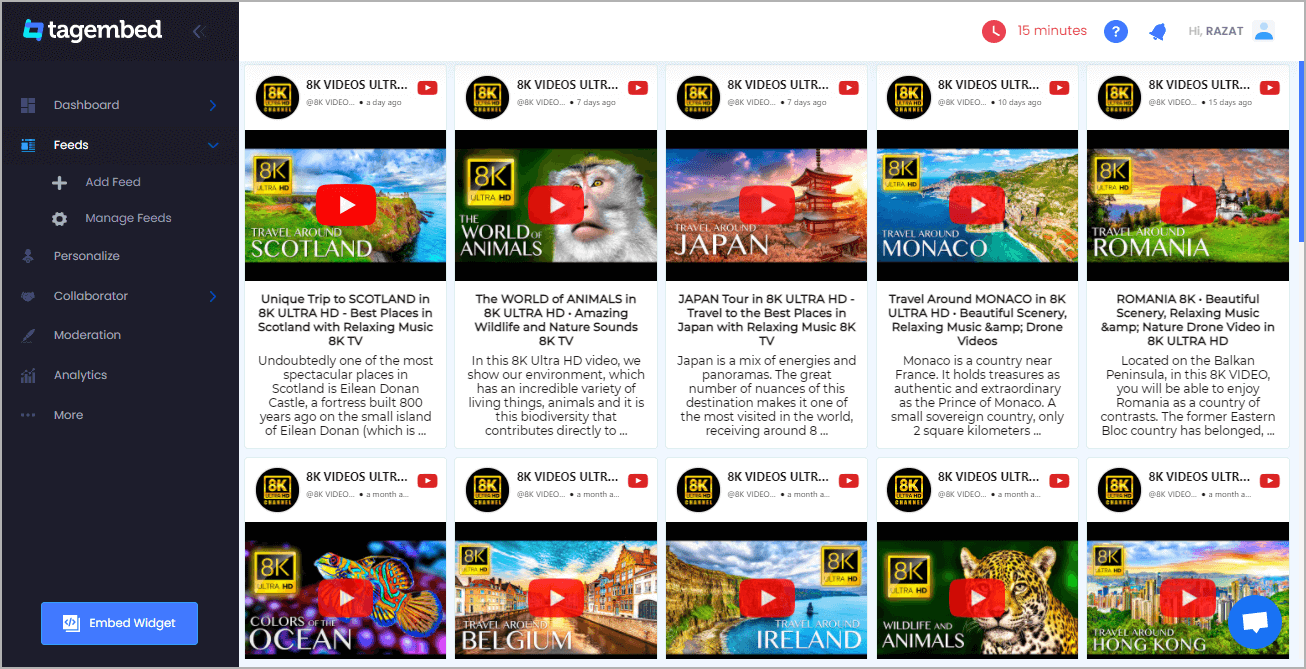
  4. A new pop-up opens and “Pick a source” will appear, here Select RSS from the list of networks
  5. Paste the copied RSS feed URL in the box and type the “Display Name” in the input bar. Click on the “Create Feed” button, and all the latest posts will be displayed on the editor screen.
  6. Now, click on the Create feed button to start aggregation. Now display the RSS feed on the website
  7. So, click on the embed widget button at the bottom-left of the menu panel
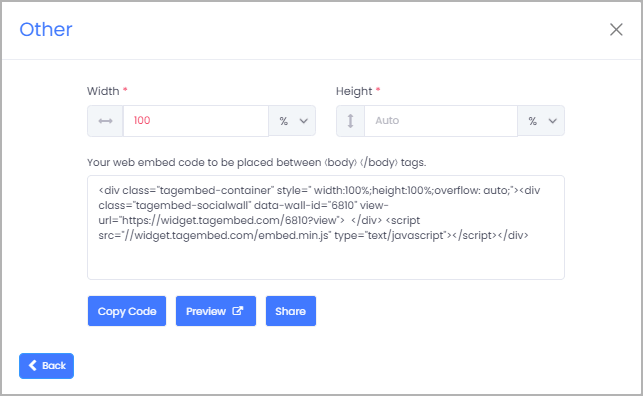
  8. Now a popup open or choose WordPress
  9. From the WordPress popup screen or adjust the pixel as per your needs.
  10. Now copy the shortcode to embed and visit the admin page of your WordPress website
  11. Congratulations! You have successfully embedded the RSS feed on the WordPress website.

Amazing Advantages of Using The RSS Feeds

  • Readers/subscribers stay informed automatically via feed readers or WP plugins
  • Customers receive news about articles in online stores
  • Links in the RSS feed take readers to the original website
  • RSS feed does not require permanent editing
  • RSS feed software is usually free for any users

Also Read – Add Elementor RSS Feed On the Website

Final Words

RSS is one of the oldest technology. However, the RSS feed is still a valuable, reliable source that can add extra functionality to your WordPress website. So, use it to bring content from any website onto your own, without needing to manually update. And you might just see an increase in engagement and conversions as a result.

So, I hope this blog explained what is RSS and how to display RSS feed on the WordPress website to grow your website’s traffic.


Digital Marketing, Technology

How To Display TikTok Hashtag Video Feed On Website?

Display TikTok video feed on your website isn’t easy as embedding an Instagram, Facebook, or Twitter feed, because TikTok doesn’t offer an official API for other developers to easily pull content from your account.

But don’t be sad.

While Tagembed is hard at work developing easier ways for you to embed your entire TikTok video feed on the website. Right here is the easy way that is currently available that allows you to embed TikTok feeds, so you can create your own curated feeds.

We’ll show exactly how to display the TikTok hashtag video feed on the website.

How To Display TikTok Hashtag Video Feed On Website?

To display TikTok video on the website, you need not be a tech-geek. Just follow these easy steps to add a TikTok hashtag video feed on the website by Using the most popular social media aggregator tool Tagembed:

  1. Start by creating an account on Tagembed free tool. If you already have an existing account on the platform, then Log in. 
free account

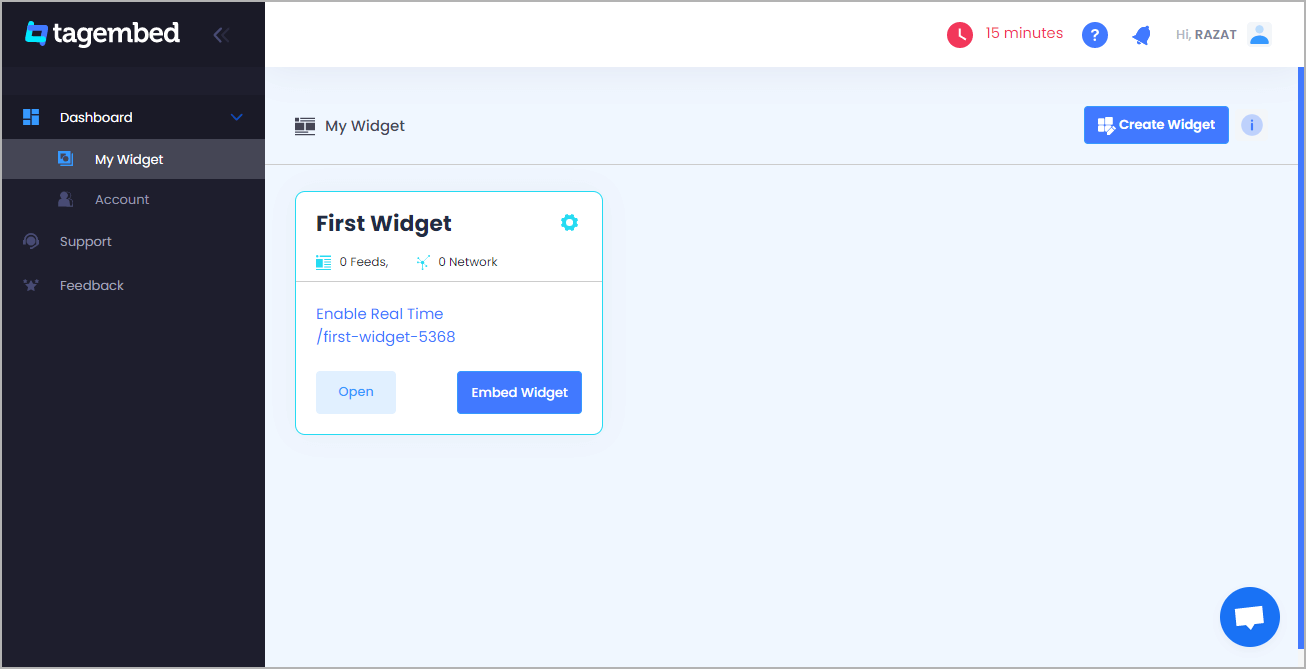
2. If you are a new user then your first widget will be created by default now click on the “Open” button to proceed to collect TikTok video feeds for your website. Or if you are an existing user, then click on the “Create Widget” button present in the top right corner of the screen, and provide the desired name for the widget.

open widget

3. Select TikTok as your content aggregation source from the pop-up menu is available on your screen.

social media sources

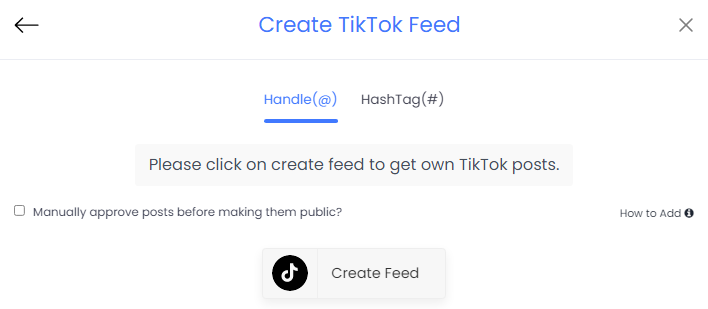
4. Once you are done selecting, you can select from two options – Handle(@) and HashTag(#) feeds as your connection type 

create tiktok feed

5. Next, you need to type your credentials and once you are done you will be able to see TikTok videos on the widget editor in a few seconds. And after that click on the Embed widget button present in the bottom left corner of the widget editor.

TikTok Widget

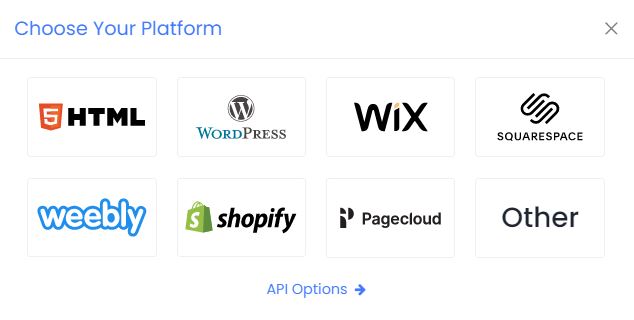
6. Next, you need to select your website building platform from the pop-up menu and you can select from a variety of options available.

website platform

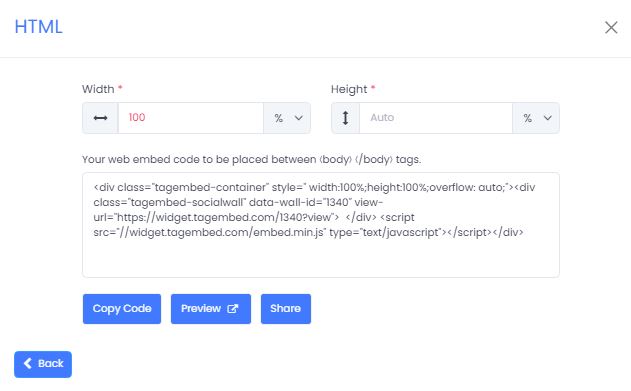
7. You will also have the option to adjust the height and width of the widget to suit the look of your website 

adjust height and width

8. Finally, Click on the Get Code option and copy the generated embed code on a clipboard and paste this embed code onto the backend of your website, webpage, and blog where you wish to embed the TikTok feeds. 

Great, now your TikTok hashtag videos would have successfully been embedded on your website! 

Why should you display TikTok videos on your website?

Why would you display TikTok videos on your website in the first place? Let’s explore some important business and marketing use cases.

1. Boost your website to your audience

Gen Z is still the main visitor of TikTok, with 43% of users between the ages of 15 and 26. However, millennials and baby boomers are the fastest-growing audiences.

So, if your business targets gen Z, or older generations that like to stay up with the times, then you can impress your target audience by displaying your TikTok hashtag feed on your website.

2. Make your website more interactive

TikTok videos are often really funny and easily capture the viewer’s attention right away.

All of the effort you put into making amazing TikTok videos and interesting topics can be maximized by including the content on your website. It’s sort of a “why not?” moment. If you’re making great TikTok videos, why not put them on your website?

Even if you have a great website template are available, you still need to freshen things up sometimes. It gives you website viewers something new to see when they visit your website, and it helps them make an immediate connection with your brand and audience.

3. Grow your TikTok follwers

You might also choose amazing videos to add to your website in order to call attention to the fact that you have a personal TikTok account. How will your customers and fans know that you have an account if you don’t tell them?

And they see your TikTok videos in the footer of your website, webpage, blog, etc. and they have the option to click on one of them, then follow you on TikTok and increase your TikTok followers easily.

Also Read : fibahub

Final Thoughts

Right now TikTok has 800+ million active users, 500+ million of which live in China and 300+ million in the rest of the global. Their total user base is higher than LinkedIn, Pinterest, and Reddit. Clearly, the platform now has every right to be considered one of the most popular social media platforms in the world.

Because the non-Gen-z community is the fastest-growing in marketing, it’s also clear that TikTok isn’t just for kids.

Brands are using TikTok to boost business growth and the business community. And you can extract more benefits from platform by adding TikTok Widget on your website.

So make the most out of this platform and display TikTok videos on your website with ease.

Digital Marketing, Technology, WordPress

How To Add Linkedin Widget On WordPress Website?

Do you want to add your LinkedIn Widget on the WordPress website? LinkedIn is a social network of professionals which helps you connect with other professionals and influencers in your business. In this article, we will show you how to simply add LinkedIn widget for WordPress website.

How To Add LinkedIn Widget on WordPress Website

In this complete guide, I’ll go over the different methods of embedding LinkedIn widget on WordPress Websites. Then, I’ll provide you with the best LinkedIn WordPress plugins and social media aggregator tools to accomplish each method.

Method 1: Adding LinkedIn Widget Using By WordPress Plugin

Social Media Feeds WordPress Plugin

Here are the easy steps to add LinkedIn widget to WordPress Website using the Social Media Feeds WordPress Plugin:

Step1 – Go to the plugin section on your WordPress dashboard and click on Add New.
Step2 – Search Tagembed & Install or Upload Tagembed Plugin Zip Folder.
Step3 – Activate the Tagembed Widget.
Step4 – Register or Sign Up with the Tagembed WordPress plugin.
Step5 – Click on Add Feed to collect social media feeds from your desired networks like LinkedIn.
Step6 – So now fetch the LinkedIn feed as per your preference.
Step7 – Select from 10+ Layouts, Personalize feed style, and set up moderation.
Step8 – Click on the display section to preview and copy the shortcode.
Step9 – Now you can go to the blog and webpage where you can embed code.
Step10 – To add a new block, search “Tagembed”, select the block and a dialog box appears.
Step11 – Paste the shortcode and click on “Embed”. And update the website to see the published content.

Method 2 – Adding LinkedIn Widget Using By Social Media Aggregator Tool

tagembed

Right here are the easy steps of adding LinkedIn widget on WordPress website by the Tagembed Widget:

Step1 – Sign Up to a Tagembed account or log in if you already have an account
Step2 – Now open the Tagembed dashboard
Step3 – Create the first widget that will be already created, just click on the open button to proceed
Step4 – A new pop-up open and “Pick a source” will appear, here select LinkedIn from the list of networks
Step5 – Now, go to the LinkedIn post that you want to collect on the widget and copy the LinkedIn post link and paste the post URL into the input box post URL tab
Step6 – Now, click on the create feed button to start aggregation. Now display the LinkedIn post on WordPress website
Step7 – So, click on the embed widget button at the bottom-left of the menu panel
Step8 – Now a popup open or choose WordPress
Step9 – From the WordPress popup screen or adjust the pixel as per your needs.
Step10 – Now copy the shortcode to embed and visit the admin page of your WordPress website
Congratulations! You have successfully embedded LinkedIn posts on the WordPress website.

Final Words

Adding a LinkedIn widget with your company’s WordPress website can bring your business operations to the next level. These two different methods boost operations – both your business’s and website’s – is with the help of Tagembed Widget. We hope this guide helped you learn how to easily add your LinkedIn feed on WordPress website.

Digital Marketing, Technology

Top 7 Benefits of Embed Facebook Feed On Website

Facebook feeds are the elements that play a pivotal role in taking Facebook to new heights. Facebook feeds pile up the latest creative content from all over the world at a single place for you.

Facebook was launched as a site for communication for ordinary people across the globe. Facebook’s evolution game has been splendid over the years; it has effortlessly modernized itself along with the dynamic period.

Due to the amazing portrayal of embed Facebook feed, Facebook is not just restricted to a platform for communication and entertainment but has transformed into a flawless platform for marketing and business promotions.

Facebook offers many features like trouble-free posting of feeds, updates you with the latest news, interactive user interface, etc. that make it a prime place for both consumers and marketers.

About Facebook Feeds

A Facebook feed refers to a list of content that is updated on a regular basis and is uploaded by the users. The feeds that appear on your wall are uploaded either by you or by others, using Facebook mentioned features.

Facebook feeds are User-Generated content that is voluntarily uploaded by your consumers and you can make great use of your business.

Facebook feeds apprise their users in an extraordinary fashion which is very interactive and amusing.

Therefore, Facebook feeds can turn out to be a great element in boosting your business digitally.

facebook feed

Top 7 Benefits of Embedding Facebook Feeds on Your Website in 2022

Embedding Facebook feeds to your website can give your business amazing exposure to a large amount of audience. This trick is very helpful in standing out, as the competition is growing very rapidly day by day.

Facebook feeds help your business correspond with a humongous amount of social media content. Embedding Facebook feeds to your website in a glamorous manner can attract huge traffic to your website. To achieve this you can use social media aggregators to create wonderful Facebook feeds.

Along with adding visual attractiveness to your website, it should be intriguing enough to keep your visitors engaged, therefore increasing their dwelling time.

Some of the benefits of embedding Facebook feeds to your website are listed below:

1. Increases vibrancy of your website

Representation of the content posted by authenticated consumers makes your website attractive. Websites play a key role in amplifying your brand’s performance.

Content and feeds uploaded by the users are very interesting and lively and make your website the hub for new visitors.

2. Highly User-Generated

Since Facebook feeds are uploaded willingly by the users, they are considered to be highly User-Generated. The presence of Facebook feeds on your website brings it to the attention of a huge number of visitors.

Embedding these social media feeds can show the transparency of your business and help you build trust socially.

3. Make your website look attractive

Embedding Facebook feeds to your website makes your website look more attractive for visitors. Facebook feeds can be embedded into your website using various customization options available, depending on your webpage.

These customizations are easy to implement and provide fascinating experiences to your visitors.

4. Increase the visitors’ engagement

The responsive nature of the website plays a crucial role in increasing the visitors’ dwelling time. Embedding Facebook feeds to your website makes it very interactive for the visitors and they end up spending a lot of time on your website.

Seeing the feasibility of communication, visitors would want to visit your website again and again.

5. Helps in building trust

Representing User-Generated content on your website can lead you in building great social trust. This proves your business’s loyalty to its customers and would work in the direction of transforming visitors into your loyal customers.

This nature is an important aspect in bringing your website into the public eye.

6. Decreases bounce rate drastically

This comes along with the increase in the dwelling time. Bounce rate basically means how fast a visitor exits from your website.

As your website becomes more interactive it leads to an increment in the visitors’ engagement, thereby decreasing the bounce rate.

7. Increment in the conversion rate

As your website succeeds in building social trust through embedding Facebook feeds to your website, you prove the transparency of your business to your visitors. This act of yours would encourage your visitors to convert into your potential customers.

Conclusion

We have already talked through the benefits of embedding Facebook feeds on your website; this can prove to be the most intelligent decision to boost your business digitally.

Since Facebook offers so many advantages, leveraging its benefits won’t be considered unholy. Users trust their peer reviews more than any business endorsement as they are regarded to be authentic and reliable. Thus, social media aggregators like Tagembed help you in embedding relevant social media feeds from diverse social media channels on your website.

While embedding Facebook feed on WordPress website, these feeds get moderated so that only valuable content reaches your consumers and visitors. This activity is properly analyzed for the smooth functioning of your website in the future.

Technology, WordPress

Top 5 Social Media Feed Plugins for WordPress Website

Social media platforms provide a great stage for businesses to promote their brand and products as they consist of huge crowds. Moreover, social media channels enhance the reach of a brand beyond local boundaries. And in this era of the internet, where cross-promotion is a smart way to increase brand recognition, embedding social media feed on WordPress websites has emerged as a wonderful strategy.

Having a social media feed integrated directly into your WordPress website and will increase user engagement, drive conversions rate, and grow your follower count while saving you time uploading and updating feed content in multiple places. Check out our top recommended Social media feeds plugin.

With most of these social media feed plugins, you will be able to easily add social feeds anywhere on your website – from your sidebar to your website footer and an entire landing page. While the free versions will work for most users, upgrading to premium versions will give you many more options when displaying your social feeds.

Top 5 Social Media Feed Plugins To Boost Your Business:

Right here 2022-best Social Media Widget Plugins for WordPress Website

1. Social Media Feeds Plugin By Tagembed

Social Media Feed Plugins

Tagembed’s Social Media Feeds is the best plugin in the market that helps you to embed social media feeds on your website. It is compatible with 18+ social media platforms and showcases social feeds without any hassle. Moreover, the tool helps you collect, curate, and customize social media feeds from different social media platforms and display them beautifully on your website.

Feature of Tagembed Plugin

  • A wide array of customization options to choose from. Select from a variety of themes, layouts, templates, fonts, colors, etc.
  • Select dynamic content from over 15+ social media platforms including all the leading ones
  • Enjoy instant updates without having to manually update the content
  • In-built analytics feature to get updated information around details like active users, clicks, engagement, click-through rates, total impressions, etc.
  • Budget-friendly offers like a ‘Free Forever Plan’ to convert your boring websites into customized ones
  • Advanced content moderation panel to maintain the topmost quality of content before publishing it
  • Create a fast and super responsive widget with unlimited social media feeds without affecting the speed of your website
  • 27×7 back support team for anytime assistance to the users

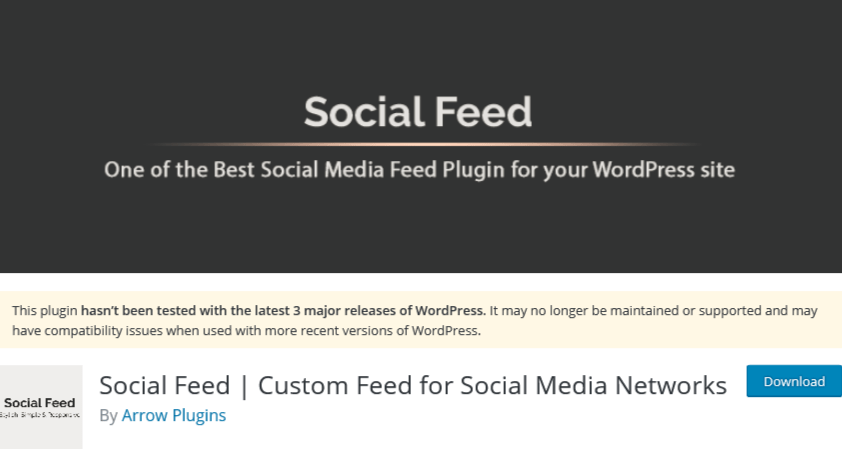
2. Social Feed By Arrow Plugins

Social Feed By Arrow Plugins

It allows you to display your feeds from your Facebook, Instagram, Twitter, and Pinterest accounts. Let’s create one feed from one of your social accounts or create custom social feeds taking information from the accounts. For example, you can select to show your pictures from Twitter, Instagram, Facebook, or Pinterest which means that you can use it as a gallery.

One of the interesting features of Social Feed is that It’s the only plugin that lets you remove the social icons from your feed if you want a clean social feed design.

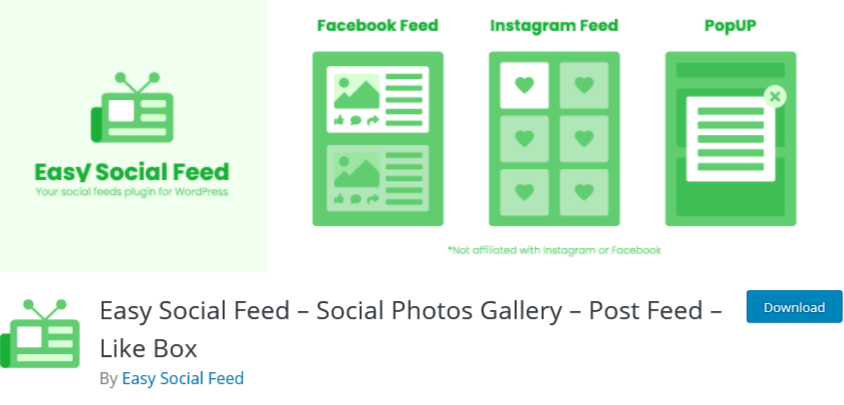
3. Easy Social Feed By Easy Social Feed

Easy Social Feed

One of the easiest and user-friendly plugins to display the Facebook feed on the WordPress website is Easy Social Feed. It offers a fully customizable Facebook feed that you can personalize according to your style and showcase your artistic side.

The feeds are responsive, which means your visitor can view it on any screen and watch all the content without any trouble.

Many people post images, videos, etc with the product on their social media, which act as social proof. A potential customer always looks for social proof before making a purchase, and therefore it is important that he views the feed without any trouble.

It also allows you to put a limit on the words to display on the website. With this feature, the customer can view more feeds at a time. Moreover, this feature makes the site interactive, as visitors even have the option to view full captions.

4. Flow-Flow Social Stream By Looks Awesome

Flow-Flow Social Streams

Flow-Flow Social Stream is simply add social feeds to WordPress websites with a one-click API authentication. This plugin is a highly customizable and Amazing drag and drops builder grid that allows you to display your posts from different social media channels on the same page. Additionally, Flow-Flow Social Stream shows social media indicators like comments, likes, views, and more to engage your audience.

5. 10Web Social Post Feed By 10 Web

10Web Social Post Feed

If you are looking for an easy way to integrate your WordPress website with Facebook, then 10Web Social Post Feed is an ideal solution. The plugin provides features to display a wide and varied range of content from any page with full control over the feed. That means you can change the content, length, and styling. In addition, the plugin is compatible with visual content, hence it can display images and videos without affecting the website’s speed.

Conclusion

Finally, take benefit of these plugins and your social platform to optimize your digital marketing strategy. This way you can adjust the content you show to get more interactions and improve your audience. Adding social media feeds to your WordPress website will increase the interactions and user engagement with your audience and help you grow your business.

These are just some of the best social media feed WordPress plugins that you can add to your WordPress website but there are many more. Do you have any favorite plugins?
Let us know in the comment section below!

Technology

Why Do Brands Embed Facebook Feed On Website?

A website is the most important aspect of a business affair. It should be as amazing as the brand itself. Every website owner tries making it engaging which drives a great deal of web traffic. To do so, there is N number of options available but not all turn out to be fruitful. But, Facebook has always turned out to be a lifesaver in terms of its inordinate reach.
Facebook is one of the most popular and engaging social media channels. It is a holistic platform for marketers to reach out to their target audience. Whether you are trying to influence millennials or boomers, you can find them on Facebook. On an average, Facebook users spend about 45 minutes per day.

Ever wondered what are the amazing benefits of embed Facebook feed on website? Can you imagine the response your website will receive? Well, this isn’t imaginary. Facebook widget make that possible for you. It collects and curates the UGC from your Facebook business page, profile, timeline and embeds them all into the web platform. Widgets are simple to embed on your website.

facebook feed

Amazing Benefits to Brands Embed Facebook Feed On Website:

Let us delve into the best benefits of embedding Facebook widget on your website.

1. Boost Brand Awareness

Integrating Facebook feeds on a website increases brand awareness and reach to a large extent. While browsing your website, a visitor can also access your Facebook feed without leaving the web platform. If the content appears interesting and attractive, they will start following your Facebook account. This will automatically result in increased brand awareness and reach.

2. Add Social Proof to the Brand

User-generated content, well known as UGC is the best tactic used by marketers to spread the word about the brand. Creating a user-generated Facebook wall and embedding the same on your website increases the authenticity of the content.

This, in turn, increases credibility and makes it easy for your audience to trust your brand. Real-time or live Facebook feed on the website enables users to better accept your social presence.

Read More – Facebook Plugins to Grow Your Business on WordPress

3. Helps to Boost User Engagement

When UGC is displayed on the Facebook feed, it lets the user click, visit and explore your website too. Once the users visit your website, they are more likely to explore it and find the relevant posts. When users share your Facebook post with hashtags related to your business, it compels others to have a look and share it further.

4. Creates a Visual Hub on Your Website

Facebook is undoubtedly the most vibrant and appealing social media platform when it comes to user engagement. Adding this lively Facebook feed to your website, makes it attractive too. The interface of your website which previously lacked engaging colors, gets enriched with attractive and eye-catching content.

Facebook widget comes with customization options that let you refine the feeds before displaying them on your website. You can curate and personalize them with beautiful backgrounds and themes.

5. Boost Sales and Conversion Rate

Brands are rapidly advancing towards Facebook to connect with a diverse audience. Since people have a rationale while exploring Instagram, you are likely to make a lasting impression. Also, your brand gets recognition.

Embed Facebook feed on WordPress website enhances user engagement and reach. This leads to increased conversion and sales. Your customers will be willing to connect to your brand. This is beneficial when your Facebook feed is augmented with relevant and meaningful posts that capture users’ attention.

Embedding Facebook feeds transforms your website which looks more appealing and engaging for the users. The website traffic increases subsequently and the bounce rate is likely to decrease. As a result, revenue and leads scales new heights.

Read More – Embed Google Reviews on Weebly

6. Enhance Users Experience

Embedding Facebook feed on the website, improves the user interaction with the website interface . It innovates your website to stay ahead of your competitors. Your audience is most likely to increase their average time spent on your website. Flashing Facebook feed delivers excellent customer experience and induces them to stay longer on your website.

7. Easy to Use

Embedding Facebook feeds is a piece of cake. Use a Facebook aggregator tool, curate your content, and embed them on your website.

Yes, it is that very simple and quickly. It is an absolutely coding-free method and doesn’t require any skills. Anyone with no technical background can integrate them effortlessly.

Widgets liberate you from the complicated and pesky coding techniques. Get access to the updated Facebook feeds on your website with just a few clicks.

At presently Tagembed is one of the best social media aggregators which makes your work simplest. It comes with additional features, apart from what is mentioned above. Marketing your brand is no longer challenging and onerous. So why not indulge yourself in the latest fad and give your brand a whole new social appeal.

Digital Marketing, Technology

9 Amazing Benefits of Google Review Widget You Might Not Know

Whenever you decide to make a purchase from an eCommerce website, you are most likely to look for customer reviews. But why so? It is because you as a customer respond to social proof. It is believed that other users will not be biased towards the brand and will present their genuine feedback. For the same reason, brands should focus on displaying Google customer reviews on their website in order to increase their credibility.

About Google Reviews?

Google reviews are the feedback about the products and services which are made by the customers who have purchased, used, and had an experience with the brand. Google review widget is made public and your audience gets access to the information about the quality of the product you are offering.   Google reviews serve as a perfect mix of positive and negative feedback from your audience. Displaying them on your website increases your online reputation and the credibility of your brand. It carries some other benefits as well.

Let us enumerate some key benefits of embed google reviews on websites.

google reviews

Amazing Benefits of Google Review Widget on Website:

Embed Google reviews widget can beneficial for any brand and business in multiple ways. All that you need to do is aggregate and embed customer reviews on your website. This will enhance trust, gather recognition, showcase transparency and help you achieve the marketing and increase sales target strategically better and faster.

1. Improves the quality of products and services :

Customer reviews are beneficial to marketers in improving the quality of services and products they offer. Customers will leave genuine feedback which will let you know about their experience and keep your feet on the ground with respect to customer satisfaction. By quickly resolving the queries generated by your users, you can refine the customer services thereby giving them an overwhelming experience and satisfaction.

2. Increased social proof and authenticity

The quality of products and services can definitely please your existing audience. But, what about your customers beyond that? Despite giving a good quality service to your customers, you are less likely to reach a considerable number of users. Google review widget helps them with their buying decisions. Much like we would ask the people around for recommendations, google reviews allow us to do this online with just a few clicks.

3. Reviews acts as a voice for your brand

Everyone wants to be heard and share their experience for others to see. Google review widget give a voice to your customers. It lets you interact with them which otherwise is not possible. If the user is taking time to leave a review then he/she is most likely to be your loyal customer. This builds their relationship with your business. 

4. Influence the customer’s buying behavior 

As per Brightlocal, consumer review survey, 97% of consumers looked for online reviews about local businesses. The number in itself says the importance of flashing your reviews on your website. Above all, 85% of the users trust google reviews more than what’s being recommended to you by your family, friends, and marketers. Your online ratings and reviews will greatly impact their buying decisions. So, make sure google review occupies a space on your website.

Read More – Embed Google Reviews on Weebly Website

5. Impacts sales and revenues 

Embed Google reviews can significantly affect your revenues because that’s what customers look for when deciding to buy a product. Your audience wants to hear the opinions of the other consumers despite being complete strangers. They find it genuine as it is drawn from experience. Higher ratings and positive reviews make your product desirable. This increases the chances of conversions which results in increased sales and revenues.

6. Acts as a unique UGC

User-generated content, generally referred to as UGC, creates transparency between you and your customers. Google reviews act as reliable content that a consumer can refer to before making a buying decision. No in-house content is trusted completely. Many promotional activities fail because of the same reason. But, google reviews never lets you down. They add up to brand advocacy and give it recognition.

7. Improves your ranking

Positive reviews engage a considerable amount of audience with your brand. This is trustworthy content that benefits your brand valuation. Google reviews are one of the most important and crucial factors that helps improve your brand ranking. Pages with reviews that mention a particular keyword are found to have higher rankings.   

8. Promotions being done by your customers itself

Favorable reviews from your happy customers are no less than a successful marketing campaign. The scrutiny spreads through word of mouth and leads to some more customers adding up to the brand. Your audience acts as micro-influencers that continues maintaining a positive image of your brand amongst potential customers and even beyond that.

Read More – Embed Airbnb Reviews on Website

9. Increased time spent on your website

User engagement and their time spent on your website are what make it thriving. Customer reviews are additional information about the products and services you offer. So, why not flash them on the website? Customers love clarity and genuineness. Reviews are the bona fide experiences that every user wants to access. It increases their dwell time and your website will receive new visitors every now and then.

Google reviews are no less than a marketing strategy that adds credibility to your brand. This is a cost-effective approach to reach out to your potential customers. 

Tagembed has made your task even simpler. Its google review widget tool helps you embed and displays customer reviews on your website. The simple steps to embed google review saves you from the pesky codes and complex integrations. 

Here Some Example of Google Review Widget on Website:

So Why You Waiting For

Technology

How To Embed TikTok Widget On Website – Try Now

Worldwide, TikTok has around 900 million lively customers. And, while TikTok is largely used by Generation Z, it has become increasingly popular with Millennials and Generation X over time. Nowadays, it’s even common to see a handful of Baby Boomers creating and sharing content on the app. So, in case you’re a TikTok influencer, you’re in good company.

But, what in case you use different social media networks in your influencer advertising and marketing business?

Like each different famous social media platform, TikTok lets its users share TikTok videos on different platforms and even add TikTok Widget on websites. In a short guide, we’re going to show you how to embed TikTok videos on your website to get the most from your content and reach a wider audience. We’ll be sharing methods of adding TikTok widget on websites.

titktok widget

Why Embed TikTok Widget on Your Website?

Turns out, there are amazing reasons it just makes sense to embed TikTok widget on your website:

  • User experience
  • Site resources
  • SEO boost
  • Increase the visitors time
  • User-Generated content
  • Decrease bounce rate

Read More – How To Embed Twitter Feed On WordPress Website?

How to Embed TikTok Widget on Website?

TikTok widget can be easily embedded by using social media aggregator tools available in the repository.  You can use them to embed the videos anywhere on your website.

Latest Social Media Aggregator Tools to Embed TikTok Widget on Website –

  • Tagembed
  • Curator
  • EmbedSocial
  • Walls
  • Socialproofed

To embed TikTok video on website, you need not be a tech-geek. Just follow these easy steps to add TikTok video for website:

  1. Create TikTok Feed By Using Tagembed Widget
  2. Embed TikTok Video to Your Desired Website Platform 

1. Create TikTok Video Feed By Using Tagembed Widget

  • Sign Up to create your free Tagembed account or if you are an existing user, log in to your account.
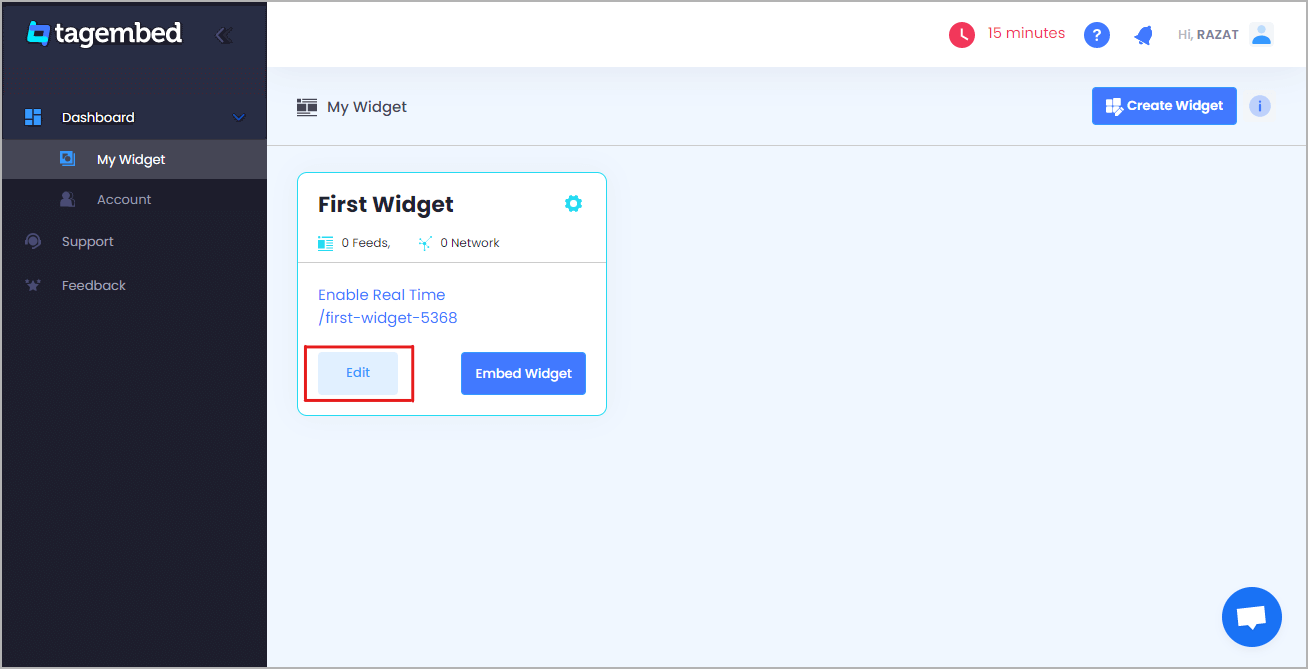
  • You will land up on the Tagembed dashboard window, if you are a new user, your first widget will be present on your screen, click the Edit button to proceed.
  • If you are an existing user and looking to create a new widget with TikTok, click on the Create Widget button on the top right corner of the screen. Next, provide an appropriate name for your widget on the popup box and click on Create Widget button.
  • Pick a source window that will appear on your screen, click on TikTok from various given options.
  • Click on the Create Feed button and provide your credentials.

Read More – 3 Best Facebook Plugins to Grow Your Business on WordPress

2. Embed TikTok Video to Your Desired Website Platform

  • Click on the Embed Widget button that is present on the bottom left corner of your screen.
  • You have the option to adjust the height and width of your widget. Now, click on Get code button to get the embedding code.
  • Copy the code on your clipboard and paste it onto the backend of your website.

And that’s it, within just a few easy steps, now you own an attractive website that display amazing TikTok video feeds.

Read More – How To Embed Google Reviews on Weebly Website?

Over To You

Create interactive TikTok widget on website really helps you a long way in establishing your brand and product dominion, increasing user-engagement, and building impression in the minds of your users. So try the best social media aggregator tool for your websites today and display amazing and beautiful user-generated content to your target audience.

Why are you waiting for? Use now this tool right now

Technology, WordPress

How To Embed Twitter Feed On WordPress Website?

With over 330 million active monthly users, Twitter is one of the world’s leading social networks. Displaying your Twitter feed on your website can help you connect with your audience and grow your business.

so if you are looking for an easy way to display your Twitter feed on your WordPress, then this blog is just for you.

Here you can find how to embed Twitter feed on WordPress website without any hassle. Displaying your Twitter feed on your website is a cool way to cross-promote your content on various platforms.

There are various articles that teaches different methods, but in this article you will find the easiest way to embed Twitter Feed on WordPress website. You can use this process with ease – even if you’re not an IT mastermind.

add twitter feed

Read More – 3 Best Facebook Plugins to Grow Your Business on WordPress

Why Should Add Twitter Feed on WordPress Website (Without Any Coding)

Adding a Twitter feed on the website can enhance your brand’s marketing efforts by ensuring better user engagement and boost sales.

  • It can attract website’s users by highlighting your interaction with the target audience
  • Creates a convincing first impression by increasing your visual appeal
  • Twitter generated UGC content will help in decreasing the bounce rate of your WordPress website
  • Gives a push to user engagement and interaction with your audience
  • Works as social proof and generates social trust

Social media channels are proving to be a boon for businesses as they boost a huge following and have the power to influence and turn the targeted sales of brand/business into reality!

Read More – Add Instagram Widget on a Website

How Can You Embed Twitter Feed On WordPress Website?

Tagembed Widget is an effective social media aggregator tool that can help you embed Twitter feed without any limitations and with attractive features that will enhance the look of your website by showing amazing content that is most relevant to your brand/product.

To embed Twitter feed on the WordPress website, you need not be a tech-geek. Just follow these easy steps to add Twitter widget for WordPress website:

  1. Create a Twitter Widget
  2. Generate Twitter Feed Embed Code
  3. Embed Twitter Feed on WordPress

1. Create a Twitter Widget

  • Log in to your Tagembed account, and if you are a new user, sign up to Tagembed.
  • Click on Create Widget button present on the top right corner of your screen.
  • Provide the desired name to your Twitter widget on the pop-up window and click on Create widget button.
  • Select Twitter from the Select your source popup window.
  • Select your connection type; you can choose from HashTag, Handle, Mention, List, Favorites, Advanced. If you want, you can provide added instruction from tick boxes.
  • Click on Create Feed button and provide your Twitter credentials.

2. Generate Twitter Feed Embed Code

  • Click on the Embed Widget button, present on the bottom left side of the screen.
  • Click on WordPress from your pop up.
  • Adjust the width and height of the feed according to your preference and click on Get Code button.
  • Copy the code and paste it on the backend of your website.

Great, you have successfully generated the embedding code from Tagembed; you are only one step away from add Twitter feed on wordpress website.

3. Embed Twitter Feed on WordPress

  • Log in to your WordPress account.
  • Open the website page where you want to display the live twitter feed.
  • Choose Text Mode, from the visual and text options on the page editor.
  • Paste the generated code on the text mode 
  • Apply the changes and Save.

Read More – Embed Google Reviews on Weebly Website

Over To You

Create interactive Twitter widget on WordPress website really helps you a long way in establishing your brand and product dominion, increasing user engagement, and building impression in the minds of your users. So try the best Twitter embedding tool for your websites today and display amazing and beautiful user-generated content to your target audience.

What are you waiting for? Use the tool right now  

Social Media Marketing, Technology

How to Embed YouTube Videos on Any Website?

YouTube has Billion of users around the world. So presently you should feel that it will be not difficult to acquire sees on the recordings with a particularly immense client base, correct? However, there is a trick : 62% of organizations use YouTube to post video content. Subsequently, you need some astonishing techniques that increment sees on your perspectives and advance your YouTube channel.

And peoples have started using YouTube videos on their website to improve their business. If you think adding videos to the website is a difficult task and somehow decreases the performance or speed of the website, you are highly mistaken. There are amazing social media aggregation tools like Tagembed is available in the market through which you can embed YouTube videos on website without any hassle.

Below are the steps to embed Youtube videos on websites using Tagembed:=

Steps to Embed Yotube Videos on Websitw

1. Sign Up to create a Free Tagembed account or Login if you already have an account.

Embed YouTube Playlist on Blogger Websites

2. You’ll be redirected towards the Tagembed dashboard.

Embed YouTube Playlist on Blogger Websites

3. Your First Widget will be already created, just click on the Edit button to proceed.

Embed YouTube Playlist on Blogger Websites

4. A screen “Pick a source” will appear, here select YouTube from the list of networks.

Embed YouTube Playlist on Blogger

5. YouTube Widget lets you aggregate feeds using multiple methods, such as:

  • Channel URL – Enter the URL of the channel you wish to embed on your website.
  • Playlist – Copy and paste the URL of the YouTube Playlist that you’d like to display on your website.
  • Keywords – Input the relevant keyword that you want in a video.
  • Location – Enter the location and keyword using which you want to embed YouTube videos.

Here, select Playlist as your preferrable method to aggregate YouTube Playlist Feeds.

Embed YouTube Playlist on Blogger

6. Finally, click on the Create Feed button to start aggregation.

7. On the bottom-left menu panel, click on the Embed Widget button.

Embed YouTube Playlist on Blogger

Also Read: Embed Instagram Feeds

8. A new pop-up “Choose Your Platform” will appear with the list of different website CMS.

Add YouTube Playlist on Blogger Websites

9. Choose your website CMS as OTHER (for blogger CMS users) and adjust the height & width of the widget,

Add YouTube Playlist on Blogger Websites

10. Finally, click on the Copy Code button to copy the embed code and paste it on the backend of the website.

Digital Marketing, Technology

How To Embed Google Reviews on Weebly Website?

Google Reviews are reputation-building blocks of any business brand on digital platforms. Basically, reviews are the most important for the customer’s experience visible and increase the reliability of the brand/product.

Google reviews can be embedded using various website platforms. So, right now so many various tools are available in the market to embed google reviews on the Weebly website.

One of them is the Tagembed Google review widget which allows embedding reviews along with real-time updates. It also offers a variety of moderation and customization options to enhance the look of the feed and filter out irrelevant reviews. It helps you to fetch all Google reviews examples from your GMB and embed them on your Weebly website.

google review widget

This is my all-time favorite social media aggregator tool. It is an amazing tool providing users with the accessibility to embed google reviews from the various platforms at a time with real-time updates. Also, its moderation panel and profanity filter allow the user to filter the content. Amazing themes helps to design and customize review widget as per website themes.

Try Now This Amazing Tool You Will Easily Display Google Reviews on the Weebly Website With No Coding:

1. Sign Up to create a Free Tagembed account or log in if you already have an account.

Sign-Up

2. You’ll be redirected towards the Tagembed dashboard.

Tagembed dashboard

3. Your First Widget will be already created, just click on the Edit button to proceed.

edit new widget

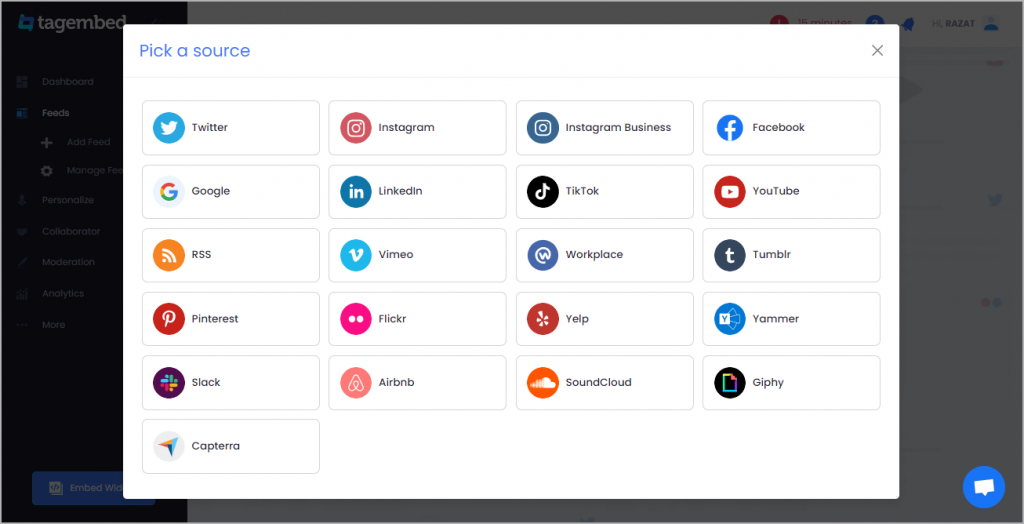
4. A dialogue box will appear to “pick a source”, Choose “Google” now

Pick-a-Source

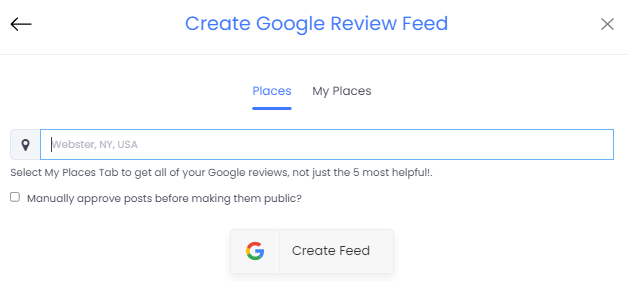
5. You can Create Google Review Widget from the following methods:-

Business Page: To fetch Google Reviews from Business Page enter the Google business page URL

Business Name: To fetch Google Reviews with the help of Place Name enter location and keyword

create-google-reviews

6. Finally, click on the Create Feed button to start aggregation.

Tip: You can click on the Personalize tab on the left menu panel to change the themes & layout, background, banners, and other dedicated themes settings to make the widget look more appealing and attractive.

7. On the bottom-left menu panel, click on the Embed Widget button as displayed in the below image

google-reviews-feeds

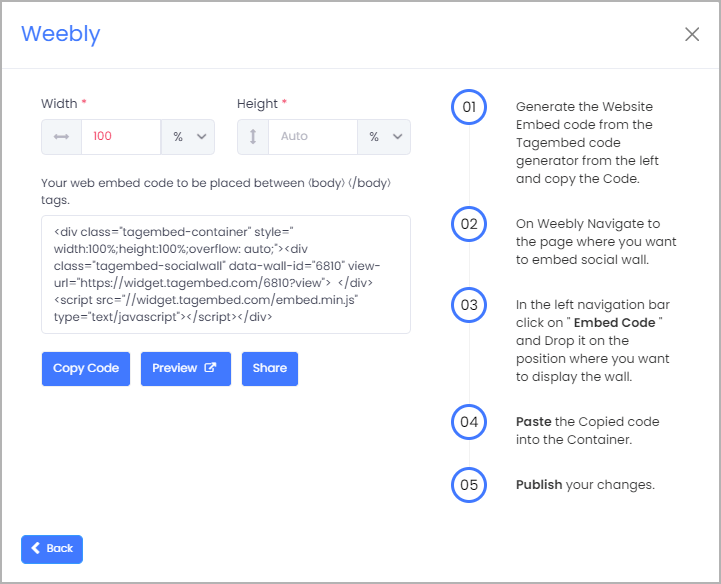
8. New pop-up will open with “Choose Your Platform” Now Select “Weebly

Choose-Your-Platform-Weebly-New-1

9. Choose Weebly as your website CMS then adjust the height & width of your widget.

Weebly-Get-Code

10. Click on the Copy Code button and copy the embed code.

11. Login to the admin account of your Weebly website and navigate to the page where you want to add Google Customer Reviews.

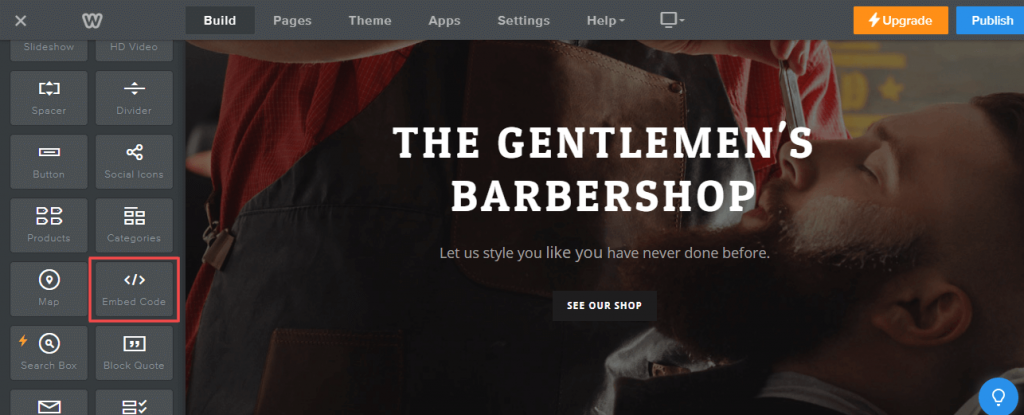
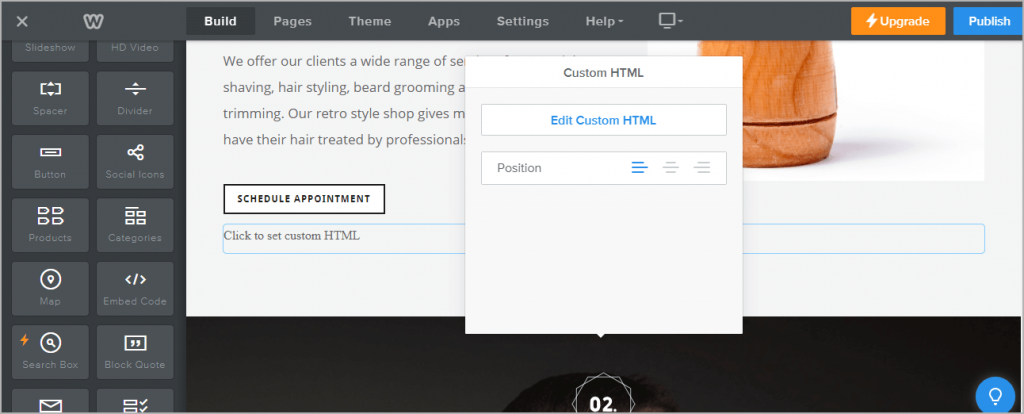
12. Scroll the elements on the left-hand screen to find the Embed Code option. Drag & drop the option on the page where you want to embed Google reviews.

weebly-embed-Code-2

13. A pop-up will appear Edit Custom Weebly click on it too and Paste the embed code into it.

Edit-Custom-HTML

14. Finally, click on the Publish button at the top-right corner to make the changes effective.

Basically, Google reviews widget will help you collect & curate your user reviews into a feed (via Places & My Places) that you can personalize & embed on your Weebly website. It is a specially designed widget for Weebly websites offering Weebly elements & functionalities.

Great! You have successfully Embedded Google Reviews Widget on Weebly website.