Digital Marketing, Social Media Marketing

Top 5 Facebook Feed Apps For Shopify

According to the statistics provided by Shopify, there are more than 820,000 merchants on their platform. If you are one of them and looking for simple ways to stand out from the crowd. Then you are at the right place.

Shopify is the most popular commerce platform that allows everyone to open an e-store and sell goods., But what makes Shopify such a popular platform? Out of many reasons, one major reason that stands out is its regular support to its user, which includes apps that you can install from its App Stores. 

Now, getting back to the topic in hand about getting an edge over competitors. In this competitive world, you need to have an X-factor in your store to attract customers, and you can achieve that by Integrating Facebook with your Shopify store. Admit it, one cannot rely on just one source for their growth, and in this era of cross-promotion marketing, it is now essential to have integrations to stay up to date and capture a huge audience.

Shopify and Facebook integration can be made easy by using the Facebook Feed Shopify app. For your convenience, we have listed the best Facebook feed app for Shopify below. 

Best Facebook Feed Shopify App

1. Facebook Feed by Tagembed

What makes an app ideal? Great features, useful benefits, and fair pricing. Facebook Feed by Tagembed has it all. This app helps you collect Facebook feeds, curate them, and display them beautifully on your Shopify store. With just a simple two-step setup, you can add Facebook feed on Shopify and instantly make your store more engaging.

The app offers complete customization, letting you choose from themes, layouts, fonts, and styles to match your brand’s look. A stylish feed not only makes your store well-organized and attractive but also creates a strong first impression that draws in more customers.

To keep your content relevant, Tagembed includes moderation features so you can filter spam and highlight only posts that matter. Best of all, it’s free forever, making it both practical and cost-effective. Along with Facebook, the app integrates with 15+ other popular social platforms, giving your store even more versatility.

2. POWR Facebook Feed by POWR.io

It is another useful Shopify Facebook feed app that increases user engagement on your website without any coding. 

The tool provides a responsive widget that displays images, videos, and texts without affecting the website’s speed. Moreover, the widget adjusts automatically according to the different screen types. Hence, you don’t need to change the display setting according to different devices. Moreover, to maintain the vibrancy of your eStore you can even set the widget to display only images and hide texts.

3. FBWall by Webkul

This app allows you to display Facebook feed on your Shopify page as per your requirements. You can use this app to showcase customer testimonials, social proofs and reviews from your Facebook Business page. These measures help customers in their buying decision and assist you in converting your visitors into your customers.

With the help of the customization feature, users can showcase their artistic side and personalize the widget as per their needs. 

The app has a simple installation process and provides a free trial to explore the tool and its features. 

4. Facebook Feed by Elfsight

Although Facebook allows its users to embed feed by copying the link of the post and pasting on the Shopify backend, there are limitations. One of the major flaws is that users have to copy the code of each post manually.

To counter this limitation, you can install the Facebook Feed Shopify app by Elfsight on your Shopify store, it automatically updates the posts from Facebook. So, as soon someone posts the content related to your business, it will be displayed on your eStore. 

Also Read – TIPS TO INCREASE YOUR SHOPIFY WEBSITE TRAFFIC

The app supports 12 popular languages, which makes this app a useful tool for your global customers.

Installing and running this app is very easy and does not involve coding. So even if you don’t have any coding skills or coding knowledge, you can still operate the app without any trouble. Besides the customization feature, it also allows you to show or hide like counts, share counts, and comments. So, if you have a huge number of likes on your posts, then by displaying them, you can showcase your social media strength.

5. Facebook Channel by Shopify

Facebook Channel Shopify app provides you a great opportunity to grow your business and attain more customers. Moreover, with the help of this tool you can manage Facebook accounts and products from one place.

It is a simple-to-install tool that integrates your Facebook account with your Shopify store. Other than Facebook, you can even integrate it with Instagram, which helps you build more audience and boost your reach. 

The app is free to install but involves additional charges as per different services.

Over To You…

These are the best Facebook feed widget app for Shopify that allows you to integrate Facebook with your Shopify store. These tools are judged based on features, advantages, and pricing.

These apps have more features than mentioned in the blog, and you can easily explore them by installing them on your Shopify website. In addition, these apps are easy to install and provide great returns. So what are you waiting for? Go ahead, and find the appropriate tool for your eStore and enjoy amazing benefits.


Social Media Marketing

Why Should You Embed Instagram Feed On A Website?

Integrating Instagram feeds on a website is a must marketing strategy of recent marketers. But you know why is it so? To get the answer, let’s dive into this post and learn why brands and marketers are using Instagram feeds in their marketing campaigns. 

With the growing competition and globalization of the market, it becomes highly important for brands and marketers to focus their attention on creating effective marketing strategies to survive in this growing competition. 

Building trust and improving connection with the customers is the proven strategy that marketers are concentrating on and framing strategies around it. 

There are several reasons why you should embed Instagram feed on a website and why it is a must marketing strategy for your business. Here you will find answers to all your queries and get useful insights to embed Instagram feed on website. 

Embed Instagram Feed On Website – Advantage

Instagram is one of the most addictive social media platforms with millions of active users who are contributing amazing content on Instagram. This content can be in the form of images, videos, stories, and any other that make the content compelling and engaging.

Also, these users create content that is impactful for brands to attract the audience and add unique content to their website. Moreover, there are several benefits of embedding Instagram feeds on a website. 

  • Transpose Instagram Traffic To Website

Instagram feeds offer a similar experience to the website users as they get on the social media platform. This engages the visitors’ attention and increases the surfing time on your website. 

Visitors like more real content that is shared by the real people instead of brand created content. Adding Instagram feeds on a website allows visitors to learn about what the existing customers are saying about your brand and what their experience with your brand is. It creates curiosity and converts visitors to your website. 

  • Display Users-Generated Content

Embedding Instagram feeds on a website is the best way to display user-generated content on your brand website. You can collect the relevant users’ Instagram content that you find perfect for your brand’s marketing and embed it on your website. Displaying user-generated content is cost-effective and adds more uniqueness to your website which is attractive as well as engaging to attract more visitors to your website. It will increase the quality of the content and represent the social presence of your brand.

  • Build Trust and Authenticity of Content

Instagram feeds are created by your customers with their own will and consist of real customer experience they have with a brand. This makes the content more authentic, trustworthy, real, and attractive for new visitors. It will improve the brand reputation and new customers believe in the content shared by the real customers. Creating branded content is the old game and non-effective marketing strategy in this growing competition age. To build trust, authenticity, and attract more customers to your website user-generated content is the best content strategy for brands. 

  • Boost Conversion Rate

Integrating Instagram feeds to the e-commerce website helps to convert visitors into long-term customers. It is because when people learn about the real customers experiences and what benefits they received or feeling with your products and services, it will encourage other people to experience a similar feeling like others. 

User-generated content displays the satisfied and happy customers that are using your brand’s product and service, which in turn help new customers to learn about unbiased and real reviews of the existing customers. Displaying Instagram feeds inspire the visitors at the same time when they are looking for your product and services and satisfy their search for the good product. This will eventually lead to strong purchase decisions and encourage them to buy your product. 

  • Enhance Brand Image

Displaying Instagram feeds on a website tells your prospective customers about the social presence of your brand and increases the social reach with your customers. It also shows that more people know about your brand, use your products and services, and like to talk and share their experience with your brand. 

Embedding Instagram feeds on a website works as the word-of-mouth marketing of your brand and aware your new visitors about the real features and benefits of products and services you sell. 

This will in turn enhance and build a stronger image of your brand and represent how genuine you are about customers’ experience. 

Final Words

Embedding Instagram feeds on a website is the foolproof strategy for your brand’s marketing in this new competitive era. It opens doors for wide scope with lots of effective marketing strategies that are worth paying attention and efforts. 

If you want to grow your business as well as build brand value, then embedding Instagram feeds on a website is a must promotional game plan for your brand. 

To display or embed instagram feeds on a website, you can simply use a social media aggregation tool. There are several available in the online market, but make sure to choose one in which you will get more features and full customer support.

Content Originally Published @ https://bit.ly/3F2VyZG

Digital Marketing, Social Media Marketing

Tips To Increase Your Shopify Website Traffic

If you desire to open an e-store, then Shopify is your one-stop solution. Talking about the popularity, according to an announcement made by the platform, Shopify has more than 820,000 satisfied merchants around the world.

One of the main reasons for Shopify’s popularity is that it provides over 5300 app that provide great aid to businesses and adds charm to the store. However, with great opportunity comes great competition. As mentioned above, it has more than 820,000 merchants from 175 countries, running over 500,000 active stores. And to stand out in this competition, you need some great Shopify strategies. Therefore, this article discusses some excellent tips that will help you to increase traffic on your Shopify website.

BEST WAYS TO INCREASE SHOPIFY WEBSITE TRAFFIC

GOOGLE SHOPPING FREE LISTING

Google rolled out a useful feature for eCommerce and e-store merchants which allows them to get a listing on the Shopping tab of the Google search. Any eCommerce and eStore product brand can opt for the free listing. Moreover, this feature allows merchants to upload products that appear in organic search across Google platforms.

All you need is a Google merchant account and optimized product data feed, and your product will show up in Google’s shopping tab. But keep in mind that, as this feature is free, there will be huge competition here as well, so make sure you provide fully optimized product data on the platform. In addition, Google listing increases your product visibility and encourages visitors to visit your store to look for more products from your brand.

ADD INSTAGRAM FEED ON SHOPIFY WEBSITE

Extending the cross-platform promotion, you can even add Instagram feeds to Shopify website. Many tools are readily available in the market that help you to collect, curate, and customize content from Instagram and then provide you the facility to display them beautifully on the website.

You can use Shopify Instagram feed app to display content related to your brand, usually consisting of user-generated content from Instagram users. People often use Instagram to upload images of the product they bought or upload videos of the products while unboxing them or reviewing them. By adding them to your Shopify website, you enhance the beauty of your eStore and encourage users to stay on the website. A good-looking website assists in increasing Shopify website traffic, as people prefer visiting a colorful and lively website.

Moreover, Instagram feeds provide them with social proofs about the product and brand, and hence visitors don’t have to look for other websites searching for the purpose mentioned above. And this eventually helps you to win their trust and enhances your Shopify website traffic.

OPTIMIZE YOUR ESTORE FOR SEARCH ENGINE TRAFFIC

People always search about the product on search engines before purchasing it. And with proper optimization and use of SEO, you can increase your visibility. As a result, it not only increases Shopify website traffic but also enhances brand recognition.

Begin with in-depth knowledge of keyword research. Try to gather a list of keywords for your product and industry. Then, explore your competitors’ websites and note down keywords they are using to better their search engine ranking.

Once you have gathered keywords, use them on your product titles, product descriptions, blogs on the page, and other additional content.

Also Read – Key Benefits of Adding Social Media Feeds on Websites

CROSS-PLATFORM PROMOTIONS

In these modern days of marketing, cross-promotion has created a special space in every marketers’ strategy. Cross-promotion means promoting your eStore on a different platform. With the rise of social media platforms, businesses mostly use social media networks for promotions.

For example, many businesses provide their Shopify website link in their Instagram bio and market their products on the platform. The vibrant images and videos spark an interest in the viewers’ minds and encourage them to visit the e-Store to look for more products from the brand. Talking about Instagram itself, it provides various features that allow users to market their products differently.

USE INFLUENCER MARKETING

In recent times, influencer marketing witnessed a great rise in popularity. And this is all because it costs less than expensive advertising, and as influencers have a huge following, it provides a brand with a large audience. Influencers are famous personalities of social media platforms that have huge followings.

You can collaborate with influencers and promote your eStore. As these influencers have huge followings and many people show their faith in them, people would check that eStore which their favorite influencer is promoting. Moreover, you can even make them the face of your brand and increase brand recognition and reach.

Also Read – How to Add Live Social Media Feeds on WordPress Website

USE REFERRAL PROGRAM

Referral marketing has a great potential to market a brand. A referral program not only increases brand recognition but also helps in attaining more sales. You can use a referral program as: refer to x amount of people and get a product free. It means if a person referrals some people to your eStore, they gets a product free of cost. These schemes provide great results as people don’t miss out on the opportunity to get their hands on the product with less price than usual. In simple words, sales and schemes always attract audiences.

DISCOUNT CODES AND OFFERS

Discounts and offers are the best way to promote anything, whether it is a brand or a website. It also helps you to attract more customers to your eStore and increase brand recognition. For example, you can provide a discount on the first purchase; it will introduce your website and brand to the consumer and increase sales.

Moreover, you can also organize giveaways and contests on your social media handle, and winners of these competitions get a special offer from your eStore. It will boost your brand’s reach and eventually spark an interest in the minds of the platform users, which will encourage them to visit the website to explore.

OVER TO YOU

Marketing is an important essence for business. Unless people won’t be aware of your brand or website, your chance of attaining sales reduces. Therefore, you need good marketing to gather a crowd for your website and your brand. Hence, you can adapt the strategies mentioned above and boost the web traffic for your Shopify website and eventually generate revenue by attaining more sales. Because, more crowds means more chances of sales.

Originally Published at – https://bit.ly/3rU9di3

Social Media Marketing

Key Benefits of Adding Social Media Feeds on Websites!

In today’s competitive world of social media, businesses & brands are more concerned about their social presence and online reputation. According to recent research, marketers find it a bit difficult to update the content on the website creatively and engagingly. The solution to this dilemma is to add your social media feeds on the website, to make & keep your website more productive and interesting. 

The benefits of adding social media feeds on your website are unquestionable, the blend of platforms results in enhanced brand visibility, increased brand awareness and increased productivity. Today, in this article we will dig more into the benefits of incorporating Social media feeds on the website. 

What are Social Media Feeds? 

Before diving deep into the benefits of adding social media feeds on website, you must know what actually the social media feeds are? Social media feeds are nothing beyond the social media posts, which your consumers share in the form of comments, posts, mentions, photographs, videos, etc. 

The social media feed is the catalog of all the updated content which your followers post on different social media channels like Instagram, Twitter, and Facebook. Incorporating social media feeds on website is helpful and profitable when it comes to spreading the word about your brand’s loyalty, trust, and product quality. Computing and showcasing this user-generated content on the website will help you gain more audience and enhanced brand exposure. 

Benefits of Adding Social Media Feeds on Website

Confused about the benefits of adding social media feeds on websites? The actual benefits of adding these feeds on your website could be variable depending upon the industry type and the size of your business. But, there are some basic benefits which each & every size of business and industry type can get. 

It includes: 

  1. Build Engagement & Boost Organic reach: Largest audience engagement is the passkey to run a successful business and to reduce bounce rate. When you add social media feeds on website, it enhances the look and feel of your website while at the same time building the trust of your audience towards your brand.

    By showcasing compiled user-generated content on the website you will meet more attention of the user, the increased session time of a visitor, and will grab an opportunity to convert visitors into loyal customers. When you add user-generated content, the audience or the visitors start to believe in the quality of your product & brand, helping your business in seizing the attention of the customer and more potential opportunities.
  2.  Drive more Conversions: When you decide to add your accumulated social media feeds on website, you collect user-generated content from different social media platforms that your users have shared. User-generated content is the experience of the customer with your brand, which works as the social proof for your visitors. Showcasing more trustworthy, reliable, and legitimate content will attract more visitors and will also help you in driving more conversion.

    Visitors on your website want to know what your regular or past consumers had to say about your brand, and according to that, they build trust in your business or brand. The higher the quality of the Social media content posted on the website, the higher is the conversion rate.
  3. Equipped with real-time update functionality: When you add social media feeds on website, it displays more accurate and updated user-generated content, which is collected from different social media channels. To carry out this task, different social media aggregator tools are available in the market to do it easily and efficiently.

    Tools like Taggbox, Tagembed, Curator.io, and many more can help you in collecting, analyzing, and showcasing the most updated social media feeds on websites. You can optimize the interval of updating the feeds on the website according to your need and the content available. 
  4. Improvised SEO: Obsession towards social media is seen in every age group. When you collect and embed social media feeds on website, it will convince your visitor to stay on your website, see or read those reviews, and increase the number of clicks on your website. When the number of clicks is increased, your profits increase.

    When you attract more visitors, increase the number of clicks, convert your visitors into your customers, and improve your rate of investment. By displaying more relevant content, the performance of your website will improve, and it will help you in improvising the SEO of your website and will result in an improved rank on the search engine result page. 
  1. Grow your Social Influence: There might be a possibility that your official website followers do not know about your social media channels. Or the social media followers do not channelize with you through your official website.

    While you add social media feeds on website, you combine the content from different platforms, showcase it, and maximize your audience reach by connecting your audience on one platform from all different channels. It will help you build trust, traffic, and bond or relation with your audience. This will help you in increasing your brand awareness, brand visibility, and enhanced social influence. 

Coming to an End

The above-mentioned benefits are very few out of which you receive when you embed your social media feeds on a website. These days social media has become one of the most influential hatchets through which you can target most of your audience and can use it as a marketing strategy. 

What are you waiting for? Yet, if you have not embedded social media feeds on your website, do it now! Enhance your brand awareness, increase your brand visibility, improvise the rank of your website, gain more customers, and enhance your profit percentage. 

Content Originally Published @ https://bit.ly/3dsNC81

Digital Marketing, Social Media Marketing

Facebook Reviews: Increase Your Business Gradually

What does a rational customer do before making any purchase? – They check reviews. That is not a false claim, as 95% of people agreed to read reviews before making a purchase decision (source: G2). While 93% of customers read reviews of local businesses to determine their quality (source: Bright Local).

Therefore reviews are important. Many platforms offer the facility to their users to post reviews regarding any product or brand. But often, these platforms lack users or aren’t trustworthy. Another disadvantage of these review platforms is that people often post one or two-word reviews, which does not solve the purpose and provides no help to the reader.

And this is where Facebook reviews jump in. Firstly, Facebook has over 1.73 million daily users, which means there will be no shortage of users/reviews. And secondly, with the latest update, Facebook users now can choose from the option ‘recommend’ or ‘not recommend.’ So even if users aren’t writing in detailed reviews and choose either of the options, it gives readers a better view, which can help them make their purchase decision.

These recommendation options create a great impact as many people try new things based on friend’s suggestions (Source: Forbes). And that is the reason why businesses need Facebook reviews for their brand. They are so highly dependent on these reviews that many marketers embed Facebook reviews on websites.

If you still aren’t convinced, then here are some amazing benefits of Facebook reviews and how they can increase their business.

1. Builds Credibility

Businesses need to build trust to win new customers, and one of the primary ways to do so is by showcasing the reviews and feedback from the previous customers. Facebook’s business page provides a common platform/ground where people can exchange their opinions.

And as there will be more reviews and feedback, it will build a reputation and credibility for your business. So, as you build credibility for business, your chances to attain more customers increases. And that is how it creates a big impact.

2. Provides Credibility for Your Website

Facebook also provides a facility where you can embed Facebook reviews on your website. You just have to copy the embedding link of the selected review and paste it into the backend of your website. But then you have to copy each review one by one, and you cannot customize them to match it with your website’s style. Hence, we recommend you to use tools like social media aggregators that can ease your embedding process and provide various other features that add great relevance to this strategy.

There might be a case where people won’t be aware of the existence of your Facebook page or don’t have a Facebook account. This strategy then helps you in building credibility for your website and business in front of them.

Moreover, it increases your brand reputation as it appears that your brand considers customer feedback and appears transparent in front of visitors. Also, another hidden advantage of this strategy is that it builds a strong relationship with customers. A customer feels respected when a brand displays the reviews on their website and eventually helps you build a strong reputation.

Also Read – Embed RSS Feeds On Websites In Just A Few Simple Clicks

3. Builds a Review Cycle

People tend to follow the trend or copy what other people are doing on the social network. A similar principle is implied here when people read reviews posted by other users. Therefore, it encourages them to post reviews. And as there will be more reviews, you will be able to establish credibility for your brand, and eventually, it can help you reach your desired goal.

4. Helps in Conversion

As mentioned above, a potential customer always looks for reviews before making a purchase decision. And therefore, when you will be able to gather more reviews and showcase them on your Facebook page or website, it will help you convert that potential customer into your customer.

Also, if you are adapting the embedding strategy, then Facebook reviews can help you to hold viewers to your website. There can be a case where visitors look for the reviews and often explore other review websites with multiple similar products and end up buying any product based on the reviews. It is where embedded Facebook reviews come to the rescue. Visitors will get to know about the product and its review all at one place and hence it gives you a great chance to convert your visitor into your customer.

5. Builds a Strong Customer-Brand Relationship

You also have the option to comment or like the reviews posted by your customers. Hence by reverting to their reviews or engaging with them helps you in building a customer-brand relationship. It eventually enhances your brand reputation and also converts your customer into a loyal customer. Furthermore, customers feel respected when a brand replies to their reviews or responds to their comments, it shows that you care for your customers and value their feedback.

6. Helps You to Know Your Brand/Product Reputation

Your customers are the best judge for your products, and as they post the review or express their opinions about your brand or your product, you get to know the reputation and reception of your product. It also helps you know the strong and weak aspects and eventually helps you improve if there is any flaw.

7. Increases Brand Recognition

Whenever a user posts anything about your business or product on your business page, the Facebook circle of that user gets to know about it as it shows them on their respective feeds. Hence, it eventually increases brand recognition and therefore boosts the reach of your business/business page.

Summing It Up

We have enough data to prove that people read reviews before making any purchase. So, on the one hand, it helps potential customers in their buying decision, and at the same time, it helps businesses to public opinion about their products or business. While embedding Facebook reviews on the website adds more advantages and helps them to enhance the brand reputation and convert their potential customers into customers.

Originally Published at: https://bit.ly/32CqH89

Social Media Marketing

How to Add Live Social Media Feeds on WordPress Website

No doubt there are many social media aggregator tools out there, but in some cases, they are either hashtag-oriented or limited in features. Using such tools is great but there’s more than that in a social media aggregator that’s gonna make your content stand out from your competitors. Here are the tools or say solution on how to add live social media feeds on your WordPress websites.

With a little overview of social media platforms, let’s dive in.

What is Social Media?

Social media are interactive platforms for sharing information, ideas, thoughts, or any form of expression via online communities. There are a variety of features and different UI available for every platform making them different from each other.

These platforms were built as a way to interact with family and friends but then with the growing reach and potential of the platform, it was adopted by the businesses as a means of marketing.

It is different from traditional media like magazines, newspapers, radio broadcasting, and TV broadcasting in different ways. Like, as to reach frequency, usability, quality, etc. that makes the social media platform a good marketing platform for businesses.

Social media platforms are a huge part of today’s marketing strategy. With the growing audience on social media platforms, it attracts businesses to share their content with huge audiences.

Social media marketing strategies are different for every business and brand but their primary goal is reaching out to huge audiences and making interactions to understand their requirements.

Alternately, users use social media platforms to share their recent activities, achievements, informational content, experiences, or review of any product or service with their users. Businesses use it for spreading brand awareness among the audience.

However, the important role that social media play for business is User-Generated content such as:

  • Photos
  • Videos
  • Comments
  • Text Posts etc.

This experience or opinion that is shared by the users over social media platforms is the key content for the businesses and brands for marketing purposes.

These contents are created by the users based on their experiences with the products and services which is a perfect testimonial for the brands to use for influencing other users. These contents can be used by the businesses and brands by embedding them into the websites.

How to Add Live Social Media Feeds on WordPress Website?

There are multiple social media aggregator platforms available on the internet that can be used for easing up the process.

Embedding of feeds comes into the third step, the first two steps before embedding are Discovering and Curating.

Discovering means collecting relevant social media feeds from different platforms.

Curating means organizing the collected feeds into the proper order that makes feeds look appealing to the viewers.

Then finally, create the embedding code for your website and incorporate it into the webpage for displaying the feeds.

Well, live social media feeds means getting the feeds integrated into the websites in real-time. In other words, as the post gets published on the social media platform they get automatically embedded into the website without a single click.

For WordPress websites, it can also be done using social media aggregator tools or plugins.

Some of the best tools to embed the live social media feeds on the WordPress website are:

Tools to Embed Live Social Media Feeds on WordPress Websites

These tools are completely responsive and user-friendly. No technical knowledge is required for accessing the tools’ features.

1.Tagembed – Tagembed is a free forever social media aggregator tool for collecting, organizing, and embedding social media feeds on websites.

You can aggregate feeds using the following methods:

  • Hashtags (#)
  • Handles (@)
  • Mentions (@)
  • Tagged Feeds
  • Locations
  • Page URL etc.

After aggregating the feeds you can organize the feeds using the following features:

  • Customization
  • Moderation
  • Profanity filter
  • Custom Posts
  • Custom CSS
  • Analytics
  • Real-time update
  • CTA etc

Using the above features you can organize content that will make it appealing and attractive for viewers.

Tagembed also has a WordPress plugin for embedding social media feeds on WordPress websites.

2. Smash Balloon – Smash Ballon is a WordPress plugin that offers collectively four social media platforms for integration. 

Features of Smash Balloon are:

  • Display Hashtag Feeds
  • Create carousels of posts
  • Moderation
  • Block posts 
  • Custom CSS
  • Load More Button

To help you with your goal of integration it has many other features for simplifying the process.

3. Juicer – Juicer is a social media aggregator platform that can help you embed the social media feeds from different platforms and then add it to your website.

Juicer provides WordPress plugins for embedding feeds directly into your WordPress websites in a few clicks.

Some of the features of Juicer are:

  • Gather feeds using hashtags or username
  • Filter Contents
  • Moderation
  • Infinite scroll
  • Custom CSS
  • Analytics

And some more that can help you build an appealing feeds interface for displaying.

4. Social Media Walls – Social Media Walls is a social media aggregator platform that lets you easily curate content and embed it into the websites.

They don’t have a WordPress plugin for now but they provide an option to create the embedding code and paste it into the WordPress website. 

Features that the tool offers are:

  • Moderation
  • Feeds Update frequency
  • Different visualization options
  • 1000 latest posts etc

Create a beautiful widget using the above features for WordPress websites.

Conclusion

Use any of the above tools according to your requirements and create a beautiful and appealing feeds interface for attracting website visitors.These tools also allow different pricing features based on the plan you select. Now, the live social media feeds for WordPress website is just a few clicks away.

Content Originally Published @ https://bit.ly/3xN5aF9

Website

Embed RSS Feeds On Websites In Just A Few Simple Clicks

Want to make your website informative and engaging for the website? – Here is a straightforward hack – Embed RSS feeds on website. Many people still consider RSS outdated, but RSS still has its relevance even in this modern digital world.

RSS feeds help you to combine all the needed information from different sources in one place. Therefore it saves time, as you don’t have to visit different websites to collect information. Moreover, it is a more organized way to assemble information in one place. You can even categorize or subcategorize feeds under different headings. In simple words, RSS feeds are still worthy and provide tremendous help. Furthermore, you can enhance the advantage of the RSS feeds by embedding RSS feeds on your website.

You can use tools like social media feed aggregators that help you in the embedding process and provide various other features that add more relevance to the strategy and beautify the website.

But before learning about the embedding process, let’s start with generating RSS feed URLs from different websites.

How to find an RSS feed on different websites?

Most of the websites use CMs platforms to build their website. Therefore, here, we will be mentioning 4 of the powerful RSS platforms. These platforms are WordPress, Tumblr, Blogger, and Wix. Each has different ways to extract RSS feeds, and here is how you can do it.

  • WordPress: It is really simple to find an RSS feed from websites powered by WordPress. Just add /feed to the end of the URL—
  • For example – https: //example.wordpress.com/feed
  • Tumblr: Tumblr is another popular CMS platform that assists people in website building. Add/RSS at the end of the homepage URL to find RSS feeds for the websites using Tumblr.
  • For example – http: //example.tumblr.com/rss
  • Blogger: Blogger, another popular CMS. It is one of the most used platforms by bloggers and content writers. It powers 617,000 blogs globally. To find an RSS feed for the websites using Blogger, add feeds/posts/default to the end URL.
  • For example – http: //blogname.blogspot.com/feeds/posts/default
  • Wix: Wix is another well-established CMs platform that has over 120 million users (source). To find an RSS feed for the websites using Wix, add /blog-feed.xml to the end of the URL.
  • For example – https: //www.wix.com/blog/blog-feed.xml.

So, now you are aware of the technique to extract RSS feeds from different websites, here is how you can embed RSS Feeds on your website. We will be using a well-known social media aggregator for this process – Tagembed. It is known for its budget-friendly prices and user-friendly interface.

It is really simple to use Tagembed, and with just a few simple clicks, you can easily embed RSS feeds on your website. Here is how you can do it.

Also Read – 4 Best Social Media Auto Post Apps for Shopify Merchants

How to embed RSS feeds on the website

Step 1: Sign Up and make your free Tagembed OR if you already have a Tagembed account, fill in your credentials to log in to your account.

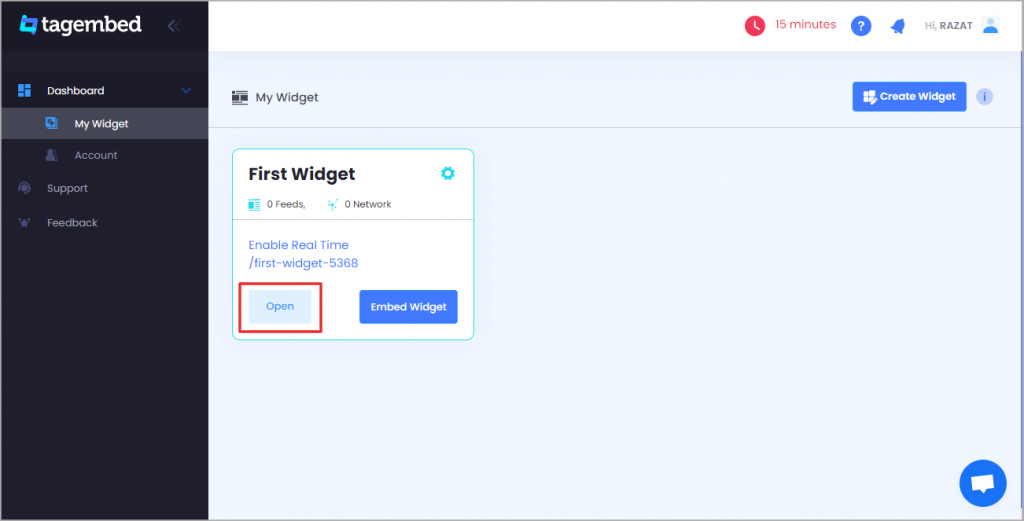
Step2: Tagembed dashboard will appear on your screen. If you are a new user, your widget will be ready and present on your screen. Just click on Open to proceed.

-OR-

If you are a new user – Click on the Create Widget button on the top right corner of your screen. Next, provide an appropriate name for your widget on the pop-up dialog box, and then click on the Create Widget button.

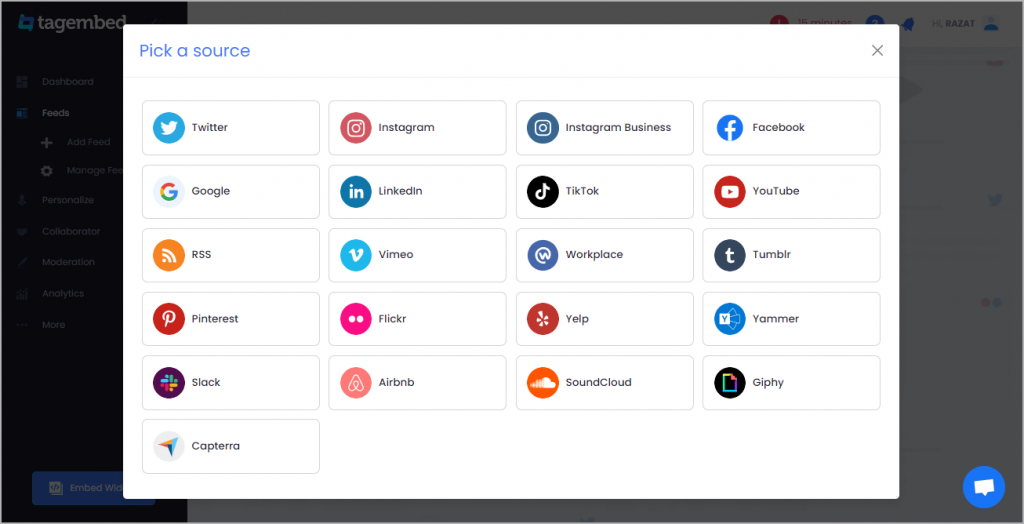
Step 3: From Pick, a source window, choose RSS from provided options.

Step 4: Paste the URL of your desired RSS feed and click on Create Feed.

Step 5: Your RSS feed will be ready.

You can even customize your feed as per your requirements by clicking on the Personalize option on the left-hand side of your screen. Here, you can choose an appropriate theme, font size, font style, background, and more. It helps you to provide a graceful and professional look to your website.

Step 6: Click on the Embed Widget button on the bottom left corner of your screen.

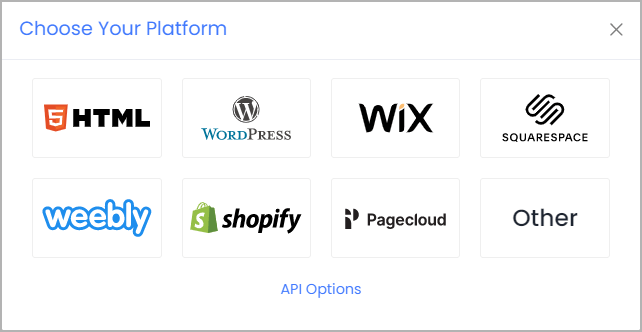
Step 7: From Choose Your Platform, select your appropriate platform.

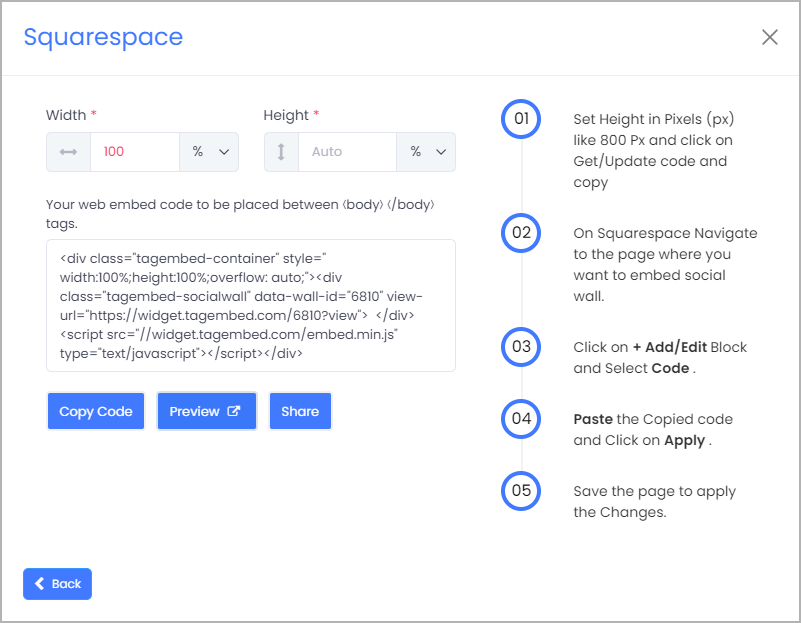
Step 8: Here, you can adjust the width and height of your widget, copy the embedding code on your clipboard and paste it on the backend of your website.

And that is it, a few simple steps, and your website is ready to display RSS feeds.

Also, Read – Embed RSS Feeds On WordPress Website

Final Words

RSS feeds have significant benefits, as it saves time, reduces your email junk and keeps your information organized. You can extract more benefits from the website by embedding RSS feeds on your website. Follow the steps shown above, and within minutes your website will be ready to showcase RSS feeds on your website.

Originally Published at: https://bit.ly/3lav5l7

Digital Marketing, Website

Complete Guide to Embed Twitter Widget on Website for 2022

Twitter has no more restricted its wings only till making communication among people all over the world feasible and interesting. It has become the hatchery for numerous businesses and brands that are animatedly working to make themselves noticeable.

Twitter as a social media platform has always been the best source of crisp and unique information from all over the world.

Marketers are making great advantages with Twitter Widget to aggregate, curate & embed Twitter feed on the website and have made it the centre for doing all the endorsement for their brand. This has also been possible due to the massive number of Twitter users that scroll through Twitter feeds all the time.

Embed Twitter widget on your website is a fantastic idea to make your website stand out from the crowd of other similar and bland-looking websites. Thus, this gives your website the golden opportunity to bring a great number of visitors to it, thereby making your brand triumphant.

How to Display Twitter Widget using by Tagembed?

While in the process of embedding a Twitter widget to your website, you are first needed to create a Twitter widget for it. Here Tagembed comes into action, it serves as the best tool for creating an amazing Twitter widget to be embedded on your website.

Here are the steps that you can follow to create a beautiful Twitter widget for your website

  1. Create a Tagembed account for yourself, else log in to it if it already exists.
  2. From the dashboard that appears on your screen, choose “Add Social Feeds”, to give a functional command for the widget.
  3. Opt for “Twitter” as the source of information to create the widget.
  4. Tagemebd will now efficiently collect all the Twitter feeds for the widget through page URLs, posts, mentions, tags, etc.
  5. Finally, give the Facebook credentials to create the widget.
  6. Yay!!! You have now successfully created the Twitter Widget for your website using Tagembed.

Simple ways to Embed Twitter Widget to your website

  1. Creating the widget was not all, now you will have to embed that widget on your website at a required location. This allows your visitors to find all your Twitter feed widgets at a single place on your website.
  2. Below given are the steps that you can follow to Embed a Twitter widget on your website!
  3. Begin with clicking on the “Embed Widget Button”
  4. Choose the CMS platform for your website, which may be WordPress, Wix, Shopify, etc.
  5. Adjust the height and width of the widget according to the requirements of your website.
  6. Select “Get Code” to generate the code and then “COPY” it.
  7. Now, “PASTE” the code that you have copied, is on the backend of your website.

Embed Twitter Widget on Distinct Website-Building Platforms

There are several website-building platforms available that you can use for embedding your Twitter widgets to your website. Learn the methods involved in different website-building platforms to embed Twitter widget for WordPress websites!

1. Add Twitter Widget On WordPress Website

WORDPRESS

WordPress is the most popular platform building website, it provides plugins for your website that add various new functions to it. If you want to use Plugin, Tagembed has invented a WordPress Plugin named a social media feed plugin for WordPress users. WordPress controls both the backend as well as the front end of the website.

1.a) WordPress Classic Editor

This is for the ones who choose the older version of the WordPress website, these are the steps that you can follow!

  • Choose the most suitable WordPress plugin for your website.
  • Generate the embed code of the website and then copy the code on the clipboard.
  • Now, see the backend of the WordPress website and find the visual and text options, further click on “Text Mode”.
  • Paste the code that has been generated, in the backend part of the website where you wish to place the widget.
  • Tap on “Update/Publish”, to save the changes that you have applied.

1.b) WordPress 5.0

Here we come to the steps for the ones who have chosen the upgraded version of the WordPress website.

  • Start with choosing WordPress as the CMS for your website.
  • Generate the embed code using Tagembed and copy the code in the clipboard.
  • Now, go to the WordPress backend page.
  • Choose “(+)Add/ Block” from the WordPress Editor, and click on the formatting
  • Select “Custom HTML” and then page the code in the widget editor.
  • Finally, “ click on “Publish/ Update post”.

2. Twitter Widget for Shopify Website

Shopify

Shopify allows you to extend the functionality of your website by adding many features to it. The main focus of Shopify is to grow sales on your e-commerce website. On the high demand of e-commerce users, Tagmebed launched its Shopify plugin as well which reduces all your efforts and gives an amazing social wall on your e-commerce website. Below mentioned are the steps that you can follow to embed Twitter widget on the Shopify website.

  • Choose Shopify as your website-building platform.
  • Proceed by generating the Twitter embed code using Tagembed and then copy the code on the clipboard.
  • Log in to your Shopify account and explore the online stores.
  • Go to the themes menu present on the sidebar.
  • Select HTML/CSS option.
  • Choose layouts/ templates/sections of your choice, for the website.
  • End by pasting the code and clicking on Save.

3. Embed Twitter Widget on Squarespace Website

Squarespace

Squarespace is a Saas-based website building platform. It also offers numerous features and customization options for your website. Here are the steps listed that you can follow to embed Twitter widget on your Squarespace website.

  • Choose Squarespace as the website building platform for your website.
  • Generate the embed code using Tagembed and copy the code in the clipboard.
  • Choose the location to place your Twitter widget.
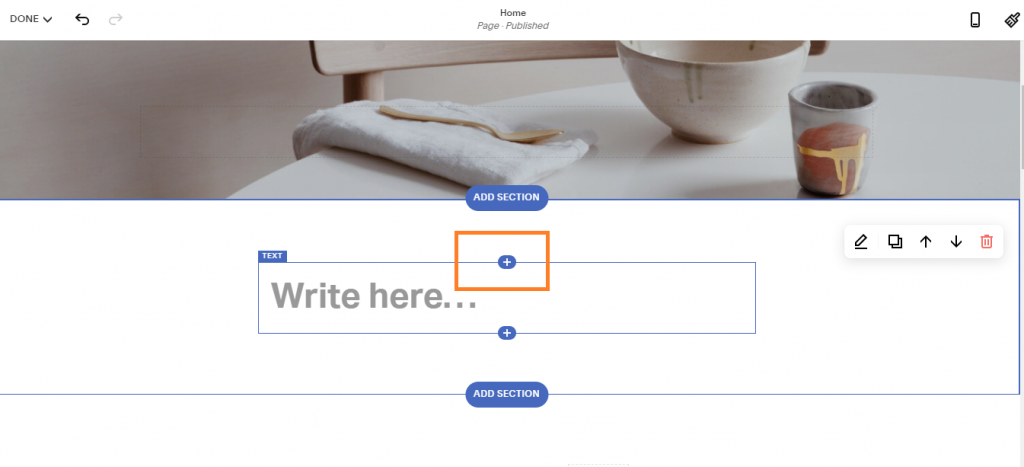
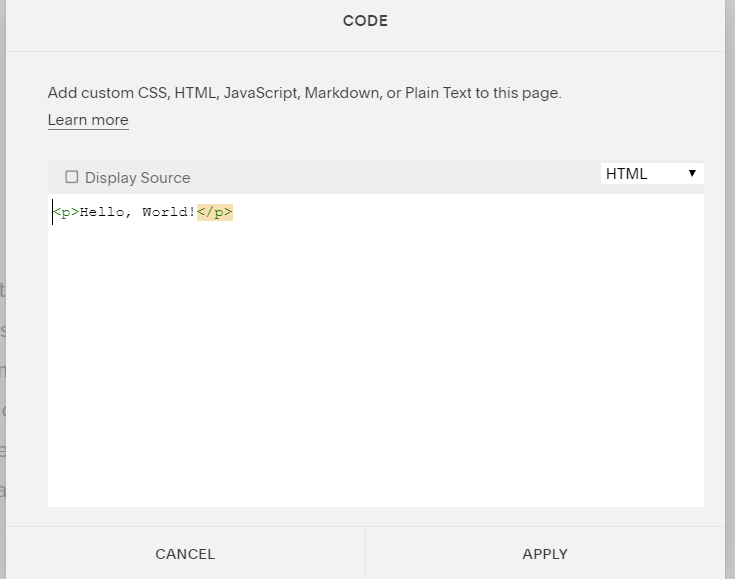
  • Tap on “+Add/ Edit Block” and choose code from the menu.
  • From the URL field, click on < / > icon.
  • Finally, save the applied changes.

4. Add Twitter Widget on Wix Website

Wix

Wix provides various customization options for your website, thereby making it visually appealing and interesting for visitors. Follow these steps to embed Twitter widget on your Wix website and make it super amazing!

  • Again, start by selecting Wix as your website building platform.
  • Now generate embed code for it using Tagembed and copy it on the clipboard.
  • Got to the Wix Editor.
  • Explore the page and choose the best location to embed the Twitter widget.
  • Now, click on the “+Add” button followed by clicking on “More”.
  • Now, choose HTML iframe and paste the HTML code.
  • Lastly, tap on Apply to save the changes.

Conclusion

It was wonderful to learn about embedding Twitter widget to your website and making your business grow splendidly. The Twitter widget has the ability to make your website more visible by showcasing colorful and impressive Twitter widget on your website.
Waiting? Why?
Hurry up! Make your website extraordinarily amazing and excel in the market field.

Social Media Marketing

Embed Instagram Feed Gallery on Website

With the rise in technology, diverse Social media platforms have become much popular among people of all ages. Social networking platforms such as Instagram, Facebook, and Twitter will help marketers to communicate and connect more easily with their customers. For the past many years, Instagram has become the most popular choice among brands, marketers, and users.

This social networking platform holds the highest rate of user engagement, best marketing reach, and brand following. Therefore the maximum of the brands uses this social media platform to market their product and reach more new customers.

Understanding the Instagram Feed

Take on board Instagram feed in simple words, as the discovery and curation of all significant and valuable user-generated content or UGC. These UGC can be curated into a single feed with the help of hashtags, keywords, handles, and many more.

The brand can simply use these feeds on their website to enhance user engagement and boost sales. For effective marketing, it is essential to curate all the valuable UGC into a single feed from different locations.

Numerous Tools to Embed Instagram Feed on Website

There are several tools to help you embed Instagram feed gallery on your brand website. Know which tool works best for you. Here is the list of some of them:-

Tagembed

Tagembed is a budget-friendly social media aggregator that helps in embedding the Instagram widget on a website. 

With this tool, brands can collect, curate & embed social media feeds like Instagram in real-time (via hashtags, mentions, etc.) on any website building platform like Shopify, Wix & more.

Perfect for small businesses, Tagemed offers a variety of features to brands like;

Customization to help you apply favorite themes, layout, style, size, color, or a banner on feeds. 

Moderation to filter out unwanted & irrelevant content.

Analytics to help you monitor the performance of your embedded Instagram widget or any other social media widget.

So what are you waiting for? Start with the basic plan that is for free & get one feed updated every 24 hours. You can upgrade the plan to update more than one feed at a time.

Apart from that, there’s no need for technical knowledge to generate and embed the code on your website. 

Taggbox

One of the best user-generated content platforms for marketers is Taggbox. This tool lets them curate all the valuable UGC into a single feed and embed it on the website. It helps the marketers to enhance user engagement, boost sales, and grow conversions. This can be simply done by displaying all the Instagram feeds on the website.

This valuable tool brings great features such as feed customization with beautiful designs, themes, fonts, colors, layouts, etc. Besides, this tool also offers a solid moderation panel with automation and profanity filters that maintain the quality of the content. It updates the content in real-time to maintain a unique, fresh, and updated feed.

Instagram Embedding

Instagram is a growing social networking platform that offers gigantic functionality. Thus Instagram itself offers you the feature of embedding the Instagram content on your website. All you can do is to embed a single post at a time from your Instagram account to your business website.

All this can be done with the access of Instagram from your desktop or laptop as it is not possible with your mobile phones. Like other tools, Instagram embedding also offers various features. Few of which are fast and responsive embedding as Instagram itself is the source, thus there are no security concerns.

You can easily and directly embed the post of your choice as it does not require any technical expertise. This is a good way to flaunt your reviews, testimonials, feedback, mentions, or shout out by any popular personalities.

Flockler

Flockler is another excellent social media aggregator tool that helps in easy curation of your content from social media platforms. After curation it easily displays it on websites. Like other tools, this tool also helps in easy curation of the content from your Instagram account and embed it on your brand website to enhance conversions. This, as a result, will help in increasing the visitor’s time spent on the website.

Some of the features that this tool offers are- data analytics availability for the feed, excellent feed customizations with designs, styling, layouts, and themes, feed API access to customize it, content moderation facility, and many more.

Curator.io

Curator.io is another of the most popular Instagram feed embed tools. This tool covers not only Instagram but also other diverse social media networks all at once, which makes it much popular among individuals.

This social media aggregator tool works with Instagram, Facebook, LinkedIn, YouTube, Hashtag feeds, and many more. With the use of this tool, you can easily aggregate feeds from all of the different sources into a single embedded feed.

Benefits of Adding Instagram Feeds

For sure Instagram feeds proved to be beneficial for the brands. Its most obvious benefit is to help in the expansion of brand, visibility, growth, and finally great impact on visitors. Embedding your Instagram feeds on the website will help in building a strong social community.

It makes it easier for visitors who come to your website to know your brand visibility on social media platforms. Thus maintain exciting and interesting feeds that help to catch a visitor’s eye and influence them to become your Instagram follower.

Instagram has become a solid selling tool, thus placing your happy real-customers photos will help you in increasing sales. Embedding Instagram feeds on the website is a good way to drive up online conversions. This marketing tactic also acts as social proof in displaying a consistent and powerful Instagram business presence. This, as a result, delivers authenticity and credibility to your brand.

Key Takeaways

If you wish to see good results from your social media marketing then you must try adding an Instagram feed to your website. The simple and sure result of it will boost the reach and visibility of your posts so that it reaches a more number of people.

With its use, you can even tell your brand story on your website through real customers. thus it is beneficial for both your website and Instagram through more engagement, sales, and followers.

Uncategorized

4 Best Social Media Auto Post Apps for Shopify Merchants

Taking up an eCommerce business can be no simple errand, particularly for novices. Consequently, exploiting auto post applications for Shopify will assist dealers with expanding their image mindfulness and drive more deals. 

Luckily, we have recorded down under 4 Shopify applications that will assist you with taking care of business.

4 Best Social Media Auto Post Apps for Shopify

1. Tagembed: Social Media Widget 

Tagembed is a powerful, robust social media aggregator tool that lets you collect feeds from almost 15+ social networks. Later, you can curate them according to your needs using different customizations and personalization methods such as themes, banners, hashtag highlighter, card style, background, dedicated theme settings and more.

The highlighting feature of the tool are:

  • Advanced Moderation
  • Analytics
  • Profanity Filter
  • Custom CSS
  • Custom Posts
  • CTA
  • Auto Real-time feeds update and more.

Finally, generate the embed code for your website and paste it to the backend of your website webpage where you’d like to embed Social Media Feed on Shopify.

Hence, showcase social proof, user-generated content, reviews to your website visitors and engage users, build trust, increase social reach, bring liveliness to your website, drive conversion and more.

2. Facebook and Instagram AutoPostr by Post Studio 

Facebook and Instagram AutoPostr is one of the most mind-blowing auto post applications for Shopify traders. By zeroing in on Facebook, Twitter, and Instagram, this application allows online shippers to post substance on these web-based media stages easily. 

With Facebook and Instagram AutoPostr by Post Studio, you can interface your online media records and set the framework up without any problem. In addition, prior to distributing an auto post, you can see the review of what it looks like and support it. You can have full command over your online media takes care of. 

The principle element of auto-post applications is that you can plan your posts at explicit occasions. This assists online vendors with having common dynamic feed presents on draw in more clients to their Shopify stores.

Also Read – How to Add Google Reviews on Squarespace Website?

3. Instablog – Auto Post to Blog by The Scorpio Lab

With a touch of distinction, Isntablog Auto Post to Blog is one incredible Shopify auto post application for online dealers on this stage. 

Dissimilar to other applications, Isntablog Auto Post to Blog by Scorpio Lab can just assist with putting away proprietors mechanize their item posts on Instagram. All things considered, it can certainly uphold every one of the highlights that internet based traders can request. 

The application offers excellent SEO apparatuses that assist clients with making extraordinary substance, expanding SEO and search positioning. Besides, online vendors can likewise change over their Stories into a blog naturally, making Instablog an all inclusive resource.

Also Read – Must Know Tiktok Marketing Strategy for 2022

4. Lotus Auto-Post by Beans 

Like other applications, Lotus Auto-Post is a Shopify auto post application for online shippers to mechanize item posts. Right now, it just backings Facebook and Twitter. 

Lotus Auto-Post by Beans assists shippers with making more deals by expanding Twitter and Facebook outreach. Additionally, the application can likewise build vendors brand mindfulness via online media by making posts routinely. The more clients see your image, the more worth you can get for your business.

All the more critically, online storekeepers can get week by week warnings of how their posts are performing. Therefore, they can know which items are drawing in more clients via online media.

Uncategorized

Unique Ways To Showcase Customer Reviews Widget On Squarespace Websites

Positive customer reviews play a huge role in making a strong presence of business in the market. Reviews become an essential part in promoting the business through digital marketing as this is a great means by which people get to know what the other people are saying about a business. 

As many businesses are adopting digital marketing, it has increased competition between businesses to attract more customers and sell their products and services. 

But how will customers buy products from your business? Do they have trust in you? Are they finding your brand’s products and services problem-solving? How do they come to know about your business and it helps in solving problems?

People are searching for what other people say about you and what their experience with your business is. 

Reviews help people to know what are the features of your products and services. Online reviews are a compelling attribute for your business that you can use to tell people about your products and services and how much they are helpful in improving their life. 

But how are you going to use customer reviews for your business? In this article, you will learn unique ways to showcase customer reviews widget on your business website and engage customers. 

Four Unique Ways To Add Reviews Widget On Website

You can show reviews in four different ways which can be imperative for building effective marketing strategies. 

It is a well-known fact that customer reviews examples increase users’ engagement and attract their attention. Use these four techniques to increase more user engagement and allow them to stick to your website. 

Testimonials

Testimonials are an essential part of the business reviews and should be a part of your website. Earlier, testimonials were just a part of the company in the quotation marks, which is not very effective in attracting new customers. 

In order to make reviews reliable, you must add them directly to the website or show in a case study. 

When you place testimonials on your website rather than quotations, new customers can read about your existing customers experience. It helps in increasing customer interaction time on your website as well as make your business more valuable and believable to those who are visiting your website for the very first time. 

You can easily get reviews from your customers or give them a form as a request to fill out how you help them in solving their problems. 

Ask permission to add review on Squarespace website with their name and designation before you place them on your website. 

Review Badges And Widgets

In order to ask your customers to give online reviews about your business on big platforms like Google or Yelp, you can use reviews to invite your customer to the website. Some review. These reviews allow your customers who are looking for your business to read reviews and what the other customers are saying about you. 

Before buying your product or service, almost every customer is looking for satisfaction before they make a purchase decision. 

Always use big names like Google, Yelp, Facebook, or Capterra to invite people to write as well as read on your website. These are the most conducive websites where people can believe in your brand and the products and services you are offering.

Don’t worry, reviews widget won’t make your website heavy to load and do not affect speed. You can also custom design reviews widget and match the style with the layout of your website.   

Embed Reviews Widget

If you don’t want your customers to leave your website, you can also embed a reviews widget on your website. You can fetch customer reviews from social media platforms like Instagram, Facebook, Twitter, or any other and embed them on your website. 

This will directly tell your new customers about what the people are talking about you in social media and their experiences with your brand. 

When you place social media feeds on your website, it will help in building more trust and reliability on your brand. Not only this, but it will also add quality content on your website that engages your visitors. 

You can use social media aggregator tools like TagEmbed, Taggbox, Embed.ly, and others to embed reviews widgets on your website.

If you want to play with your customer reviews and make it highly impactful then featured reviews with attribution technique you should adopt. You can take the reviews on the next level that are also helpful in building strong SEO. 

Showing testimonial can be static and may not help in bringing desirable actions on your website.

You can embed the URL to the client’s website or link with the online review website that immediately helps in increasing the value of your business using the schema markup tool. With this, you can show high-quality reviews on the biggest search engine every time your business appears in search results. 

With the help of schema markup, you can make it easy for search engines to represent your reviews on search engine result pages. 

With the help of Schema Generator, you can create schema markup and submit it with Google’s Structured Data Testing Tool. 

You can enhance the schema markup with CSS or HTML if required and place it on your business website.

Edge Out In This Competitive Era

As competition is increasing tremendously, it becomes hard for businesses to attract customers as there are hundreds of competitors who are selling similar products. 

One of the potent strategies that make you edge out in this competition is showcasing reviews. When people learn what your existing customers are feeling and how your brand helps them solve it, they are more likely to trust in your business. 

Thus, to attract customers, you should showcase reviews widget on your website and let the other customers know what your brand is and how it is helpful. 

Investing your time in embedding reviews and badges on your website pays you in the long run and creates an impactful image of your business. Every business should use it and harness the potential of reviews to grow their business. 

Digital Marketing, Social Media Marketing

What is RSS and how can it help my business?

RSS is a term you might have seen, maybe even in one of our other blog sections. You may have even seen or preferred another site’s RSS feed, however what is RSS? Do you truly require a RSS feed for your own site? Does anybody by any chance use them any more? The appropriate response, obviously, is indeed, you ought to offer a RSS feed for your site. We will survey what RSS is, the way it’s utilized, and why it’s an advantage (maybe even a need) for your business and Internet advertising. 

What Is RSS? 

RSS initially represented RDF Site Summary yet is presently more usually alluded to as Really Simple Syndication. It is an arrangement used to distribute content that is consistently distributed like a blog or news features. It’s a standard arrangement, which implies that each RSS feed is intended to appear to be identical for consistency. This commonly incorporates a post title, secret or full body text, in addition to the date distributed and creator. RSS feeds will show the latest sections first, however the quantity of absolute passages will differ. 

Example: The Social Media Hat’s principle RSS feed interface resembles “https://www.thesocialmediahat.com/news/feed&#8221; and can be used to utilize the RSS symbol in the header of each page. We likewise have particular RSS feeds for simply our blog, explicit classifications of posts, and a couple of different feeds. 

People would then be able to utilize programming or a site that goes about as a RSS peruser. The RSS peruser will naturally check any feeds that the client has preferred and download any new sections that are found.

How to use RSS for business?

You can embed RSS feed on website to boost the awareness of your business like blogs, articles, news etc. to a website. Hence, you can create a RSS feed url of your required feeds and then collect, curate and embed RSS feeds on your website. 

For example, you can use free social media aggregator tools like Tagembed to integrate RSS feeds on websites in just a few clicks.

Thus, increase awareness, increase reach of your blogs and articles, showcase blogs and more.

Also Read – Embed RSS Feed Widget On Webflow

How is RSS Used? 

RSS utilization starts with an organization or news site choosing to distribute their new substance through RSS. Content Management Systems like Drupal regularly give no less than one site wide RSS feed of course. The most widely recognized model is to give a RSS feed of your business blog. 

Guests to your website who are keen on naturally accepting your new blog entries conveyed to them will prefer your feed. This is by and large refined by tapping on the RSS feed symbol that your website admin sets up for yourself and afterward connecting the location to their RSS Reader. Many email customers and internet browsers incorporate RSS perusers, or clients might decide to utilize frameworks like FeedBurner or Google Reader. 

Also Read – How To Embed Facebook Feed On Weebly Website

Any site distributing new substance can offer a RSS feed, however the most normal classifications are Business, News and Entertainment. 

Curiously, there have been a few times throughout the most recent couple of years where those in the blogosphere have attempted to guarantee that RSS is dead. Indeed, as with most specialized parts of the Internet, RSS is essentially turning out to be more incorporated in the apparatuses that we use and less noticeable. For instance, rather than expressly preferring a RSS feed, you may download a portable application from a business or news source which is basically a RSS feed from their site in a pleasant versatile configuration. 

Also Read – Must Know Tiktok Marketing Strategy for 2022

What Are The Benefits of RSS? 

As you can presumably envision, the principal extraordinary advantage to having a RSS feed is that intrigued guests can prefer your feed and get a notice each time you distribute a novel, new thing. In case you’re composing incredible substance for your site, when you click your Publish button, that content is consequently conveyed to your supporters at no extra expense for you.

Also, Read – Add RSS Feed On WordPress

Technology, WordPress

Top 5 Social Media Feed Plugins for WordPress Website

Social media platforms provide a great stage for businesses to promote their brand and products as they consist of huge crowds. Moreover, social media channels enhance the reach of a brand beyond local boundaries. And in this era of the internet, where cross-promotion is a smart way to increase brand recognition, embedding social media feed on WordPress websites has emerged as a wonderful strategy.

Having a social media feed integrated directly into your WordPress website and will increase user engagement, drive conversions rate, and grow your follower count while saving you time uploading and updating feed content in multiple places. Check out our top recommended Social media feeds plugin.

With most of these social media feed plugins, you will be able to easily add social feeds anywhere on your website – from your sidebar to your website footer and an entire landing page. While the free versions will work for most users, upgrading to premium versions will give you many more options when displaying your social feeds.

Top 5 Social Media Feed Plugins To Boost Your Business:

Right here 2022-best Social Media Widget Plugins for WordPress Website

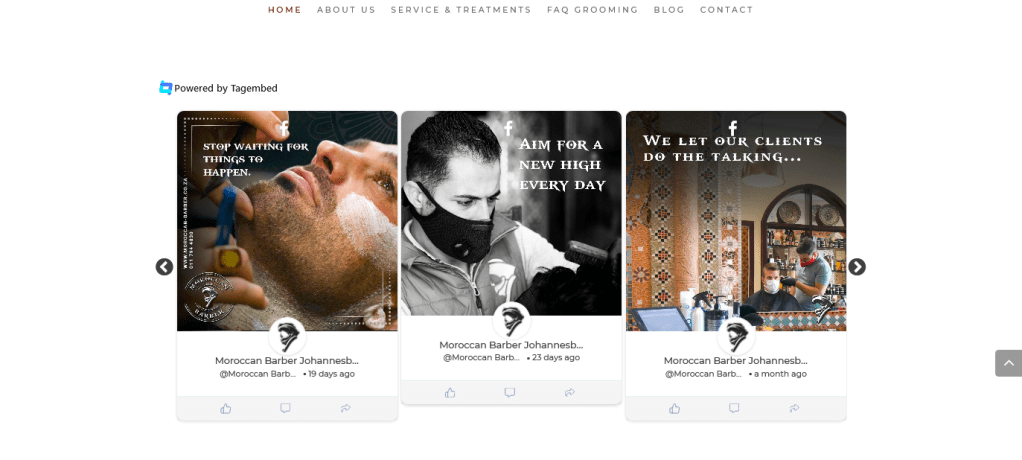
1. Social Media Feeds Plugin By Tagembed

Social Media Feed Plugins

Tagembed’s Social Media Feeds is the best plugin in the market that helps you to embed social media feeds on your website. It is compatible with 18+ social media platforms and showcases social feeds without any hassle. Moreover, the tool helps you collect, curate, and customize social media feeds from different social media platforms and display them beautifully on your website.

Feature of Tagembed Plugin

  • A wide array of customization options to choose from. Select from a variety of themes, layouts, templates, fonts, colors, etc.
  • Select dynamic content from over 15+ social media platforms including all the leading ones
  • Enjoy instant updates without having to manually update the content
  • In-built analytics feature to get updated information around details like active users, clicks, engagement, click-through rates, total impressions, etc.
  • Budget-friendly offers like a ‘Free Forever Plan’ to convert your boring websites into customized ones
  • Advanced content moderation panel to maintain the topmost quality of content before publishing it
  • Create a fast and super responsive widget with unlimited social media feeds without affecting the speed of your website
  • 27×7 back support team for anytime assistance to the users

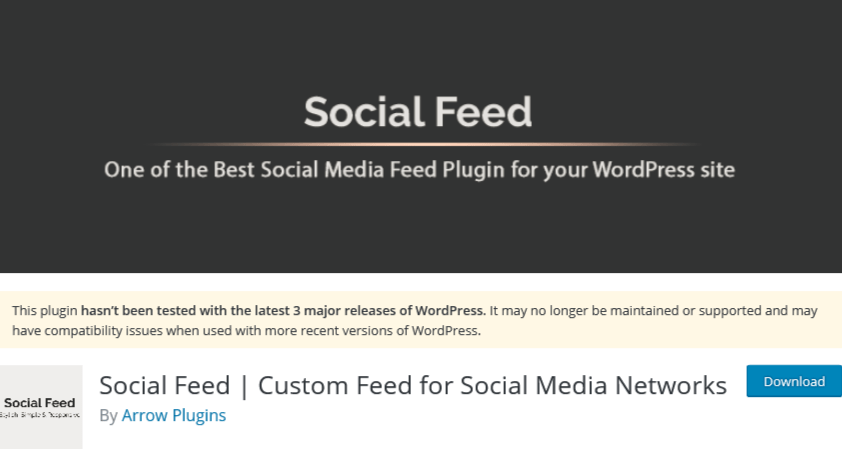
2. Social Feed By Arrow Plugins

Social Feed By Arrow Plugins

It allows you to display your feeds from your Facebook, Instagram, Twitter, and Pinterest accounts. Let’s create one feed from one of your social accounts or create custom social feeds taking information from the accounts. For example, you can select to show your pictures from Twitter, Instagram, Facebook, or Pinterest which means that you can use it as a gallery.

One of the interesting features of Social Feed is that It’s the only plugin that lets you remove the social icons from your feed if you want a clean social feed design.

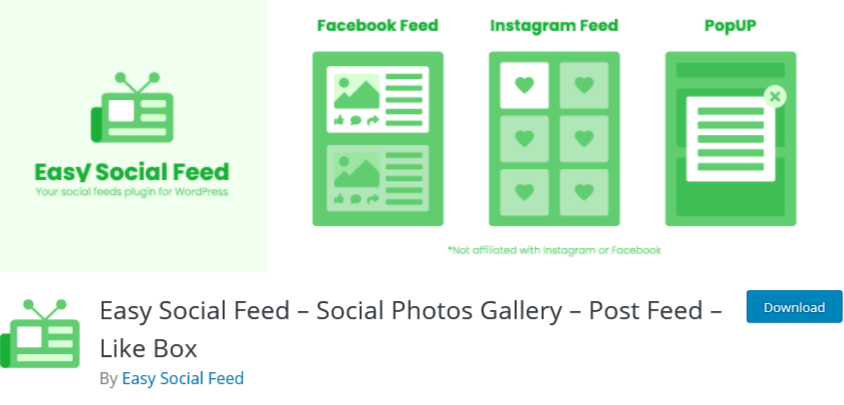
3. Easy Social Feed By Easy Social Feed

Easy Social Feed

One of the easiest and user-friendly plugins to display the Facebook feed on the WordPress website is Easy Social Feed. It offers a fully customizable Facebook feed that you can personalize according to your style and showcase your artistic side.

The feeds are responsive, which means your visitor can view it on any screen and watch all the content without any trouble.

Many people post images, videos, etc with the product on their social media, which act as social proof. A potential customer always looks for social proof before making a purchase, and therefore it is important that he views the feed without any trouble.

It also allows you to put a limit on the words to display on the website. With this feature, the customer can view more feeds at a time. Moreover, this feature makes the site interactive, as visitors even have the option to view full captions.

4. Flow-Flow Social Stream By Looks Awesome

Flow-Flow Social Streams

Flow-Flow Social Stream is simply add social feeds to WordPress websites with a one-click API authentication. This plugin is a highly customizable and Amazing drag and drops builder grid that allows you to display your posts from different social media channels on the same page. Additionally, Flow-Flow Social Stream shows social media indicators like comments, likes, views, and more to engage your audience.

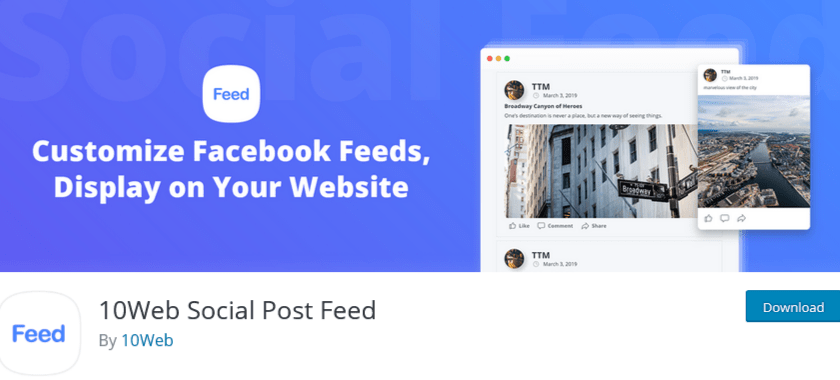
5. 10Web Social Post Feed By 10 Web

10Web Social Post Feed

If you are looking for an easy way to integrate your WordPress website with Facebook, then 10Web Social Post Feed is an ideal solution. The plugin provides features to display a wide and varied range of content from any page with full control over the feed. That means you can change the content, length, and styling. In addition, the plugin is compatible with visual content, hence it can display images and videos without affecting the website’s speed.

Conclusion

Finally, take benefit of these plugins and your social platform to optimize your digital marketing strategy. This way you can adjust the content you show to get more interactions and improve your audience. Adding social media feeds to your WordPress website will increase the interactions and user engagement with your audience and help you grow your business.

These are just some of the best social media feed WordPress plugins that you can add to your WordPress website but there are many more. Do you have any favorite plugins?
Let us know in the comment section below!

Website

How To Embed Facebook Feed On Weebly Website

Starting in 2004, Facebook has become the most popular social media channel worldwide with the largest number of customers compared to other social media networks. Moreover, with more than 2.8 billion social media users, it has become the largest community with diverse demographics.

Now Facebook is limited to social media sharing and networking, but it has also become a prominent channel for marketers to grow their businesses. By promoting your business, Facebook is proving to increase sales and revenue for the growing competitive edge.

As a marketer, you must make the most out of the resources to achieve the goal and profits for the business. A trending and effective way to use Facebook for marketing purposes in the recent competitive era is to embed Facebook feed on Weebly website.

Do you want to know how to embed Facebook Widget on your website? If yes, then continue reading this blog to easily and step-by-step embed Facebook feed on Weebly website.

Facebook feed

Heads Up: You require a social media aggregator to collect, curate, and add Facebook feed on Weebly website. There are so many social media aggregators available on the internet, but here we will talk about adding Facebook posts with Tagembed Widget on your Weebly website. About the Tagembed Widget is one of the popular and brand-trusted social media aggregators with an intelligible interface that allows anyone to easily curate, customize, and add Facebook widget on Weebly website. So without further ado, let’s get started!

Add Facebook Feed On Weebly Website In 5 Simple Steps

Step-1: Create Your Account on Tagembed

  • Create a free account with the Tagembed Widget.
  • Login with your company or personal email, enter all the required information.
  • Once you are done with these mandatory details, you will direct them to your Tagembed Widget dashboard.

Step-2: Create Facebook Feed

  • Now you are on board with Tagembed Widget. Go to the My Widgets section on the screen and create your widget.
  • Open the widget, and a screen will pop up with the multiple social media platforms on your website.
  • Select Facebook as the source to create social media feeds on Tagembed Widget.
  • Next, you have to enter the connection from which you want to collect Facebook Feeds for your widget, like mentions, URL, profile, album, Page, etc. Type the connect and click on the Create Feed button.
  • Now the next screen will appear that asks you to connect with the Facebook account information. Enter the right credentials of your Facebook account from where you want to collect the Facebook posts.

Step-3: Customize and Moderate Facebook Feed

  • As you connect with your Facebook account, Tagembed Widget will automatically fetch all the Facebook Feeds related to your created connection type.
  • You will get all the Facebook Feeds on your screen. Suppose you want to make your Facebook Feed more attractive, interesting, and engaging for your website visitors or users, than with the customization option available. In that case, you can enhance the look and feel of your collected Facebook Posts.
  • It provides you with several alluring themes, background styles, layout designs, customized colors, fonts, size, etc.
  • You can also add banners to your curated Facebook post.
  • Moreover, if you find any image or post that you don’t like to add to your Facebook post, then with the moderation feature at Tagembed Widget, you can easily deselect the feeds.

Step-4: Generate Embed Code For Weeble Website

  • Now you are ready with your Facebook Widget with full customization and moderation, it’s time to generate the embed code for your Weebly website.
  • For this, click on the Embed button, you can find it on the bottom left corner, click on the button, and a screen will pop up with the various CMS platform options.
  • From here, select Weebly as the website building platform. It will take you to the next screen, which will contain the Facebook feed embed code to place on the Weebly website.

Step-5: Past Embed Code in Your Weebly Website

  • Login to the Weebly Admin account and select your project to embed Facebook Feed on the Weebly webpage.
  • On the left-hand side menu, click on “Add Elements,” then drag and drop the “Embed” Element on the webpage where you want to embed Facebook Feed on website.
  • A Pop-up of HTML Edit Custom Weebly click on it too.
  • Paste the copied code in it and click on Save & Close button.
  • Finally, click on the Publish button to make the Facebook Feed Widget effective for your website.

Wrap Up

Tada! In just 5 simple steps, you will be able to collect, curate, customize Facebook feeds for your Weebly website.

So what are you waiting for?

Start embedding your Facebook posts and drive enormous traffic to your Weebly website.

Uncategorized

Benefits to Embed Instagram Feed With Your Website Design

Instagram is a growing social media channel with lots of active users and those increasing day by day. One of the greatest reasons why people use Instagram and like to scroll feeds is due to the Instagram UI and feeds design that make people stay stuck to the app even forgetting their important tasks. 

Thus, merging Instagram feeds to your website design can do wonders and reach another ladder ahead of your competitors. It is noticed that using social feeds increases brand loyalty and credibility among customers. 

Integrating social media feeds with your website design increases the dwell time of visitors as well as influence them to convert into loyal customers. Moreover, with Instagram widgets you can harness more benefits on your website and improve the visitors experience.  In this article you will learn about the amazing benefits as well as some tools that assist you to embed Instagram feed on your website effectively.

Also Read: Amazing Tips to Use Instagram For Your Business

Benefits of Using Instagram Feeds

Increase Visitors Engagement

As half of the population is on social media and likes to interact with social sharings,  using Instagram feeds on your website helps in increasing visitors’ interaction and engage them more with your website content. Instagram images attract the visitors attention and give them the same experience as they have using the Instagram app with your website. People like to engage with Instagram feeds, thus embedding Instagram images and videos on your website boost visitors’ dwelling time on your website.  

Build Trust

Building a trust with website visitors is what all businesses want, as this is the key to developing a long lasting relationship with your customers and your business. It is a fact when visitors come to your website they remain skeptical about what you are until they get more information about your business. Moreover, people like to hear more from the other people about what they are saying about your business, instead of what you are saying about your business. 

Create Credibility And Authenticity

Using social media content, especially Instagram feed on website, increases the authenticity  and credibility of your business and its content. As social feeds are shared by the people with their own will, businesses do not pay people to share images, thus visitors know this. Thus, sharing Instagram feeds creates authenticity and credibility of content you are displaying on your website.  

Unique and Creative Content

Adding Instagram feeds on your website is a creative way to design content on your website. Also social media feeds are unique to your brands, thus adding them to your website adds unique content on your website that will give new informative content to your visitors. 

Boost Social Presence

Embedding Instagram feeds increases the social presence of your website and people like to visit your website for learning more about your social presence. Instagram feeds on websites let the visitors know about your social media account, how active you are on social media, and what other people are talking about your business over social media.   

Also Read: Top 3 Amazing Ways to Embed Instagram Widget on a Website

Some Amazing Ways To Embed Instagram Feeds With Your Website Design

Adding Instagram feeds on your website is super easy, in just one click you can have amazing widgets on your website. Here below are three effective ways to embed Instagram feeds on your website. Let’s explore them:

Embed Your Instagram Posts

With the help of the Instagram official website and app, you can copy the embed code and paste it to your website backend. This is the super easy and simple way to add Instagram feeds on your website. Find the post that you want to embed on your website and click on the three dots on the top right corner of the post and copy the embed code. However, the disadvantage of this method is that it will consume lots of time for you as you have to copy and paste the code one by one, bulk action is not possible. 

Add Instagram Badge 

In order to tell people that you are on Instagram and they can share information with their Instagram friends. Adding Instagram Badge to your website is the easiest way to integrate with Instagram on a website and connect people directly with your Instagram account. 

Install Instagram Widget

Using Instagram Widget to embed Instagram feeds on your website in the most efficient way. You can collect multiple Instagram feeds in your website using hashtags, mentions, handles, and locations and easily integrate in your website with a single line code. With the Instagram Widget you also get the option to customize the feeds and embed them in the most appropriate theme as per your website design. 

Some of the amazing Instagram Widgets that you can install to embed Instagram feeds on your website are Taggbox, Tagembed, SnapWidget, etc. With the help of these widgets you can make your website look vibrant and highly engaging effectively and efficiently.  

Enhance Your Website Performance Using Instagram Feeds

Now, you have come to know the benefits of using Instagram feeds on your website. It will help you in increasing engagement and boost your website performance. Adding Instagram feeds on your website is not a tough task, with the help of the right tool you can easily embed Instagram posts on your website.

Content Already Published @ https://bit.ly/3m9dQBy

Social Media Marketing

How to Add Google Reviews on Squarespace Website?

About 70 percent of the customers seek reviews before they make a purchase decision. Reviews from the real customers not only make your business trustworthy but it also increases the chances of purchases that generate higher revenue. Reviews make customers know about the authenticity of the brand and give the right view of your product and how much it is helpful for your business. 

As businesses are marching towards making online presence, Squarespace stands as the popular choice as website building platform. And to prove their credibility marketers opt to embed Google review on Squarespace website.

Follow the easy step-by-step guide to add Google Reviews on the Squarespace website successfully:

#Step1 – Aggregate Google Reviews

1. Sign Up to create a Free Tagembed account or log in if you already have an account.

Sign-Up

2. You’ll be redirected towards the Tagembed dashboard.

Tagembed dashboard

3. Your First Widget will be already created, just click on the Edit button to proceed.

edit new widget

4. A dialogue box will appear to “pick a source”, Choose “Google” now

Pick-a-Source

5. You can Create an amazing Google Review Widget from the following methods:-

a). Business Page: To fetch Google Reviews from Business Page enter the Google business page URL

b). Business Name: To fetch Google Reviews with the help of Place Name enter location and keyword.

create google reviews

6. Finally, click on the Create Feed button to start aggregation.

Tip: You can click on the Personalize tab on the left menu panel to change the themes & layout, background, banners and other dedicated themes settings to make the widget look more appealing and attractive.

#Step2 – Generate Embed Code For Squarespace Website:

1. On the bottom-left menu panel, click on the Embed Widget button as displayed in the below image

google reviews feeds

2. New Dialogue box will open with “Choose Your Platform” Now Select “Squarespace“

Choose-Your-Platform-New

3. Choose your website CMS as Squarespace and adjust the height & width of the widget.

Recommendation: Set the width in percentage % and Height in pixels Px for better exposure

adjust height - weight

4. Finally, click on the Copy Code button to copy the embed code.

#Step3 – Embed Google Reviews on your Squarespace Website

After copying the embed code follow few more simple steps to complete the embedding process.

1. Login to the admin account of your Squarespace website and click on the Edit button to embed the Google reviews.

Add

2. Now click on the “+” Button

click button

3. A new Option Menu will open, select the “</> Code” Option

select embed code button

4. Paste the embed code into the editor and click on Apply button.

embed code

5. Save the changes made and reload the page.

Hence, your Squarespace webpage is loaded with Google reviews

Congratulations! You have successfully added Google reviews widget on the Squarespace website.

Digital Marketing, Social Media Marketing

Must Know Tiktok Marketing Strategy for 2022

With so much new substance on the web added day by day, it may very well be hard to stay aware of what’s going on the web. Individuals attempt a few distinct ways, including visiting explicit sites each day, doing Google look, or depending via web-based media to keep them informed. One arrangement that occasionally gets neglected is an outdated one: The RSS channel. 

What is an RSS channel? It’s an innovation that has impacted numerous advanced web instruments you’re comfortable with, and its smoothed out, calculation free arrangement could make it your next incredible device for understanding what you need on the web.

Must Know TikTok Marketing Tips

1. Include Suitable Hashtags 

In the same way as other web-based media organizations, TikTok clients depend on hashtags to list their recordings and quest for cuts by subject. In the event that clients click on the “Find” amplifying glass at the lower part of the screen, they see a rundown of recordings arranged by moving hashtags.

We have recently checked out how you can best utilize hashtags on TikTok in our Ultimate Guide to TikTok Hashtags. A portion of the advantages to a brand utilizing TikTok hashtags are: 

  • To intensify the range of your substance 
  • To distinguish contenders 
  • To get more devotees 

Despite the fact that you ought to incorporate significant hashtags on your recordings, you ought to likely keep away from the most well known nonexclusive hashtags. Your recordings are bound to become overwhelmed in an ocean of content. It is smarter to have your recordings hang out in somewhat less well known classes. Similarly as with all advertising, you need your recordings to seem noticeable to those individuals generally pertinent to your mission, so don’t zero in on hashtags in light of the fact that they are famous. 

Likewise, recollect that this isn’t Instagram. Try not to be enticed to utilize 21 hashtags on TikTok. Doing as such will remove the impact of your recordings.

2. Follow TikTok Trends

Another way you can utilize hashtags as a component of your advertising technique is to watch out for moving hashtags. You would then be able to make and share recordings that identify with these moving recordings. 

Recollect that patterns can be quick. Watch out for TikTok drifts and be ready to switch your substance to keep around with the frenzy. 

In case you are sharing your variant of a moving video type, don’t simply make it a duplicate of every other person’s recordings. Figure out how to make your video exceptional.

3. Embed TikTok Videos on Websites

Boost the awareness of your TikTok Videos by embedding them on your website. Hence, increase social reach, drive engagement, showcase your videos and many more. 

Social Media Aggregator tools like Tagembed are a great tool to embed Tiktok Videos on Shopify, WordPress, Wix, Weebly and more.

4. Consolidate TikTok Influencers in Your Campaign 

It is no mishap that specific individuals become powerhouses on friendly stages. Ordinarily, they develop a standing for the nature of the substance they share. Hence, it pays for most organizations to assemble useful working associations with individuals who impact their possible clients. As we wrote in How to Find TikTok Influencers, “TikTok has produced another age of powerhouses, as well; a gathering of individuals who have undeniably more clout with the present teenagers and tweens than more customary film or TV stars.” These are unequivocally the kinds of individuals you need on your side when you attempt your TikTok promoting efforts.

Also Read – LinkedIn Marketing Hacks to Grow Your Business

5. Remark Regularly and Encourage Comments on Your Posts 

Like most interpersonal organizations, TikTok upholds incessant client commitment. Remarks are a superb way of accomplishing this. In a perfect world, you will develop discussions with your likely clients. 

TikTok positions remarks by the quantity of preferences they get, so ensure you thoroughly consider your remarks, making them significant. Try not to make dull “decent video” type remarks. 

In like manner, set aside the effort to take a gander at others’ recordings and offer insightful remarks on them.

Website

Most Fruitful Ways To Embed Twitter Widget On Website 2022

Twitter is a leading social networking platform that has established itself globally as a platform where people express their views on world affairs, industries, and topics of all kinds. It has outgrown itself from just being a social media platform.

Today, brands are consciously using it for marketing purposes, whether it is an MSME or a well-established firms. If you, as a brand are maintaining an active presence on Twitter, then users will probably be talking about you, tweeting their reviews, commenting on your posts and sharing their experiences using your brand-related photos and videos.

Imagine if you could collect and embed these useful user-generated content on your brand’s official website to display social evidence. Wouldn’t it be amazing? Well, what if we tell you, it is possible would it interest you? Well, that is possible and that is with the help of Twitter Widget.

There are various tools that provides you with that widget but in this blog we will be discussing about the tools that efficiently help you to embed Twitter widget.

Easy-To-Use Tools That Helps To Embed Twitter Widget On Website

1. Tagembed Twitter Widget

tagembed widget

Tagembed is a wonderful social media aggregator that helps you to embed Twitter Widget on the website and display Twitter contents. It puts together real-time feeds and keeps your website up to date. It collects the post Via profile posts and pages and more, and displays them on your website without any hassle.

The irrelevant content can be filtered out either manually or automatically, using the powerful moderation function. Moreover, you can also customize the Twitter feeds according to the look and feel of your brand/website. Twitter Widget comes with fabulous themes, background choices, banners, and advanced custom CSS option settings. The robust analytics helps you monitor the output of your Twitter feeds in terms of user engagement, interaction and Twitter feed contribution.

2. Everwall

everwall

Like any other social media aggregator tool, Everwall supports Twitter for displaying event posts and tweets in the form of a visual gallery. The content filtration can be used to curate posts according to the keyword, hashtag, or phrase and helps you restrict the irrelevant trolls, posts, or tweets from showing up on the screen.

Everwall Twitter Widget fits in any screen resolution, be it a laptop, tablet, or iPad. It also allows customization that makes your feeds attractive and appealing, that encourages users to be a part of the campaign.

3. HootFeed

Hootfeed

The customizable HootFeed from Hootsuite is a live Twitter stream that can be presented on the big screens around your events. The HootFeed is an easy-to-customize tool, and also allows your website visitors to engage with the feed.

Along with that, HootFeed uses Twitter Widget to embed tweets containing your default hashtag(s) that can then be seen at your event screen(s). By encouraging people to engage with the show, it proves to be the perfect way to promote audience participation. Without making an account, you can use HootFeed, or you can choose to sign up for a free account or one of the four subscription plans.

4. TwitterFall

twitterfall

TwitterFall allows you to curate Tweets based on several keywords and hashtags. This Twitter Widget is highly customizable. You can change the text size of your tweet, determine whether to include retweets, set the display speed, set exclusions and geolocations, and more.

It takes advantage of the search patterns of Twitter which are listed on the search page of Twitter and show the most common and most discussed subjects of the time. You can even fetch content based on a particular hashtag relevant to your event and display them live on screens.

5. TweetWally

tweetwally

Tweetwally is another Twitter Widget that allows you to search Twitter for posts and tweets based on the hashtag, username, account mention, or keywords to create your own customized live feeds for events. The curated content is then displayed on big screens at events, parties, conferences, and more.

In addition, live streaming, social networking, and virtual reality have started to blur the distinction between being in the event and being digitally present there. Tweetwally Twitter Widget offers an excellent way to offer a seat at the table to your virtual friends as well.

Conclusion

Embedded twitter widget on the website delivers something new and easier to connect with your audience. It gives them real-time insightful and engaging content. It also saves your time and effort to create content when you primarily harness user-generated content.

The future of content marketing is UGC and you need to have a solution to aggregate and incorporate such fruitful content into your business website. Now that you are aware of the simplest tools to embed twitter feed on website that enriches your events and web platforms with engaging content. It is time for you to take steps to see how Twitter Widget operates in real life

facebook widget
Website

What is Facebook Widget And Importance For Business Website

Marketers are always on the lookout for new strategies and ideas to generate more revenues for their businesses. One of the smartest ways to achieve growth is to apply strategies that are economical and keep them ahead in the competition. In this blog, we will be talking about one such strategy which has turned out to be a game-changer for marketers. The strategy integrates social media giant, Facebook, with your website and that is to use – Facebook Widget.

Facebook has been a revolution in the social media network; the platform has seen tremendous growth since its inception and still holds the prime position in generating the most number of users. Even with such competition in the network, it is a leading platform with a reach of 59.0% social media users.

These numbers attract marketers to build their business strategy around this great platform. Marketers always look to add Facebook as part of their marketing plan, and in recent times Facebook ads have surfaced as the best choice for them.

Businesses often find Facebook ads a little burden on their pockets, and hence, to fill this void, the Facebook widget has emerged as the best alternative to this strategy. Facebook Widget is a tool that presents all the Facebook feeds related to a particular business in one single presentation and showcases them on the website.

This blog will provide you a brief understanding of the Facebook Widget, its importance, and steps to embed it to your website using the most popular social media aggregator tool, Tagembed.

so let’s begin.

What is Facebook Widget?

Facebook Widget is a phenomenal tool that fetches, curates, and presents the feeds from your Facebook page, album, reviews, in one single presentation on your website. It makes your website more interactive and user-friendly while providing social proof to your users.

It allows a sneak into your Facebook account without closing the window of your website. Making your website more engaging for the users.

Facebook Widget aggregates all the content from Facebook relevant to your business and presents it in a well-curated and beautiful manner on the website. In other words, a Facebook feed Widget can only be the difference in converting your potential customer to a loyal customer.

Now, as you know the basics about Facebook feed Widget, let’s dive further into their significance.

Importance of Facebook Widget For Business Website

  • It makes your website interactive.
  • It gives a vibrant and eye-catching look to your business website.
  • The widget increases the traffic of your business website.
  • Boosts users to create more user-generated content related to your business.
  • Develops social proof of your business
  • Boosts sales.
  • It Increases the customer base.
  • Economical at cost

Facebook Feed Widget is currently ‘The Most Talked-about’ Tool In The Market. And here are simple steps to Embed Facebook Feed On Website Using The Social Media Aggregator Tool, Tagembed.

Simple Steps To Embed Facebook Feed Widget On Your Website:

Step 1: Sign up to Tagembed for free or log in if you already have an account.

Step 2: Click in Create Widget button on the left corner of your screen.

Step 3: Create a Widget dialog box will appear on your screen. Name your wall according to your preference and click on Create Widget.

Step 4: Select Facebook from Choose your platform pop-up window.

Step 5: Choose a Facebook connection suitable for you from the given options.

Step 6: Click on Continue with Facebook button and provide your Facebook credentials, so aggregator tool and aggregate Facebook feeds.

Step 7: Click on the Embed Widget button on the bottom left side of your screen.

Step 8: Choose your platform pop-up window will appear on your screen, select your particular platform from the given options.

Step 9: You can even adjust the height and width of your widget, then click on Generate Code button.

Step 10: Copy the code and paste it to your website editor.

Congratulations. Now you have an interactive, eye catchy, and vibrant-looking website in just a few easy steps. Enjoy the heavy traffic on your website and convert your leads into successful business transactions.

Social Media Marketing

Best Tool to embed Facebook Reviews on websites

Producing more internet based surveys is one of the most proactive things you can do to help your business’ believability and realness on the web. Among the numerous well known survey stages out there, for example, Yelp and Google audits, Facebook stays one of the greatest to profit by. 

With up to 1.62 billion day by day dynamic clients and instruments for neighborhood organizations to develop their organization and client reach, as an entrepreneur, you ought not pass up the upsides of getting Facebook audits. Requesting that cheerful clients set the ball rolling in a good direction through a positive audit can assist you with drawing in new clients and develop your business’ perceivability. 

Notwithstanding, not every person might have the option to see your Facebook Business page without any problem. A basic and powerful way of make your Facebook page open is to embed Facebook Reviews on websites by inserting it onto those destinations. This will diminish the time you spend requesting audits by giving your clients quick access with a single tick! 

Moreover, by inserting a solid survey onto your site, it goes about as a client tribute. Potential clients will actually want to check your business’ worth and may even divert to your Facebook Business page to more deeply study your administrations. 

Peruse on to discover how you can embed Facebook Review Widget and make amazing social confirmation of your business’ administration.

Hence embedding Facebook Reviews on websites is super easy using free social media aggregator tools like Tagembed.

Follow the simple steps to embed Facebook reviews using Tagembed

  1. Create a free Tagembed account.
  2. Select your social network from the list to collect feeds.
  3. Choose your aggregating method and enter the input accordingly.
  4. All of your social media feeds will be aggregated to your widget editor.
  5. Organize the feeds using themes & layouts, banners, background, and many more.
  6. After organizing feeds generate the embed code for your website.
  7. Copy the embed code and paste it into the backend of your website webpage.
  8. Save the changes made and reload the webpage.

Hence, Facebook reviews are now live on your website. Perhaps, showcase social proof, build trust, increase social reach and more.

Also Read – Embed Airbnb Reviews on Any Website