Social Media Marketing

How to Add Google Reviews on Squarespace Website?

About 70 percent of the customers seek reviews before they make a purchase decision. Reviews from the real customers not only make your business trustworthy but it also increases the chances of purchases that generate higher revenue. Reviews make customers know about the authenticity of the brand and give the right view of your product and how much it is helpful for your business. 

As businesses are marching towards making online presence, Squarespace stands as the popular choice as website building platform. And to prove their credibility marketers opt to embed Google review on Squarespace website.

Follow the easy step-by-step guide to add Google Reviews on the Squarespace website successfully:

#Step1 – Aggregate Google Reviews

1. Sign Up to create a Free Tagembed account or log in if you already have an account.

Sign-Up

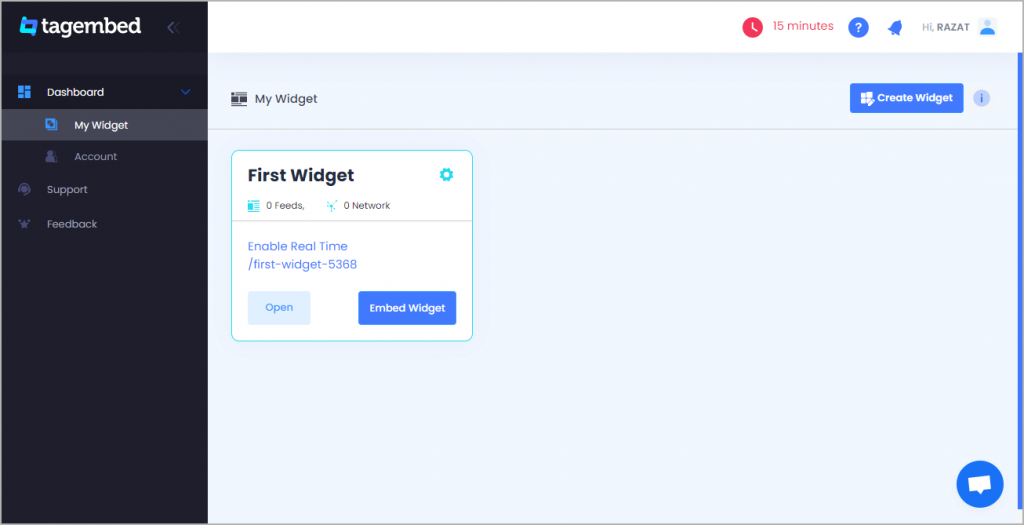
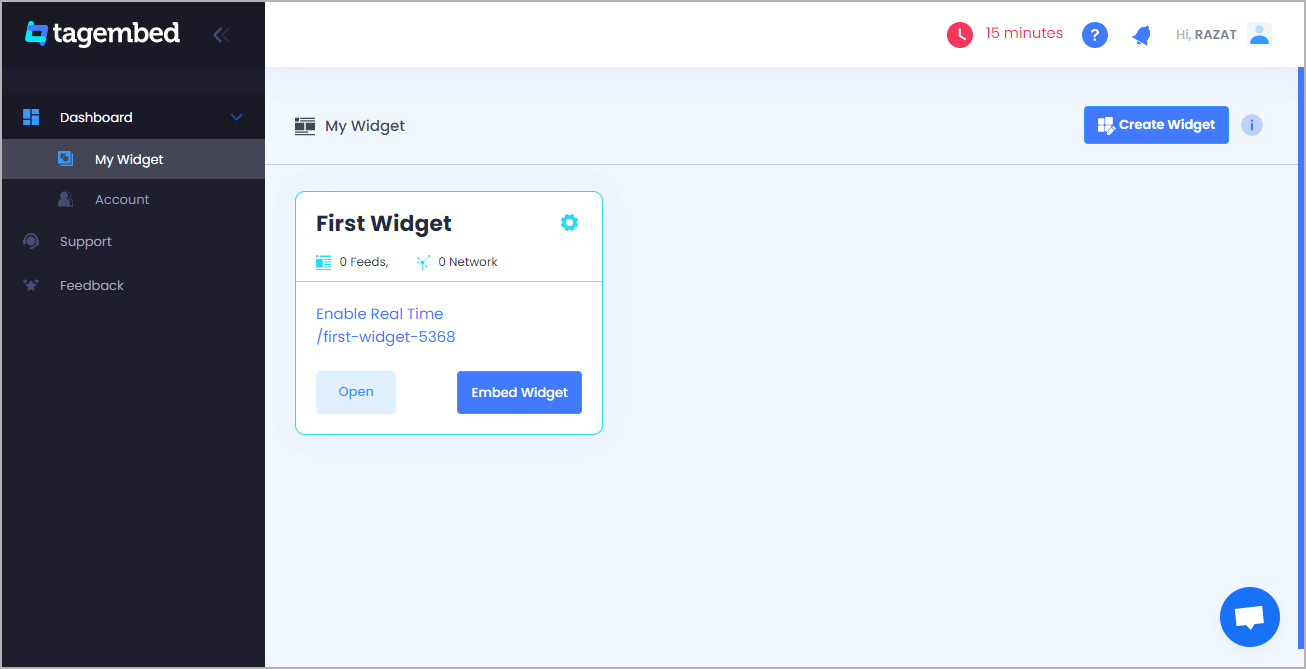
2. You’ll be redirected towards the Tagembed dashboard.

Tagembed dashboard

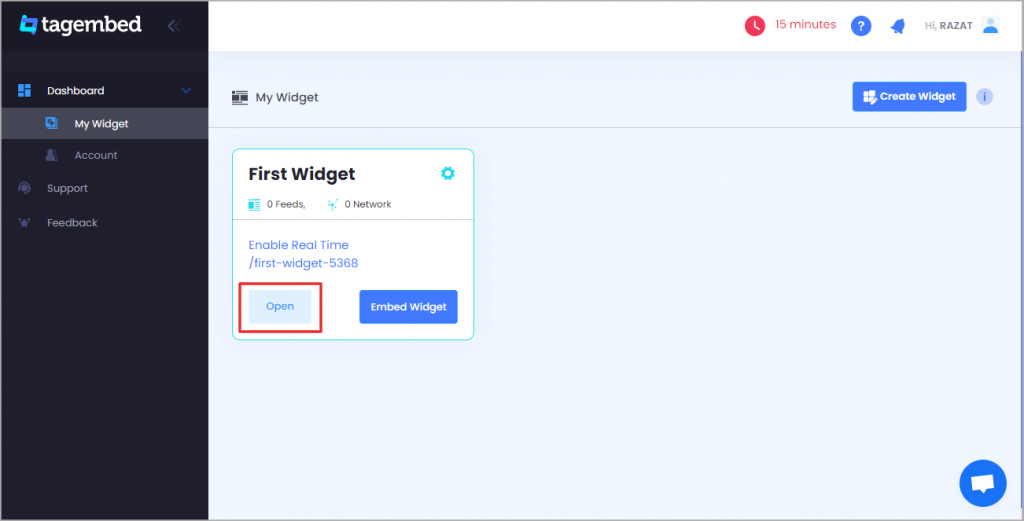
3. Your First Widget will be already created, just click on the Edit button to proceed.

edit new widget

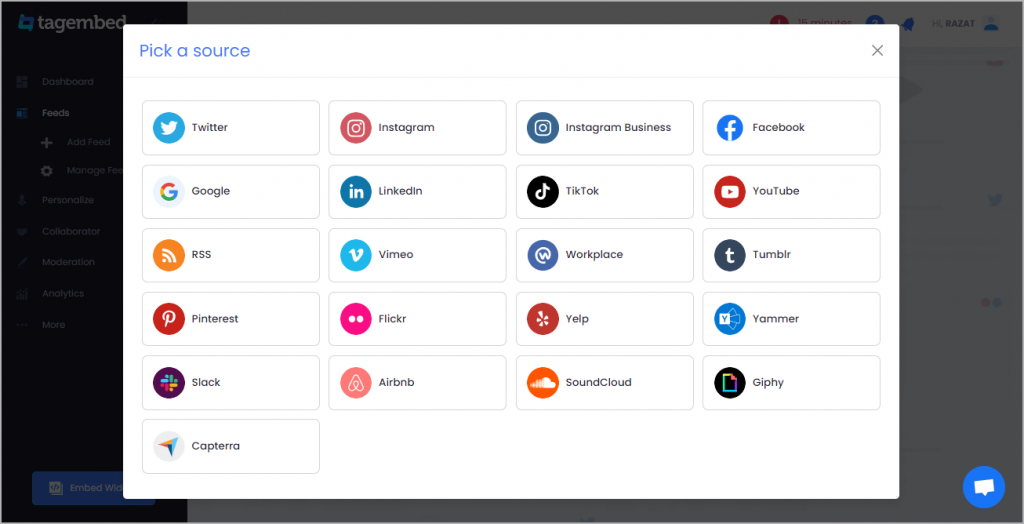
4. A dialogue box will appear to “pick a source”, Choose “Google” now

Pick-a-Source

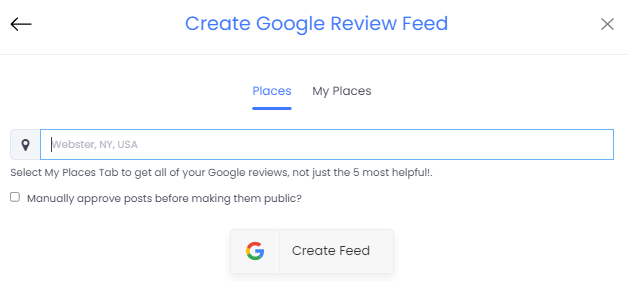
5. You can Create an amazing Google Review Widget from the following methods:-

a). Business Page: To fetch Google Reviews from Business Page enter the Google business page URL

b). Business Name: To fetch Google Reviews with the help of Place Name enter location and keyword.

create google reviews

6. Finally, click on the Create Feed button to start aggregation.

Tip: You can click on the Personalize tab on the left menu panel to change the themes & layout, background, banners and other dedicated themes settings to make the widget look more appealing and attractive.

#Step2 – Generate Embed Code For Squarespace Website:

1. On the bottom-left menu panel, click on the Embed Widget button as displayed in the below image

google reviews feeds

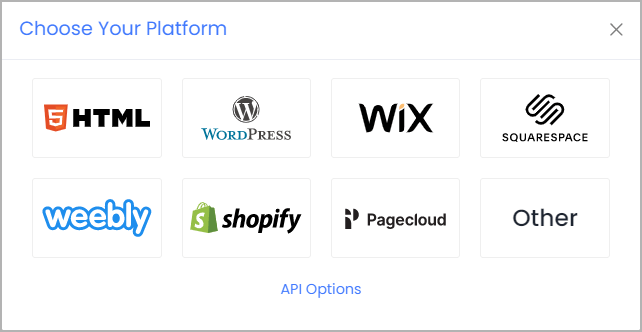
2. New Dialogue box will open with “Choose Your Platform” Now Select “Squarespace

Choose-Your-Platform-New

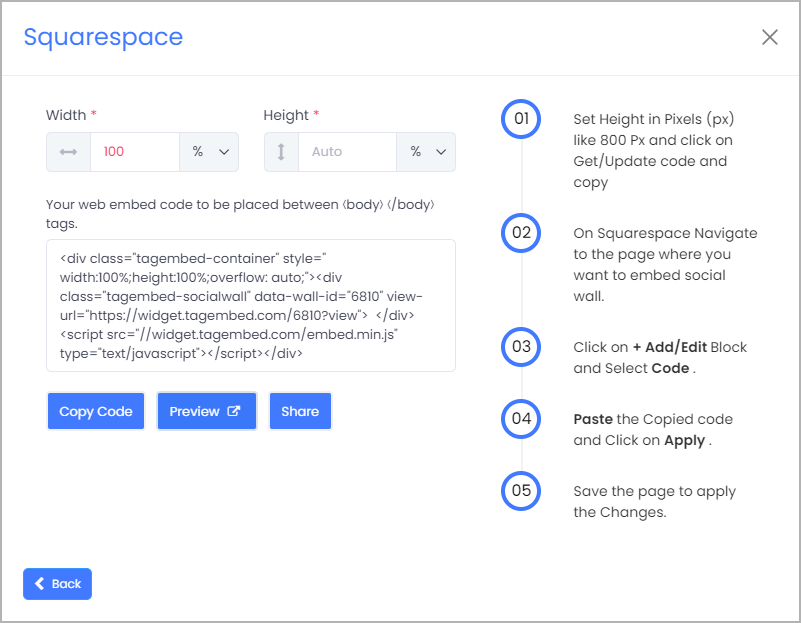
3. Choose your website CMS as Squarespace and adjust the height & width of the widget.

Recommendation: Set the width in percentage % and Height in pixels Px for better exposure

adjust height - weight

4. Finally, click on the Copy Code button to copy the embed code.

#Step3 – Embed Google Reviews on your Squarespace Website

After copying the embed code follow few more simple steps to complete the embedding process.

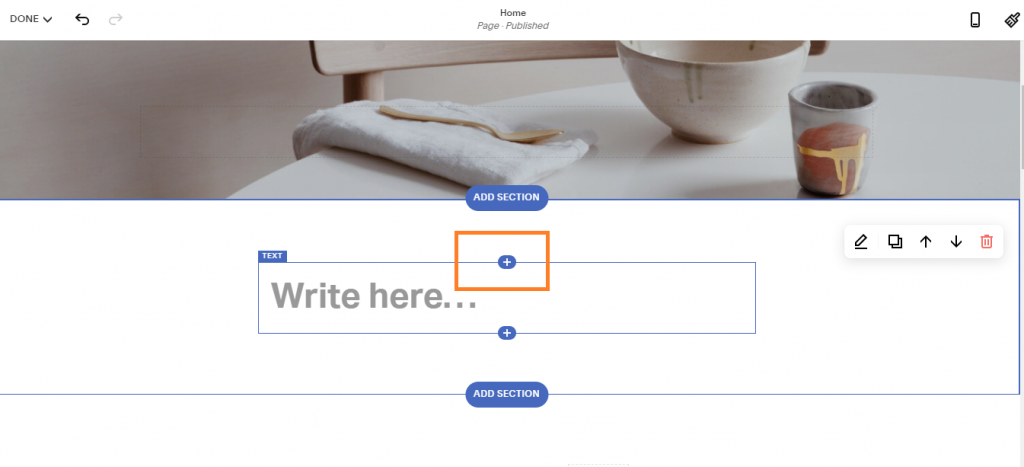
1. Login to the admin account of your Squarespace website and click on the Edit button to embed the Google reviews.

Add

2. Now click on the “+” Button

click button

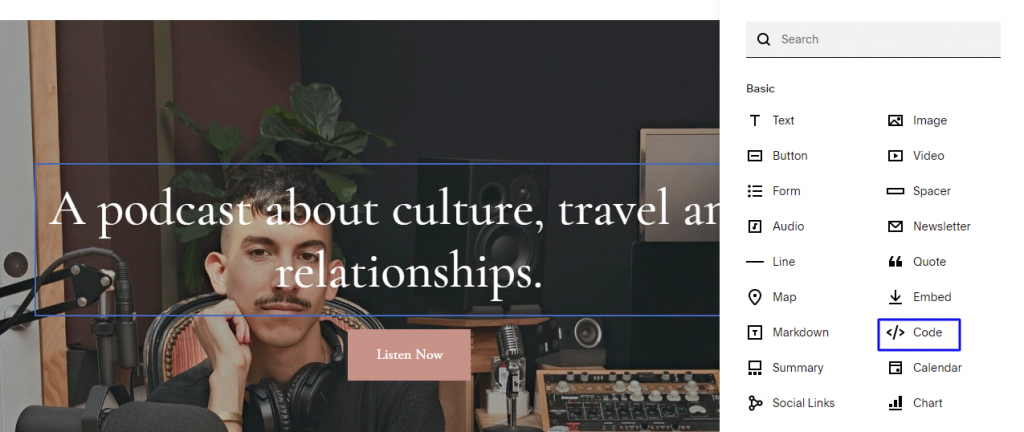
3. A new Option Menu will open, select the “</> Code” Option

select embed code button

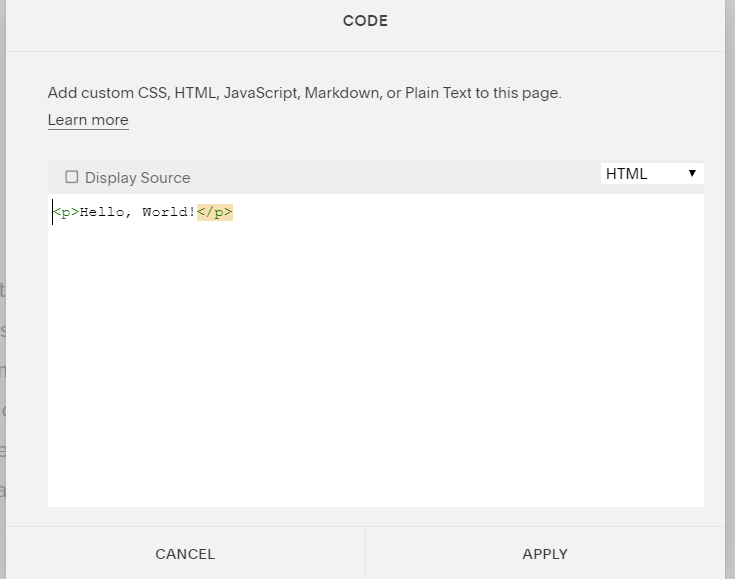
4. Paste the embed code into the editor and click on Apply button.

embed code

5. Save the changes made and reload the page.

Hence, your Squarespace webpage is loaded with Google reviews

Congratulations! You have successfully added Google reviews widget on the Squarespace website.

Digital Marketing, Social Media Marketing

Must Know Tiktok Marketing Strategy for 2022

With so much new substance on the web added day by day, it may very well be hard to stay aware of what’s going on the web. Individuals attempt a few distinct ways, including visiting explicit sites each day, doing Google look, or depending via web-based media to keep them informed. One arrangement that occasionally gets neglected is an outdated one: The RSS channel. 

What is an RSS channel? It’s an innovation that has impacted numerous advanced web instruments you’re comfortable with, and its smoothed out, calculation free arrangement could make it your next incredible device for understanding what you need on the web.

Must Know TikTok Marketing Tips

1. Include Suitable Hashtags 

In the same way as other web-based media organizations, TikTok clients depend on hashtags to list their recordings and quest for cuts by subject. In the event that clients click on the “Find” amplifying glass at the lower part of the screen, they see a rundown of recordings arranged by moving hashtags.

We have recently checked out how you can best utilize hashtags on TikTok in our Ultimate Guide to TikTok Hashtags. A portion of the advantages to a brand utilizing TikTok hashtags are: 

  • To intensify the range of your substance 
  • To distinguish contenders 
  • To get more devotees 

Despite the fact that you ought to incorporate significant hashtags on your recordings, you ought to likely keep away from the most well known nonexclusive hashtags. Your recordings are bound to become overwhelmed in an ocean of content. It is smarter to have your recordings hang out in somewhat less well known classes. Similarly as with all advertising, you need your recordings to seem noticeable to those individuals generally pertinent to your mission, so don’t zero in on hashtags in light of the fact that they are famous. 

Likewise, recollect that this isn’t Instagram. Try not to be enticed to utilize 21 hashtags on TikTok. Doing as such will remove the impact of your recordings.

2. Follow TikTok Trends

Another way you can utilize hashtags as a component of your advertising technique is to watch out for moving hashtags. You would then be able to make and share recordings that identify with these moving recordings. 

Recollect that patterns can be quick. Watch out for TikTok drifts and be ready to switch your substance to keep around with the frenzy. 

In case you are sharing your variant of a moving video type, don’t simply make it a duplicate of every other person’s recordings. Figure out how to make your video exceptional.

3. Embed TikTok Videos on Websites

Boost the awareness of your TikTok Videos by embedding them on your website. Hence, increase social reach, drive engagement, showcase your videos and many more. 

Social Media Aggregator tools like Tagembed are a great tool to embed Tiktok Videos on Shopify, WordPress, Wix, Weebly and more.

4. Consolidate TikTok Influencers in Your Campaign 

It is no mishap that specific individuals become powerhouses on friendly stages. Ordinarily, they develop a standing for the nature of the substance they share. Hence, it pays for most organizations to assemble useful working associations with individuals who impact their possible clients. As we wrote in How to Find TikTok Influencers, “TikTok has produced another age of powerhouses, as well; a gathering of individuals who have undeniably more clout with the present teenagers and tweens than more customary film or TV stars.” These are unequivocally the kinds of individuals you need on your side when you attempt your TikTok promoting efforts.

Also Read – LinkedIn Marketing Hacks to Grow Your Business

5. Remark Regularly and Encourage Comments on Your Posts 

Like most interpersonal organizations, TikTok upholds incessant client commitment. Remarks are a superb way of accomplishing this. In a perfect world, you will develop discussions with your likely clients. 

TikTok positions remarks by the quantity of preferences they get, so ensure you thoroughly consider your remarks, making them significant. Try not to make dull “decent video” type remarks. 

In like manner, set aside the effort to take a gander at others’ recordings and offer insightful remarks on them.

Website

Most Fruitful Ways To Embed Twitter Widget On Website 2022

Twitter is a leading social networking platform that has established itself globally as a platform where people express their views on world affairs, industries, and topics of all kinds. It has outgrown itself from just being a social media platform.

Today, brands are consciously using it for marketing purposes, whether it is an MSME or a well-established firms. If you, as a brand are maintaining an active presence on Twitter, then users will probably be talking about you, tweeting their reviews, commenting on your posts and sharing their experiences using your brand-related photos and videos.

Imagine if you could collect and embed these useful user-generated content on your brand’s official website to display social evidence. Wouldn’t it be amazing? Well, what if we tell you, it is possible would it interest you? Well, that is possible and that is with the help of Twitter Widget.

There are various tools that provides you with that widget but in this blog we will be discussing about the tools that efficiently help you to embed Twitter widget.

Easy-To-Use Tools That Helps To Embed Twitter Widget On Website

1. Tagembed Twitter Widget

tagembed widget

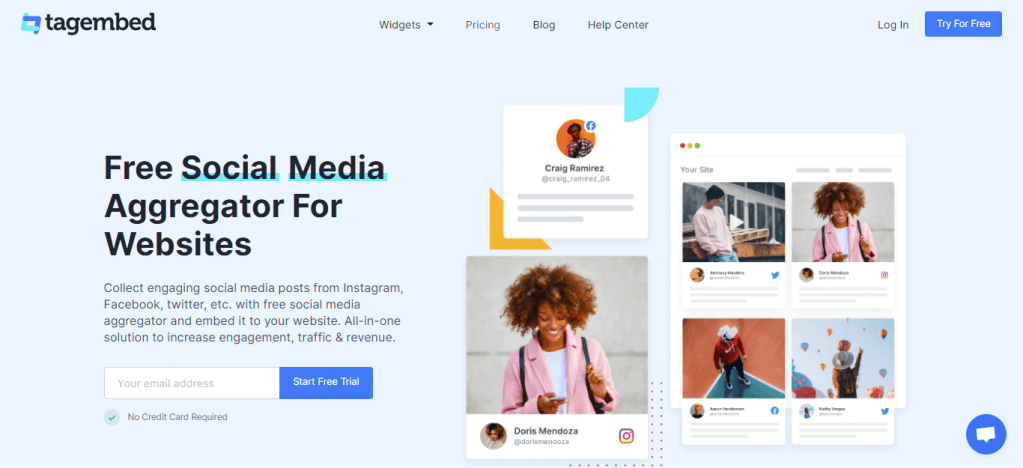
Tagembed is a wonderful social media aggregator that helps you to embed Twitter Widget on the website and display Twitter contents. It puts together real-time feeds and keeps your website up to date. It collects the post Via profile posts and pages and more, and displays them on your website without any hassle.

The irrelevant content can be filtered out either manually or automatically, using the powerful moderation function. Moreover, you can also customize the Twitter feeds according to the look and feel of your brand/website. Twitter Widget comes with fabulous themes, background choices, banners, and advanced custom CSS option settings. The robust analytics helps you monitor the output of your Twitter feeds in terms of user engagement, interaction and Twitter feed contribution.

2. Everwall

everwall

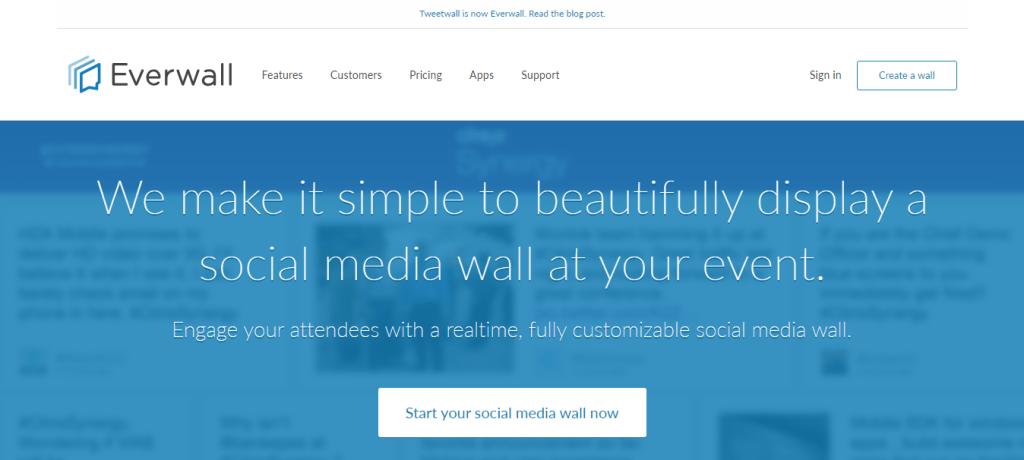
Like any other social media aggregator tool, Everwall supports Twitter for displaying event posts and tweets in the form of a visual gallery. The content filtration can be used to curate posts according to the keyword, hashtag, or phrase and helps you restrict the irrelevant trolls, posts, or tweets from showing up on the screen.

Everwall Twitter Widget fits in any screen resolution, be it a laptop, tablet, or iPad. It also allows customization that makes your feeds attractive and appealing, that encourages users to be a part of the campaign.

3. HootFeed

Hootfeed

The customizable HootFeed from Hootsuite is a live Twitter stream that can be presented on the big screens around your events. The HootFeed is an easy-to-customize tool, and also allows your website visitors to engage with the feed.

Along with that, HootFeed uses Twitter Widget to embed tweets containing your default hashtag(s) that can then be seen at your event screen(s). By encouraging people to engage with the show, it proves to be the perfect way to promote audience participation. Without making an account, you can use HootFeed, or you can choose to sign up for a free account or one of the four subscription plans.

4. TwitterFall

twitterfall

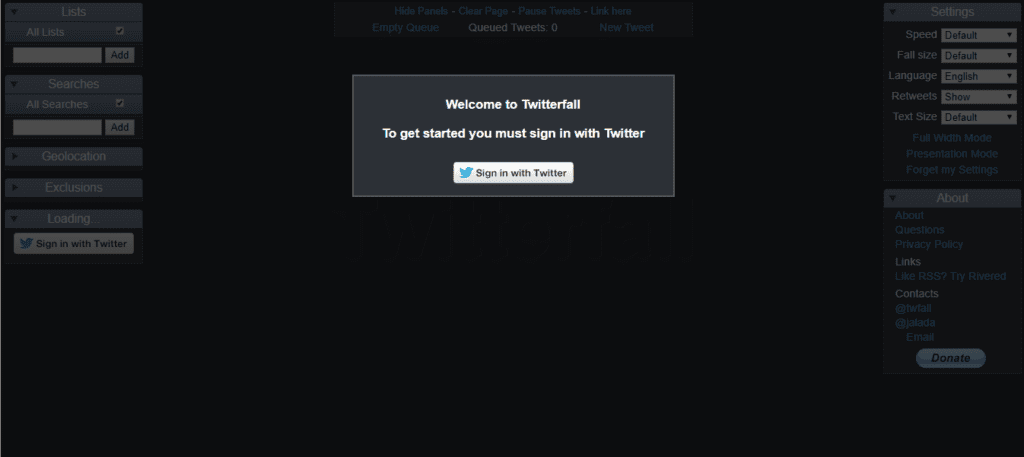
TwitterFall allows you to curate Tweets based on several keywords and hashtags. This Twitter Widget is highly customizable. You can change the text size of your tweet, determine whether to include retweets, set the display speed, set exclusions and geolocations, and more.

It takes advantage of the search patterns of Twitter which are listed on the search page of Twitter and show the most common and most discussed subjects of the time. You can even fetch content based on a particular hashtag relevant to your event and display them live on screens.

5. TweetWally

tweetwally

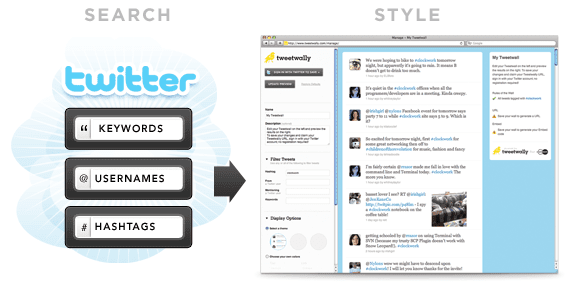
Tweetwally is another Twitter Widget that allows you to search Twitter for posts and tweets based on the hashtag, username, account mention, or keywords to create your own customized live feeds for events. The curated content is then displayed on big screens at events, parties, conferences, and more.

In addition, live streaming, social networking, and virtual reality have started to blur the distinction between being in the event and being digitally present there. Tweetwally Twitter Widget offers an excellent way to offer a seat at the table to your virtual friends as well.

Conclusion

Embedded twitter widget on the website delivers something new and easier to connect with your audience. It gives them real-time insightful and engaging content. It also saves your time and effort to create content when you primarily harness user-generated content.

The future of content marketing is UGC and you need to have a solution to aggregate and incorporate such fruitful content into your business website. Now that you are aware of the simplest tools to embed twitter feed on website that enriches your events and web platforms with engaging content. It is time for you to take steps to see how Twitter Widget operates in real life

facebook widget
Website

What is Facebook Widget And Importance For Business Website

Marketers are always on the lookout for new strategies and ideas to generate more revenues for their businesses. One of the smartest ways to achieve growth is to apply strategies that are economical and keep them ahead in the competition. In this blog, we will be talking about one such strategy which has turned out to be a game-changer for marketers. The strategy integrates social media giant, Facebook, with your website and that is to use – Facebook Widget.

Facebook has been a revolution in the social media network; the platform has seen tremendous growth since its inception and still holds the prime position in generating the most number of users. Even with such competition in the network, it is a leading platform with a reach of 59.0% social media users.

These numbers attract marketers to build their business strategy around this great platform. Marketers always look to add Facebook as part of their marketing plan, and in recent times Facebook ads have surfaced as the best choice for them.

Businesses often find Facebook ads a little burden on their pockets, and hence, to fill this void, the Facebook widget has emerged as the best alternative to this strategy. Facebook Widget is a tool that presents all the Facebook feeds related to a particular business in one single presentation and showcases them on the website.

This blog will provide you a brief understanding of the Facebook Widget, its importance, and steps to embed it to your website using the most popular social media aggregator tool, Tagembed.

so let’s begin.

What is Facebook Widget?

Facebook Widget is a phenomenal tool that fetches, curates, and presents the feeds from your Facebook page, album, reviews, in one single presentation on your website. It makes your website more interactive and user-friendly while providing social proof to your users.

It allows a sneak into your Facebook account without closing the window of your website. Making your website more engaging for the users.

Facebook Widget aggregates all the content from Facebook relevant to your business and presents it in a well-curated and beautiful manner on the website. In other words, a Facebook feed Widget can only be the difference in converting your potential customer to a loyal customer.

Now, as you know the basics about Facebook feed Widget, let’s dive further into their significance.

Importance of Facebook Widget For Business Website

  • It makes your website interactive.
  • It gives a vibrant and eye-catching look to your business website.
  • The widget increases the traffic of your business website.
  • Boosts users to create more user-generated content related to your business.
  • Develops social proof of your business
  • Boosts sales.
  • It Increases the customer base.
  • Economical at cost

Facebook Feed Widget is currently ‘The Most Talked-about’ Tool In The Market. And here are simple steps to Embed Facebook Feed On Website Using The Social Media Aggregator Tool, Tagembed.

Simple Steps To Embed Facebook Feed Widget On Your Website:

Step 1: Sign up to Tagembed for free or log in if you already have an account.

Step 2: Click in Create Widget button on the left corner of your screen.

Step 3: Create a Widget dialog box will appear on your screen. Name your wall according to your preference and click on Create Widget.

Step 4: Select Facebook from Choose your platform pop-up window.

Step 5: Choose a Facebook connection suitable for you from the given options.

Step 6: Click on Continue with Facebook button and provide your Facebook credentials, so aggregator tool and aggregate Facebook feeds.

Step 7: Click on the Embed Widget button on the bottom left side of your screen.

Step 8: Choose your platform pop-up window will appear on your screen, select your particular platform from the given options.

Step 9: You can even adjust the height and width of your widget, then click on Generate Code button.

Step 10: Copy the code and paste it to your website editor.

Congratulations. Now you have an interactive, eye catchy, and vibrant-looking website in just a few easy steps. Enjoy the heavy traffic on your website and convert your leads into successful business transactions.

Social Media Marketing

Best Tool to embed Facebook Reviews on websites

Producing more internet based surveys is one of the most proactive things you can do to help your business’ believability and realness on the web. Among the numerous well known survey stages out there, for example, Yelp and Google audits, Facebook stays one of the greatest to profit by. 

With up to 1.62 billion day by day dynamic clients and instruments for neighborhood organizations to develop their organization and client reach, as an entrepreneur, you ought not pass up the upsides of getting Facebook audits. Requesting that cheerful clients set the ball rolling in a good direction through a positive audit can assist you with drawing in new clients and develop your business’ perceivability. 

Notwithstanding, not every person might have the option to see your Facebook Business page without any problem. A basic and powerful way of make your Facebook page open is to embed Facebook Reviews on websites by inserting it onto those destinations. This will diminish the time you spend requesting audits by giving your clients quick access with a single tick! 

Moreover, by inserting a solid survey onto your site, it goes about as a client tribute. Potential clients will actually want to check your business’ worth and may even divert to your Facebook Business page to more deeply study your administrations. 

Peruse on to discover how you can embed Facebook Review Widget and make amazing social confirmation of your business’ administration.

Hence embedding Facebook Reviews on websites is super easy using free social media aggregator tools like Tagembed.

Follow the simple steps to embed Facebook reviews using Tagembed

  1. Create a free Tagembed account.
  2. Select your social network from the list to collect feeds.
  3. Choose your aggregating method and enter the input accordingly.
  4. All of your social media feeds will be aggregated to your widget editor.
  5. Organize the feeds using themes & layouts, banners, background, and many more.
  6. After organizing feeds generate the embed code for your website.
  7. Copy the embed code and paste it into the backend of your website webpage.
  8. Save the changes made and reload the webpage.

Hence, Facebook reviews are now live on your website. Perhaps, showcase social proof, build trust, increase social reach and more.

Also Read – Embed Airbnb Reviews on Any Website

Uncategorized

How to Embed Airbnb Reviews on Any Website?

Reviews are important for the business, when it comes to online reviews Airbnb stands as one of the prominent review platform. Airbnb reviews helps brands to gain credibility and reputation in the market. While many business look in gathering more reviews for their business, they often miss out on another important aspect of the reviews and that is showcasing them to potential customers. Hence, in this article we will be talking about this aspect that is – Displaying Airbnb reviews on website.

Here are the simple steps to embed Airbnb reviews on the website:-

Step 1: Aggregate Airbnb Reviews 

1. Sign Up to create a Free Tagembed Account or Login if you already have an account.

Embed Tumblr Feeds on Pagecloud Website

2. You’ll be redirected towards the Tagembed dashboard.

Embed Tumblr Feeds on Pagecloud Website

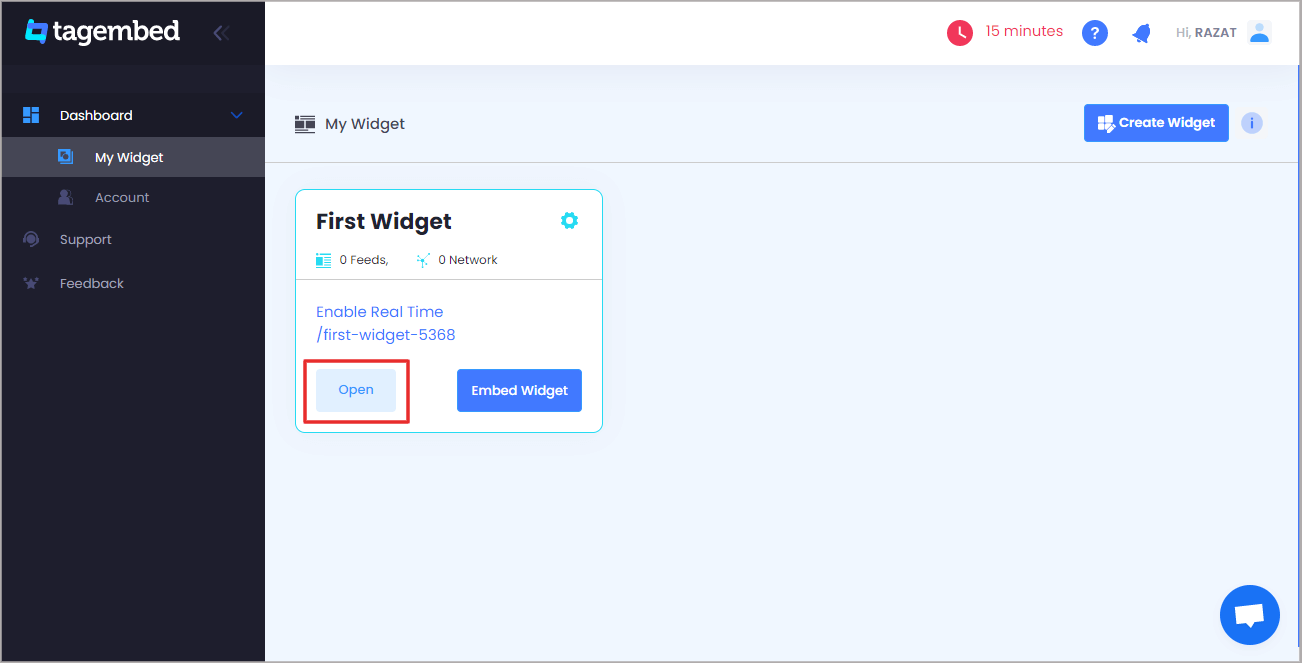
3. Your First Widget will be already created, just click on the Open button to proceed.

Embed Tumblr Feeds on Pagecloud Website

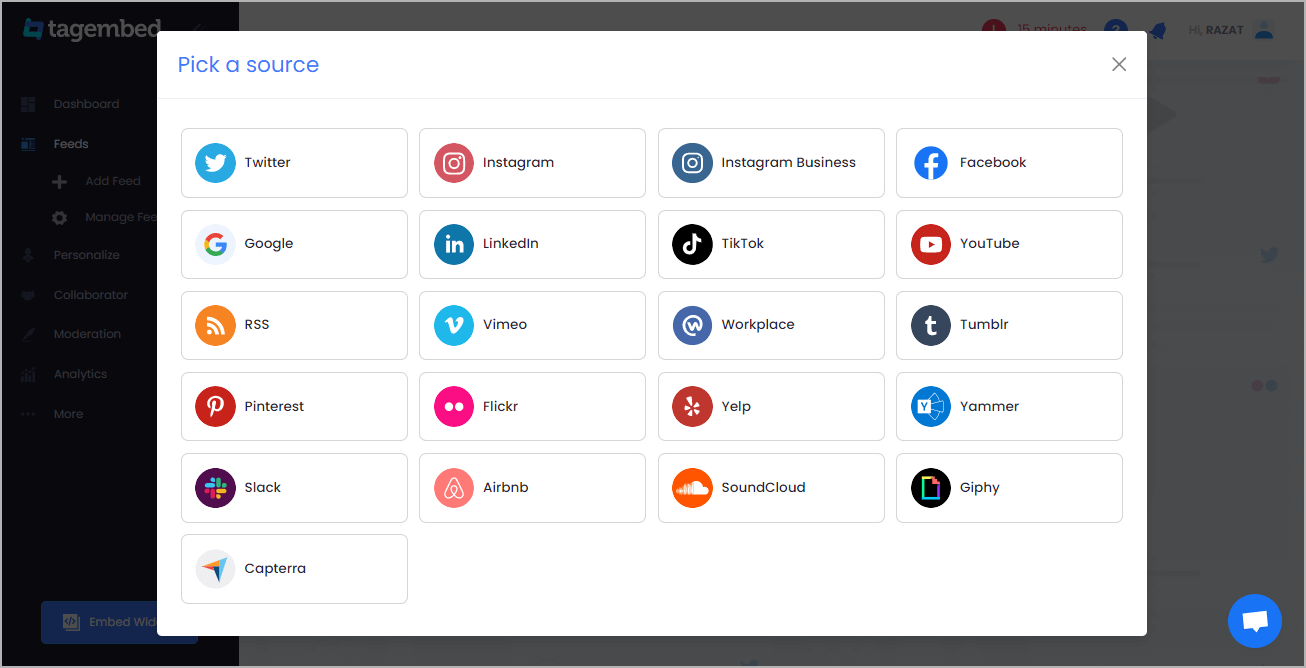
4. A screen “Pick a source” will appear, here select Airbnb from the list of networks.

Embed Tumblr Feeds

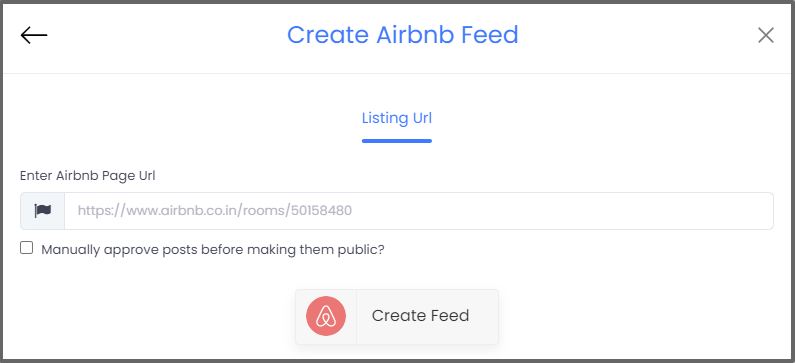
5. You can aggregate Airbnb reviews using the Listing URL

airbnb url

6. Finally, click on the Create Feed button to start aggregation.

Tip: You can click on the Personalize tab on the left menu panel to change the themes & layout, background, banners and other dedicated themes settings to make the widget look more appealing and attractive.

Step 2: Generate Embed Code for Webflow website

1. On the bottom-left menu panel, click on the Embed Widget button.

Airbnb reviews

 2. A new pop-up “Choose Your Platform” will appear with the list of different website CMS.

Add YouTube Playlist on Blogger Websites

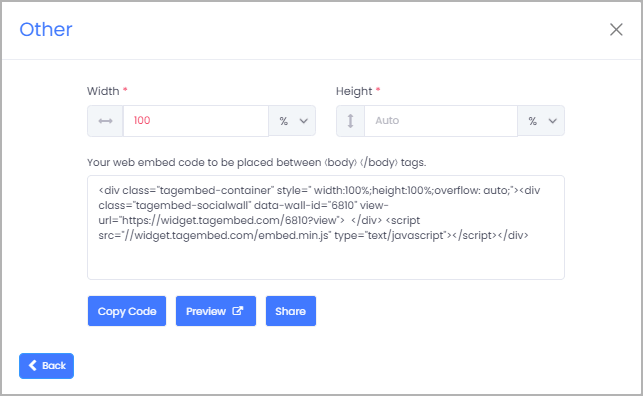
3. Choose your website CMS as OTHER (for blogger CMS users) and adjust the height & width of the widget,

Add YouTube Playlist on Blogger Websites

4. Finally, click on the Copy Code button to copy the embed code and paste it on the backend of the website.

Social Media Marketing

SIMPLE STEPS GUIDE TO EMBED RSS FEED ON WEBSITE?

Clients are continually investigating and perusing the most recent data on a different scope of subjects and ceaselessly draw in with stages that give this data.

As a business, in the event that you can give this enlightening substance on your site and keep your crowd refreshed on applicable subjects than you can likewise develop your site and generally speaking business.

RSS Feed Widget can assist you with accomplishing these objectives successfully and proficiently in the event that you embed RSS feeds on sites.

HOW TO EMBED RSS FEED ON WEBSITE?

RSS channels unite the channels from various sites into a channel for better comprehensibility and simple substance disclosure. Having a social media aggregator can make the feed more appealing and drawing in with its immense functionalities.

Tagembed, as a social media feeds aggregator, accompanies the choice of inserting the RSS channel to your site and has provisions to make the channel intelligent, drawing in, and alluring.

Steps to embed RSS feeds on websites:

  1. Create a free Tagembed account.
  2. Choose RSS as your source of aggregating feeds.
  3. Enter the RSS URL into the input bar.
  4. Click on Create Feed button to collect feeds on the RSS widget.
  5. Now, choose your preferred theme to make it best suit for your website.
  6. Lastly, click on the embed widget button to generate the embed code for your website.
  7. Choose your website platform and generate the embed code for your website.
  8. Copy and paste the embed code on your website backend.
  9. Save the changes made.

Hence, your RSS feeds are now live on your website.

Also Read – LinkedIn Marketing Hacks to Grow Your Business

Man with laptop and a dog
Social Media Marketing

LinkedIn Marketing Hacks to Grow Your Business

LinkedIn is an extraordinary spot for systems administration and developing your business. These advertising tips will assist you with utilizing the online media stage. 

  • LinkedIn is a web-based media stage that can be utilized to construct brand mindfulness and associations with shoppers. 
  • By posting drawings in content and taking part in industry conversations, organizations utilizing LinkedIn can market to expected clients and accomplices. 
  • Entrepreneurs can utilize LinkedIn to develop their email promoting list with their expert associations and organization. 
  • This article is for entrepreneurs who need to utilize LinkedIn to support their advertising endeavors and associations with shoppers.

From making associations and setting up organizations to producing leads and boosting your image mindfulness, you can do numerous things with LinkedIn that make it an important expansion to your advanced advertising technique. Dissimilar to Facebook, Twitter and Instagram, LinkedIn is an expert stage intended to assist you with building up and support business connections. 

To assist you with exploring LinkedIn as a showcasing stage, we gathered 15 LinkedIn promoting hacks you can use to discover new clients, accomplices and eventually develop your business. To begin with, however, we should discuss the significance of LinkedIn showcasing and how to set up your organization page. 

What is LinkedIn Marketing? 

LinkedIn isn’t only for experts and occupation searchers. Indeed, a huge number of experts use LinkedIn consistently to develop their organizations and their vocations, yet you can utilize LinkedIn to develop your business as well. This online media apparatus uncovered you and your business to a large number of associations that you can use to fabricate associations with people and different organizations to help your image. 

At its center, LinkedIn is an expert informal organization. Everything’s with regards to vocation advancement, proficient associations, industry conversations and other business-related exercises. You can discover clients, representatives and accomplices the same on LinkedIn.

Significance of a LinkedIn promoting technique 

LinkedIn is less with regards to selling or promoting your items and administrations than other social stages. On LinkedIn, glaringly pushing your business, spamming and clear hard-selling are profoundly disapproved of. This is the reason having a showcasing procedure explicit to the stage is so significant. Since the organization comprises an entirely unexpected crowd, LinkedIn advertising requires an alternate way to deal with getting the outcomes you need. 

As indicated by Sprout Social, organizations advertising on LinkedIn create 277% a bigger number of leads on normal than those occupied with Facebook promoting alone. Overviewed B2B advertisers additionally said that LinkedIn is liable for 80% of their web-based media leads. Utilized properly, LinkedIn is a successful showcasing device that can take your business to a higher level.

Bonus Tip: You can also embed LinkedIn feeds on your website using the LinkedIn widget powered by Tagembed. Tagembed is a social media aggregator tool that allows you to collect, curate and embed LinkedIn feeds in just a few clicks.

Hence, increase social reach, boost engagement, build trust, showcase social proof and many more.

Also Read – Top 3 Amazing Ways to Embed Instagram Widget on a Website

Website

Why It Is Important To Embed Twitter Feed On Website In 2022?

Why should you embed Twitter feed on your business website? How can you add Twitter feed on your website? You will get all the answers of your concerns in this article.

Twitter is among the most popular social media platform all around the world. Most of the people on social media are associated with Twitter; that is why Twitter accounts for 250 million active monthly users.

That is a prominent figure. It means you can reach more people with help of this social media platform. So using Twitter for your business website will be a profitable marketing purpose. Therefore we suggest you to, embed Twitter Feed on your website.

About Twitter Feed

In simple terms, Twitter Feed is a representation of Twitter posts in a collective manner. You can showcase the feed with the help of attractive and lively Twitter post widget.

You can create a Twitter Widget with a related Twitter feed or blend of Twitter feeds, like different hashtags, handles, images, videos, etc. You can easily creative attractive, and high-end Twitter feed Widget for your business website with the helps of various tools like social media aggregators.

You can simply integrate Twitter feed Widget on website main pages, landing pages, blogs, or create a separate section on the website where you can allow your visitors to glance over your Twitter posts.

Here are few reasons that might convince you to embed Twitter feed on website.

Twitter feed

Powerful Reason to Brands Embed Twitter Feed On Website:

1. Twitter Feed + Boost User Engagement

Twitter Feed comprises of dynamic and diverse user-generated content (UGC). People love to watch something new and relatable. We all know very well user generated content can be both very lively and vibrant. As a result, integrating it into your website will make it more charming and engaging for the users. The Twitter feed provides variety and new content and operates in real-time, giving website visitors more content to explore.

Alongside this, UGC helps in humanizing a brand. With more UGC, you can intrigue users with result-driven questions, such as, what is unique about your brand products, that makes customers feel happy?

2. Twitter Feed + Build Social Proof

Twitter is mostly dominated by User-Generated content (UGC) that makes the content 100% unique and informative as your customers create it.

When added on the website, the content helps to instill faith and confidence in your customers to go ahead and buy a product since they would trust another customer more than your content.

Read More – Embed Twitter Feed On WordPress Website

3. Twitter Feed + Helps Build User Trust

Trust is the major role of any relationship; may it be personal or professional. You will not invest in something that is not trustable. So gaining trust is essential for a brand/product to incur a large user base. Twitter Feeds can help you with that. If anyone views many happy customers of a brand, they will not hesitate to trust it. After all, it is all about trust and satisfaction.

As discussed in the previous point, social proof can work wonders, and Twitter Feed is a post full of social proofs and evidences that displays happy and satisfied existing users.

4. Twitter Feed + Business Website Drive Conversions

When you are engaging your users and building confidence for your brand/product among them, they will not think again before buying from it. It will give you higher conversion rates and encourage people in buying from your brand like never before.

It can help you attract new users and interact with them, forming a brand-user relationship. The great bonds, and the more loyal the customer base you create, better reputation you achieve in the market.

Read More – Benefits of Google Review Widget

5. Twitter Feed + Cost-Effective

Budget can be quite a concern, but adding UGC saves a lot of cost since users created the content. The cost you incur is only on the tool that helps you with aggregating and displaying the feed and content.

Talking about the best social media aggregator tool, they are quite affordable and cost-effective. The ROI is quite high, which covers all the cost you spend on it.

Wrapping Up

Embed Twitter Feed on your website can be quite helpful in elevating your business. We have already mentioned the powerful reasons of embedding Twitter Feed on your website that can be quite essential for a brand and product.

Not all marketing methods give you so many profits, and not employing it will be no less than a sin. We suggest you to go for it. What other tips and insights can you include in this post that will add value to our readers? Please, tell us!

Social Media Marketing

Top 3 Amazing Ways to Embed Instagram Widget on a Website

With a lot of buzz around social media networking sites nowadays, brands have turned their tables and have started using these social platforms to explore the hidden layers of the market.

Starting from marketing on these platforms to embedding it on the website, these social media platforms serve the most attractive and innovative way for brand promotion.
Out of all the major platforms, Instagram has turned out to be one of the fastest-growing networks with diverse functionalities. Embedding Instagram widget on the website not only looks attractive but also drives more sales for the brand.

Ways To Embed Instagram Widget On Website

Now since we know why it is important for the brands to embed Instagram widget on the website, let us explore different ways of embedding it. Here are 3 amazing ways to embed Instagram feeds on websites.

1.  Instagram’s embedding feature

Instagram itself provides an integrating option that allows you to have an easy embed process.

All you need to do is select the post that you want to embed, choose the embed option by clicking on the post, get the code and copy the code at the backend of your website building platform.

But the limitation that follows is that you can embed only one post at a time and that too using desktop i.e. using the Instagram website and not through the mobile application.  Also, it does not provide any functionalities such as personalizing the content, customizing it, interactive design, etc.

It is an excellent way to embed curated hashtag feed, or influencer feed that is relevant for your brand, on your website for free.

2. Using WordPress plugin

As we know, WordPress users rely on plugins to add any feature or functionality to their website and to enhance the interface of their website.

This is a reliable option for all the WordPress users that provides them with the easy integration option using the plugin. 

It provides you with an option of adjusting the number of rows and columns in your widget and customizing the number of posts that you want to embed.

Just copy the code and your desired Instagram post will get embedded on the WordPress website.

There are many WordPress plugins available that can help you integrate Instagram with your website. One such example is the Tagembed Plugin for embedding Instagram Widget that can easily be downloaded from the WordPress plugin library.

3. Social media aggregator tools

Social media aggregators are the tools that help you aggregate social media content to your website. They collect, curate and aggregate content on the website with more engaging and personalized feed. 

Not only websites, but these tools also help you to display this social feed as a social wall on large screens during events and on digital screens for indoor display. 

Some examples of amazing aggregator tools are Taggbox, Tagembed, etc.

These tools help the brands to customize their feed using different layouts, font styles, colours, themes, etc. Also, it provides the brands with the option of moderating the content to filter out the inappropriate content and display the relevant content.

Moreover, these tools come with the option of analytics to keep the track of user engagement, impressions, and performance graph. 

With real-time updates, you can display fresh and unique content on your website to enhance user engagement.

Conclusion 

Embed Instagram feed on your website is an amazing way to activate your users and convert potential customers into real customers.

We have discussed the top 3 amazing ways to embed it on website in a few simple steps.

So, embed your own Instagram widget on your website and ace your market with higher revenue and sales.

Content Originally Published @ https://bit.ly/3A9IUog

Technology

Why Do Brands Embed Facebook Feed On Website?

A website is the most important aspect of a business affair. It should be as amazing as the brand itself. Every website owner tries making it engaging which drives a great deal of web traffic. To do so, there is N number of options available but not all turn out to be fruitful. But, Facebook has always turned out to be a lifesaver in terms of its inordinate reach.

Facebook is one of the most popular and engaging social media channels. It is a holistic platform for marketers to reach out to their target audience. Whether you are trying to influence millennials or boomers, you can find them on Facebook. On an average, Facebook users spend about 45 minutes per day.

Ever wondered what are the amazing benefits of embed Facebook feed on website? Can you imagine the response your website will receive? Well, this isn’t imaginary. Facebook widget make that possible for you. It collects and curates the UGC from your Facebook business page, profile, timeline and embeds them all into the web platform. Widgets are simple to embed on your website.

facebook feed

Amazing Benefits to Brands Embed Facebook Feed On Website:

Let us delve into the best benefits of embedding Facebook widget on your website.

1. Boost Brand Awareness

Integrating Facebook feeds on a website increases brand awareness and reach to a large extent. While browsing your website, a visitor can also access your Facebook feed without leaving the web platform. If the content appears interesting and attractive, they will start following your Facebook account. This will automatically result in increased brand awareness and reach.

2. Add Social Proof to the Brand

User-generated content, well known as UGC is the best tactic used by marketers to spread the word about the brand. Creating a user-generated Facebook wall and embedding the same on your website increases the authenticity of the content.

This, in turn, increases credibility and makes it easy for your audience to trust your brand. Real-time or live Facebook feed on the website enables users to better accept your social presence.

Read More – Facebook Plugins to Grow Your Business on WordPress

3. Helps to Boost User Engagement

When UGC is displayed on the Facebook feed, it lets the user click, visit and explore your website too. Once the users visit your website, they are more likely to explore it and find the relevant posts. When users share your Facebook post with hashtags related to your business, it compels others to have a look and share it further.

4. Creates a Visual Hub on Your Website

Facebook is undoubtedly the most vibrant and appealing social media platform when it comes to user engagement. Adding this lively Facebook feed to your website, makes it attractive too. The interface of your website which previously lacked engaging colors, gets enriched with attractive and eye-catching content.

Facebook widget comes with customization options that let you refine the feeds before displaying them on your website. You can curate and personalize them with beautiful backgrounds and themes.

5. Boost Sales and Conversion Rate

Brands are rapidly advancing towards Facebook to connect with a diverse audience. Since people have a rationale while exploring Instagram, you are likely to make a lasting impression. Also, your brand gets recognition.

Embed Facebook feed on WordPress website enhances user engagement and reach. This leads to increased conversion and sales. Your customers will be willing to connect to your brand. This is beneficial when your Facebook feed is augmented with relevant and meaningful posts that capture users’ attention.

Embedding Facebook feeds transforms your website which looks more appealing and engaging for the users. The website traffic increases subsequently and the bounce rate is likely to decrease. As a result, revenue and leads scales new heights.

Read More – Embed Google Reviews on Weebly

6. Enhance Users Experience

Embedding Facebook feed on the website, improves the user interaction with the website interface . It innovates your website to stay ahead of your competitors. Your audience is most likely to increase their average time spent on your website. Flashing Facebook feed delivers excellent customer experience and induces them to stay longer on your website.

7. Easy to Use

Embedding Facebook feeds is a piece of cake. Use a Facebook aggregator tool, curate your content, and embed them on your website.

Yes, it is that very simple and quickly. It is an absolutely coding-free method and doesn’t require any skills. Anyone with no technical background can integrate them effortlessly.

Widgets liberate you from the complicated and pesky coding techniques. Get access to the updated Facebook feeds on your website with just a few clicks.

At presently Tagembed is one of the best social media aggregators which makes your work simplest. It comes with additional features, apart from what is mentioned above. Marketing your brand is no longer challenging and onerous. So why not indulge yourself in the latest fad and give your brand a whole new social appeal.

Digital Marketing, Social Media Marketing

How to increase reach of your LinkedIn Profile through website

To increase reach of your LinkedIn profile using website all you need to do is start embed LinkedIn Feeds on your website that are not only interactive, attractive but also informational for user. Seeing the live LinkedIn feed on your website will make your visitors crave for more and visit your LinkedIn Profile.

If the feeds on your LinkedIn Profile engage users, they will tap on the follow or connect button. Hence, the number of followers/connections will keep on increasing.

Eventually, follow the below steps to embed LinkedIn feeds on your website.

Steps to Embed LinkedIn Posts on your Website

  1. Create a free Tagembed account.
  2. Choose LinkedIn as your source to aggregate feeds.
  3. Copy and paste the post URL; click the Create Feed button.
  4. Use the moderation panel pin or highlight posts you want to show on the top.
  5. Then, customize the look and feel of your LinkedIn Widget using themes, banners, background, and more.
  6. Lastly, generate the embed code for your website.
  7. Copy the embed code and paste it into the backend of your website webpage.
  8. Save the changes made.

Hence, your LinkedIn feeds are live on your website to increase your social reach.

Benefits of embedding LinkedIn feeds on your website

  1. Surplus Dwell Time
  2. Decrease Bounce Rate
  3. Increase reach
  4. Make brand awareness
  5. Let yourself get discovered
  6. Engage Visitors
  7. Showcase Business Insights
  8. Increase Sales
  9. Run Campaign

And many more non-subjective benefits based on the niche of your business.

Use the opportunity to make your brand extensively popular by embedding colourful LinkedIn feeds on your website, providing customers with an amazing experience.

Also Read – Social Media Aggregator Tool You Need

Among the countless web-based media platforms, LinkedIn is viewed as the most preferred platform for businesses due to its astounding and captivating features. Integrating LinkedIn with sites is a moving LinkedIn promoting method. You can display LinkedIn feeds on sites and taste stunning advantages. 

Also Read – Embed Flickr Album on websites

Installing a LinkedIn feed to the site has made underwriting on the web-based stage considerably more successful and simpler. A tremendous mass of individuals invest the greater part of their energy looking over their LinkedIn accounts, which has made LinkedIn the most captivating online media stage.

Digital Marketing, Technology

9 Amazing Benefits of Google Review Widget You Might Not Know

Whenever you decide to make a purchase from an eCommerce website, you are most likely to look for customer reviews. But why so? It is because you as a customer respond to social proof. It is believed that other users will not be biased towards the brand and will present their genuine feedback. For the same reason, brands should focus on displaying Google customer reviews on their website in order to increase their credibility.

About Google Reviews?

Google reviews are the feedback about the products and services which are made by the customers who have purchased, used, and had an experience with the brand. Google review widget is made public and your audience gets access to the information about the quality of the product you are offering.   Google reviews serve as a perfect mix of positive and negative feedback from your audience. Displaying them on your website increases your online reputation and the credibility of your brand. It carries some other benefits as well.

Let us enumerate some key benefits of embed google reviews on websites.

google reviews

Amazing Benefits of Google Review Widget on Website:

Embed Google reviews widget can beneficial for any brand and business in multiple ways. All that you need to do is aggregate and embed customer reviews on your website. This will enhance trust, gather recognition, showcase transparency and help you achieve the marketing and increase sales target strategically better and faster.

1. Improves the quality of products and services :

Customer reviews are beneficial to marketers in improving the quality of services and products they offer. Customers will leave genuine feedback which will let you know about their experience and keep your feet on the ground with respect to customer satisfaction. By quickly resolving the queries generated by your users, you can refine the customer services thereby giving them an overwhelming experience and satisfaction.

2. Increased social proof and authenticity

The quality of products and services can definitely please your existing audience. But, what about your customers beyond that? Despite giving a good quality service to your customers, you are less likely to reach a considerable number of users. Google review widget helps them with their buying decisions. Much like we would ask the people around for recommendations, google reviews allow us to do this online with just a few clicks.

3. Reviews acts as a voice for your brand

Everyone wants to be heard and share their experience for others to see. Google review widget give a voice to your customers. It lets you interact with them which otherwise is not possible. If the user is taking time to leave a review then he/she is most likely to be your loyal customer. This builds their relationship with your business. 

4. Influence the customer’s buying behavior 

As per Brightlocal, consumer review survey, 97% of consumers looked for online reviews about local businesses. The number in itself says the importance of flashing your reviews on your website. Above all, 85% of the users trust google reviews more than what’s being recommended to you by your family, friends, and marketers. Your online ratings and reviews will greatly impact their buying decisions. So, make sure google review occupies a space on your website.

Read More – Embed Google Reviews on Weebly Website

5. Impacts sales and revenues 

Embed Google reviews can significantly affect your revenues because that’s what customers look for when deciding to buy a product. Your audience wants to hear the opinions of the other consumers despite being complete strangers. They find it genuine as it is drawn from experience. Higher ratings and positive reviews make your product desirable. This increases the chances of conversions which results in increased sales and revenues.

6. Acts as a unique UGC

User-generated content, generally referred to as UGC, creates transparency between you and your customers. Google reviews act as reliable content that a consumer can refer to before making a buying decision. No in-house content is trusted completely. Many promotional activities fail because of the same reason. But, google reviews never lets you down. They add up to brand advocacy and give it recognition.

7. Improves your ranking

Positive reviews engage a considerable amount of audience with your brand. This is trustworthy content that benefits your brand valuation. Google reviews are one of the most important and crucial factors that helps improve your brand ranking. Pages with reviews that mention a particular keyword are found to have higher rankings.   

8. Promotions being done by your customers itself

Favorable reviews from your happy customers are no less than a successful marketing campaign. The scrutiny spreads through word of mouth and leads to some more customers adding up to the brand. Your audience acts as micro-influencers that continues maintaining a positive image of your brand amongst potential customers and even beyond that.

Read More – Embed Airbnb Reviews on Website

9. Increased time spent on your website

User engagement and their time spent on your website are what make it thriving. Customer reviews are additional information about the products and services you offer. So, why not flash them on the website? Customers love clarity and genuineness. Reviews are the bona fide experiences that every user wants to access. It increases their dwell time and your website will receive new visitors every now and then.

Google reviews are no less than a marketing strategy that adds credibility to your brand. This is a cost-effective approach to reach out to your potential customers. 

Tagembed has made your task even simpler. Its google review widget tool helps you embed and displays customer reviews on your website. The simple steps to embed google review saves you from the pesky codes and complex integrations. 

Here Some Example of Google Review Widget on Website:

So Why You Waiting For

Technology

How To Embed TikTok Widget On Website – Try Now

Worldwide, TikTok has around 900 million lively customers. And, while TikTok is largely used by Generation Z, it has become increasingly popular with Millennials and Generation X over time. Nowadays, it’s even common to see a handful of Baby Boomers creating and sharing content on the app. So, in case you’re a TikTok influencer, you’re in good company.

But, what in case you use different social media networks in your influencer advertising and marketing business?

Like each different famous social media platform, TikTok lets its users share TikTok videos on different platforms and even add TikTok Widget on websites. In a short guide, we’re going to show you how to embed TikTok videos on your website to get the most from your content and reach a wider audience. We’ll be sharing methods of adding TikTok widget on websites.

titktok widget

Why Embed TikTok Widget on Your Website?

Turns out, there are amazing reasons it just makes sense to embed TikTok widget on your website:

  • User experience
  • Site resources
  • SEO boost
  • Increase the visitors time
  • User-Generated content
  • Decrease bounce rate

Read More – How To Embed Twitter Feed On WordPress Website?

How to Embed TikTok Widget on Website?

TikTok widget can be easily embedded by using social media aggregator tools available in the repository.  You can use them to embed the videos anywhere on your website.

Latest Social Media Aggregator Tools to Embed TikTok Widget on Website –

  • Tagembed
  • Curator
  • EmbedSocial
  • Walls
  • Socialproofed

To embed TikTok video on website, you need not be a tech-geek. Just follow these easy steps to add TikTok video for website:

  1. Create TikTok Feed By Using Tagembed Widget
  2. Embed TikTok Video to Your Desired Website Platform 

1. Create TikTok Video Feed By Using Tagembed Widget

  • Sign Up to create your free Tagembed account or if you are an existing user, log in to your account.
  • You will land up on the Tagembed dashboard window, if you are a new user, your first widget will be present on your screen, click the Edit button to proceed.
  • If you are an existing user and looking to create a new widget with TikTok, click on the Create Widget button on the top right corner of the screen. Next, provide an appropriate name for your widget on the popup box and click on Create Widget button.
  • Pick a source window that will appear on your screen, click on TikTok from various given options.
  • Click on the Create Feed button and provide your credentials.

Read More – 3 Best Facebook Plugins to Grow Your Business on WordPress

2. Embed TikTok Video to Your Desired Website Platform

  • Click on the Embed Widget button that is present on the bottom left corner of your screen.
  • You have the option to adjust the height and width of your widget. Now, click on Get code button to get the embedding code.
  • Copy the code on your clipboard and paste it onto the backend of your website.

And that’s it, within just a few easy steps, now you own an attractive website that display amazing TikTok video feeds.

Read More – How To Embed Google Reviews on Weebly Website?

Over To You

Create interactive TikTok widget on website really helps you a long way in establishing your brand and product dominion, increasing user-engagement, and building impression in the minds of your users. So try the best social media aggregator tool for your websites today and display amazing and beautiful user-generated content to your target audience.

Why are you waiting for? Use now this tool right now

Social Media Marketing

The Only Social Media Aggregator Tool You Need

Social media is currently a necessary piece of our lives, intentionally or unconsciously, it has turned into a day by day schedule for people. It may sound amazing to know, however the web has reached 59% of the all out populace. Furthermore, as brief passes, a great deal occurs in the computerized space.

Indeed, that is a ton of information. Also, these figures comprise of just 4 significant social media stages. Presently envision the information from any remaining social media stages. Also, presently, envision information that transfers in a day. It basically implies there is no lack of content, yet imagine a scenario in which you need to track down the substance identified with your ideal source to grandstand on your site. what’s more, this is the place where Tagembed: A Free Social Media Aggregator tool acts the hero.

Tagembed – Best Social Media Aggregator tool

Tagembed is a social media aggregator tool that assists you with gathering content from your ideal source. It permits you to clergyman and redo them prior to showing them wonderfully on the site. It is viable with 15+ social media networks which implies you will have abundant alternatives and content to show on your site.

It is free to use for every users. All you need is to create a free Tagembed account and follow the following steps:

  1. Create a Free Tagembed account
  2. From the dashboard open the widget.
  3. Pick a source from the screen.
  4. Select your desired aggregating method and enter the input accordingly.
  5. Lastly, click on the Create Feed button.
  6. Now, using personalization and moderation panel you can adjust the view of the widget and also choose what feeds to display on the website and what not.
  7. Finally, generate the embed code for your website CMS platform.
  8. Copy the embed code and paste it into the backend of your website CMS.

Save the changes made to make the widget effective and live on your website to showcase your desired social feeds.

Also Read – Embed Flickr Album on websites

Wrapping up!

Introduce social media feeds in your marketing strategy and boost the engagement, social reach, vibrancy, trust, sales etc., using the interactive social media feeds. Also, stay ahead of your competitors with the latest trends, even monitor your social engagement and your competitors’ move using the social widgets.

Instagram marketing tips
Social Media Marketing

Amazing Tips to Use Instagram For Your Business

Every business wants to grow and reach on higher heights, no matter what is the situation. They can do anything and adopt all the marketing practices that help them reach their target and make a strong presence in the market. 

Do you know what marketing strategy is popular nowadays? It is about boosting your brand on Instagram. 

About half of the population have accounts on Instagram and more than 800 millions people are active users on Instagram. 

This shows that Instagram is the highly popular channel among all other social media networks over the internet. 

But how do you use Instagram for your business and increase traffic using Instagram? This is the question that usually comes in the mind of marketers. Don’t worry, in this article I have talked about 6 tips you can use to boost your business on Instagram and attract more customers.

Analyze How Other Businesses Are Using Instagram

As you already know competitor analysis is crucial for any business, thus before you start, don’t forget to analyze what your other business owners are doing. 

It is important to check how they are using Instagram for their business. You can check for the brands and business in your category or even analyze other businesses too. 

Note down everything about what theme they are working on, what type of content they are using, and how their followers are interacting with the content they share. 

You have to analyze each step from their beginning on Instagram to latest posts. How they have developed and reached on Instagram. 

Then make a strategy about what you’re going to do on Instagram and engage your audience. What type of content you will share. 

Embed Instagram Posts On Your Website

Another effective way of using Instagram to grow your business is by embedding Instagram posts on your website. 

Yes, you heard it right. Embedding Instagram feeds on website is the popular type of content strategy  these days. Most of the businesses are using Instagram feeds on website. 

There are various ways to embed Instagram posts on your website. You can copy embed links from Instagram official websites, use social media aggregators, install plugins, or take screenshots of your website. 

However, using embed links from Instagram and uploading screenshots can create issues as users may claim you for using their posts without permission. 

Also Read: Tools to Embed Instagram Feed on Website

Upload Creative And Engaging Posts On Instagram

If you want to engage your audience with the content you share with them it highly depends on how much creative, informative, entertaining, and engaging posts you share. 

As social media is an entertainment platform, no users will engage with content if it is dull. 

You have to share quality and creative content that will engage your audience and entertain them at the same time. 

You can even create a separate team that will handle your Instagram business account

Regularly Post On Instagram

In order to keep your followers engaged with your account and get updates frequently then you have to upload posts regularly on Instagram. 

You can plan before what you’re going to upload in the next whole week. At least one post daily is mandatory during the initial phase. 

Depending on the type of business, you can share your content accordingly over Instagram. Keep in mind how frequent your competitors are posting so that you cannot stay behind them. People like to see quality and entertaining content every time they are using social media. Thus, posting regularly will increase your fan base and let them know what your business is doing. 

With social media aggregator tools and plugins like Taggbox, you can easily generate Instagram feeds without worrying about the permission.

Announce Launch Of New Products and Services On Instagram

If your business is about to launch a new product or service  then Instagram is the best platform to announce the launch date and show a preview about the product or service. 

As there are millions of active users, Instagram helps you in reaching your new product and service to a wide audience which is not possible through the traditional medium of sharing product. 

It is also a great opportunity to tell your existing customers about the new product and service your business is launching and what new features your existing business will offer them. 

Also Read: How to Add Instagram Widget on Website

Conclusion

Thus, Instagram is a big platform to boost your business presence and build strong relationships with your social media customers. 

So many people are using social media more than any other traditional platform. Thus to directly reach your digital customers you have to connect with them directly where they are. 

Instagram is the place where your customers are occupied. With your Instagram Business Account you can connect with your audience and engage them with quality content.

Content Originally Published On: https://bit.ly/3AC1hDt

Technology, WordPress

How To Embed Twitter Feed On WordPress Website?

With over 330 million active monthly users, Twitter is one of the world’s leading social networks. Displaying your Twitter feed on your website can help you connect with your audience and grow your business.

so if you are looking for an easy way to display your Twitter feed on your WordPress, then this blog is just for you.

Here you can find how to embed Twitter feed on WordPress website without any hassle. Displaying your Twitter feed on your website is a cool way to cross-promote your content on various platforms.

There are various articles that teaches different methods, but in this article you will find the easiest way to embed Twitter Feed on WordPress website. You can use this process with ease – even if you’re not an IT mastermind.

add twitter feed

Read More – 3 Best Facebook Plugins to Grow Your Business on WordPress

Why Should Add Twitter Feed on WordPress Website (Without Any Coding)

Adding a Twitter feed on the website can enhance your brand’s marketing efforts by ensuring better user engagement and boost sales.

  • It can attract website’s users by highlighting your interaction with the target audience
  • Creates a convincing first impression by increasing your visual appeal
  • Twitter generated UGC content will help in decreasing the bounce rate of your WordPress website
  • Gives a push to user engagement and interaction with your audience
  • Works as social proof and generates social trust

Social media channels are proving to be a boon for businesses as they boost a huge following and have the power to influence and turn the targeted sales of brand/business into reality!

Read More – Add Instagram Widget on a Website

How Can You Embed Twitter Feed On WordPress Website?

Tagembed Widget is an effective social media aggregator tool that can help you embed Twitter feed without any limitations and with attractive features that will enhance the look of your website by showing amazing content that is most relevant to your brand/product.

To embed Twitter feed on the WordPress website, you need not be a tech-geek. Just follow these easy steps to add Twitter widget for WordPress website:

  1. Create a Twitter Widget
  2. Generate Twitter Feed Embed Code
  3. Embed Twitter Feed on WordPress

1. Create a Twitter Widget

  • Log in to your Tagembed account, and if you are a new user, sign up to Tagembed.
  • Click on Create Widget button present on the top right corner of your screen.
  • Provide the desired name to your Twitter widget on the pop-up window and click on Create widget button.
  • Select Twitter from the Select your source popup window.
  • Select your connection type; you can choose from HashTag, Handle, Mention, List, Favorites, Advanced. If you want, you can provide added instruction from tick boxes.
  • Click on Create Feed button and provide your Twitter credentials.

2. Generate Twitter Feed Embed Code

  • Click on the Embed Widget button, present on the bottom left side of the screen.
  • Click on WordPress from your pop up.
  • Adjust the width and height of the feed according to your preference and click on Get Code button.
  • Copy the code and paste it on the backend of your website.

Great, you have successfully generated the embedding code from Tagembed; you are only one step away from add Twitter feed on wordpress website.

3. Embed Twitter Feed on WordPress

  • Log in to your WordPress account.
  • Open the website page where you want to display the live twitter feed.
  • Choose Text Mode, from the visual and text options on the page editor.
  • Paste the generated code on the text mode 
  • Apply the changes and Save.

Read More – Embed Google Reviews on Weebly Website

Over To You

Create interactive Twitter widget on WordPress website really helps you a long way in establishing your brand and product dominion, increasing user engagement, and building impression in the minds of your users. So try the best Twitter embedding tool for your websites today and display amazing and beautiful user-generated content to your target audience.

What are you waiting for? Use the tool right now  

Social Media Marketing

How to embed Flickr Album on websites

To embed Flickr Album on websites you’ll just need to have a Flickr Widget powered by Tagembed.

embed Flickr Album

Just follow the simple steps to embed Flickr Album on your website:

  1. Create your free Tagembed account
  2. Open the widget from the dashboard
  3. Select Flickr as your source to aggregate feeds from the list
  4. Choose the aggregating method from hashtag or handle and enter the input accordingly
  5. Click on the embed widget button at the bottom-left of the menu panel.
  6. Choose your website CMS from the list and generate the embed code accordingly.
  7. Finally, copy and paste the embed code into the backend of your website to successfully embed flickr album on your website.

Hence, increase engagement and sales of your business by displaying your photography portfolio right on your website.

There are many benefits of embedding Flickr Album on your website, such as:

  1. Increase engagement
  2. Boost social reach
  3. Make your website vibrant
  4. Showcase social proof
  5. Build Trust
  6. Influence users to make decisions

And many more subjective benefits according to your business industry.

Also Read – Embed LinkedIn Feed on websites

When you run out of things to say on your website, add a few images to give your page a bold new look. Flickr, a photo-sharing community, invites you to tap into its vast pool of professional pictures and place them on your Web pages free of cost. Images come in all categories ranging from nature to space exploration. Flickr even generates the code you need to embed picture links into your Web pages.

Social Media Marketing, Technology

How to Embed YouTube Videos on Any Website?

YouTube has Billion of users around the world. So presently you should feel that it will be not difficult to acquire sees on the recordings with a particularly immense client base, correct? However, there is a trick : 62% of organizations use YouTube to post video content. Subsequently, you need some astonishing techniques that increment sees on your perspectives and advance your YouTube channel.

And peoples have started using YouTube videos on their website to improve their business. If you think adding videos to the website is a difficult task and somehow decreases the performance or speed of the website, you are highly mistaken. There are amazing social media aggregation tools like Tagembed is available in the market through which you can embed YouTube videos on website without any hassle.

Below are the steps to embed Youtube videos on websites using Tagembed:=

Steps to Embed Yotube Videos on Websitw

1. Sign Up to create a Free Tagembed account or Login if you already have an account.

Embed YouTube Playlist on Blogger Websites

2. You’ll be redirected towards the Tagembed dashboard.

Embed YouTube Playlist on Blogger Websites

3. Your First Widget will be already created, just click on the Edit button to proceed.

Embed YouTube Playlist on Blogger Websites

4. A screen “Pick a source” will appear, here select YouTube from the list of networks.

Embed YouTube Playlist on Blogger

5. YouTube Widget lets you aggregate feeds using multiple methods, such as:

  • Channel URL – Enter the URL of the channel you wish to embed on your website.
  • Playlist – Copy and paste the URL of the YouTube Playlist that you’d like to display on your website.
  • Keywords – Input the relevant keyword that you want in a video.
  • Location – Enter the location and keyword using which you want to embed YouTube videos.

Here, select Playlist as your preferrable method to aggregate YouTube Playlist Feeds.

Embed YouTube Playlist on Blogger

6. Finally, click on the Create Feed button to start aggregation.

7. On the bottom-left menu panel, click on the Embed Widget button.

Embed YouTube Playlist on Blogger

Also Read: Embed Instagram Feeds

8. A new pop-up “Choose Your Platform” will appear with the list of different website CMS.

Add YouTube Playlist on Blogger Websites

9. Choose your website CMS as OTHER (for blogger CMS users) and adjust the height & width of the widget,

Add YouTube Playlist on Blogger Websites

10. Finally, click on the Copy Code button to copy the embed code and paste it on the backend of the website.

Digital Marketing, Technology

How To Embed Google Reviews on Weebly Website?

Google Reviews are reputation-building blocks of any business brand on digital platforms. Basically, reviews are the most important for the customer’s experience visible and increase the reliability of the brand/product.

Google reviews can be embedded using various website platforms. So, right now so many various tools are available in the market to embed google reviews on the Weebly website.

One of them is the Tagembed Google review widget which allows embedding reviews along with real-time updates. It also offers a variety of moderation and customization options to enhance the look of the feed and filter out irrelevant reviews. It helps you to fetch all Google reviews examples from your GMB and embed them on your Weebly website.
google review widget

This is my all-time favorite social media aggregator tool. It is an amazing tool providing users with the accessibility to embed google reviews from the various platforms at a time with real-time updates. Also, its moderation panel and profanity filter allow the user to filter the content. Amazing themes helps to design and customize review widget as per website themes.

Try Now This Amazing Tool You Will Easily Display Google Reviews on the Weebly Website With No Coding:

1. Sign Up to create a Free Tagembed account or log in if you already have an account.

Sign-Up

2. You’ll be redirected towards the Tagembed dashboard.

Tagembed dashboard

3. Your First Widget will be already created, just click on the Edit button to proceed.

edit new widget

4. A dialogue box will appear to “pick a source”, Choose “Google” now

Pick-a-Source

5. You can Create Google Review Widget from the following methods:-

Business Page: To fetch Google Reviews from Business Page enter the Google business page URL

Business Name: To fetch Google Reviews with the help of Place Name enter location and keyword

create-google-reviews

6. Finally, click on the Create Feed button to start aggregation.

Tip: You can click on the Personalize tab on the left menu panel to change the themes & layout, background, banners, and other dedicated themes settings to make the widget look more appealing and attractive.

7. On the bottom-left menu panel, click on the Embed Widget button as displayed in the below image

google-reviews-feeds

8. New pop-up will open with “Choose Your Platform” Now Select “Weebly

Choose-Your-Platform-Weebly-New-1

9. Choose Weebly as your website CMS then adjust the height & width of your widget.

Weebly-Get-Code

10. Click on the Copy Code button and copy the embed code.

11. Login to the admin account of your Weebly website and navigate to the page where you want to add Google Customer Reviews.

12. Scroll the elements on the left-hand screen to find the Embed Code option. Drag & drop the option on the page where you want to embed Google reviews.

weebly-embed-Code-2

13. A pop-up will appear Edit Custom Weebly click on it too and Paste the embed code into it.

Edit-Custom-HTML

14. Finally, click on the Publish button at the top-right corner to make the changes effective.

Basically, Google reviews widget will help you collect & curate your user reviews into a feed (via Places & My Places) that you can personalize & embed on your Weebly website. It is a specially designed widget for Weebly websites offering Weebly elements & functionalities.
Great! You have successfully Embedded Google Reviews Widget on Weebly website.