

Instagram widget tools help you show your Instagram content directly on your website. This can include posts, Reels, Stories, tagged content, and even user-generated content. Instead of asking visitors to go to Instagram, you can bring your social content to your homepage, product pages, landing pages, or blog pages.
This is useful because it makes your website look more active, more visual, and more trustworthy. A live Instagram feed can also help visitors see your products, brand style, customer experience, and latest updates in one place.
Today, the best Instagram widget tools do much more than display a basic feed. Many tools now offer moderation, multiple layout options, mobile-friendly design, hashtag feeds, mentions, and quick setup for platforms like WordPress, Shopify, Wix, Webflow, and custom websites.
If you are looking for the best Instagram widget tools for your website, this guide covers 15 strong options and explains what each one is best for.
What Are Instagram Widget Tools?
Instagram widget tools are platforms or plugins that let you collect Instagram content and display it on your website.
Depending on the tool, you can show content from your own Instagram profile, hashtags, mentions, tagged posts, or even multiple sources together. Many tools also let you control how the feed looks, how often it updates, and which posts appear on your website.
For businesses, this is helpful because it keeps your website fresh without needing to manually upload new images all the time. It also gives visitors a better view of your brand through real social content.
Why Use Instagram Widget Tools on Your Website?
One big reason to embed instagram feed is social proof. When visitors see real Instagram content on your site, your brand feels more active and trustworthy. This is especially helpful for ecommerce stores, service businesses, creators, restaurants, and local brands.
Another reason is fresh content. Many of these tools update automatically, so your website can show new Instagram content without extra manual work.
Instagram widget tools can also support conversions. When used on product pages, homepages, and landing pages, they can help visitors feel more confident. Some tools also support shoppable feeds, hashtag campaigns, and user-generated content, which can be very useful for ecommerce brands.
1. Taggbox
Taggbox is one of the best Instagram widget tools for brands that want strong design control, moderation, and multiple content sources in one feed.
It supports content collection from hashtags, handles, mentions, Reels, and personal or business accounts. It also offers custom CSS, ready-made themes, mobile-friendly layouts, and the ability to combine different accounts or hashtags into one display.
This makes Taggbox a strong choice for ecommerce brands, campaign pages, and businesses that want their Instagram feed to match their website design. If you want more control over layout, branding, and content display, Taggbox is a very strong option.
2. Tagembed

Tagembed is a great choice for businesses that want a simple setup and flexible Instagram feed embedding.
It allows users to embed live Instagram feeds, Reels, and Stories on websites with a simple code snippet. It also offers design control and works with the official Instagram API. Since Tagembed supports many other social platforms too, it can be useful for businesses that may want more than just Instagram feeds in the future.
Tagembed is a good option for agencies, small businesses, and growing brands that want an easy tool that still offers flexibility and clean website integration.
3. Smash Balloon
Smash Balloon is one of the best-known Instagram feed tools for WordPress users.
Its Instagram Feed plugin is designed for WordPress and offers customization, page-speed optimization, GDPR support, and the ability to show posts or hashtag feeds. It is widely used and trusted by a large number of users, which makes it a reliable choice for WordPress websites.
If your site runs on WordPress and you want a tool built specifically for that platform, Smash Balloon is one of the strongest options on this list.
4. Flockler
Flockler is a good fit for businesses that want more than a basic Instagram feed.
It supports Instagram, LinkedIn, and many other platforms, and it focuses on social aggregation, branded displays, and ecommerce use cases. It also promotes features like unlimited layouts and social content display for campaigns and websites.
Flockler is especially useful for ecommerce brands, marketing teams, and businesses that want to build a broader social content experience, not just an Instagram gallery.
5. Walls io
Walls io is a strong option for campaigns, hashtag content, and user-generated content displays.
It can collect content from hashtags, profiles, image posts, video posts, Reels, Stories, and more. It also offers real-time updates, moderation, custom branding, and simple website embedding.
This makes Walls io a great option for event pages, campaign pages, and businesses that want to show curated social content in a more engaging and branded way.
6. SnapWidget
SnapWidget is a simple and practical option for users who want a clean Instagram feed without too many advanced features.
It offers unlimited views, carousel support, and regular content refreshes. However, its lower plans do not include hashtag widgets, so it is better for users who mainly want to display a profile-based feed.
SnapWidget is a good fit for bloggers, small businesses, and portfolio websites that just want a simple Instagram section on their website.
7. Spotlight
Spotlight is a WordPress-only Instagram feed plugin, and that is also its main strength.
It offers a free version for displaying a basic Instagram feed, and higher plans include more features like unlimited accounts, unlimited feeds, analytics, and stronger feed management.
If your audience uses WordPress and wants a plugin made specifically for that platform, Spotlight is a good option to include in the shortlist.
8. LightWidget
LightWidget is a lightweight Instagram widget that focuses on clean visual display and responsiveness.
It supports hover effects, captions, padding, square cropping, hashtag filtering, and responsive design settings for desktop, tablet, and mobile. It also uses the official Instagram API and requires a Professional Instagram account.
This makes LightWidget a good choice for bloggers, lifestyle brands, photographers, and small businesses that want a visually neat Instagram feed without needing advanced campaign features.
9. Juicer
Juicer is a social media aggregator, which means it is useful for brands that want to combine Instagram with other social platforms in one feed.
It helps collect hashtag and social media content into a moderated website feed. It also offers a free plan with one source and unlimited website embeds, which makes it attractive for small businesses and early-stage websites.
If your goal is to combine multiple social channels instead of only Instagram, Juicer can be a smart option.
10. SociableKIT
SociableKIT is a broad widget platform built for easy setup and website integration.
It offers many social media widget types and supports a wide range of platforms such as Shopify, WordPress, Wix, Squarespace, Webflow, and more. This makes it useful for businesses that want flexibility and may want to add more social widgets later.
SociableKIT is a good option for marketers and website owners who want simple setup and a large widget library.
11. Common Ninja
Common Ninja offers a no-code Instagram Feed widget that works across many website builders.
It is designed to be easy to use, compatible with many platforms, and GDPR-compliant. The setup is simple: create the widget, save it, copy the embed code, and paste it into your site.
This makes Common Ninja a strong option for non-technical users and businesses that want a quick setup without getting into complex website changes.
12. POWR
POWR is part of a larger website plugin ecosystem, which makes it useful for businesses that want more than one type of website tool.
Its Instagram Feed and Social Feed apps are no-code and work with platforms like Wix, Shopify, WordPress, and HTML websites. It also supports multiple social accounts and fits well with businesses already using POWR plugins for forms, popups, or lead capture.
If you want one plugin provider for several website features, POWR can be a practical option.
13. Curator
Curator deserves a place on this list because it is already well-known in this space and offers a simple social feed solution.
It is designed to help users collect and display social media content from Instagram and other platforms. It offers a free plan, moderation features, multiple source support, and display templates.
Curator is a good fit for users who want an affordable starting point and a straightforward social-wall style tool. It is also a strong competitor in the Instagram widget space, which is why it is worth including in this comparison.
How to Choose the Right Instagram Widget Tool
The best Instagram widget tool depends on your website goals.
If you want strong design control, content moderation, and multiple content sources, Taggbox and Tagembed are excellent options.
If you use WordPress, tool like Spotlight make more sense because they are built for that platform.
If you want campaign-focused content, hashtag feeds, or user-generated content, then Flockler, Juicer, and Curator are better choices.
If you only need a simple, clean Instagram feed, then LightWidget, Common Ninja, or POWR may be enough.
So before choosing a tool, think about what matters most to you: design, simplicity, platform support, moderation, or campaign features.
How to Add an Instagram Widget to Your Website
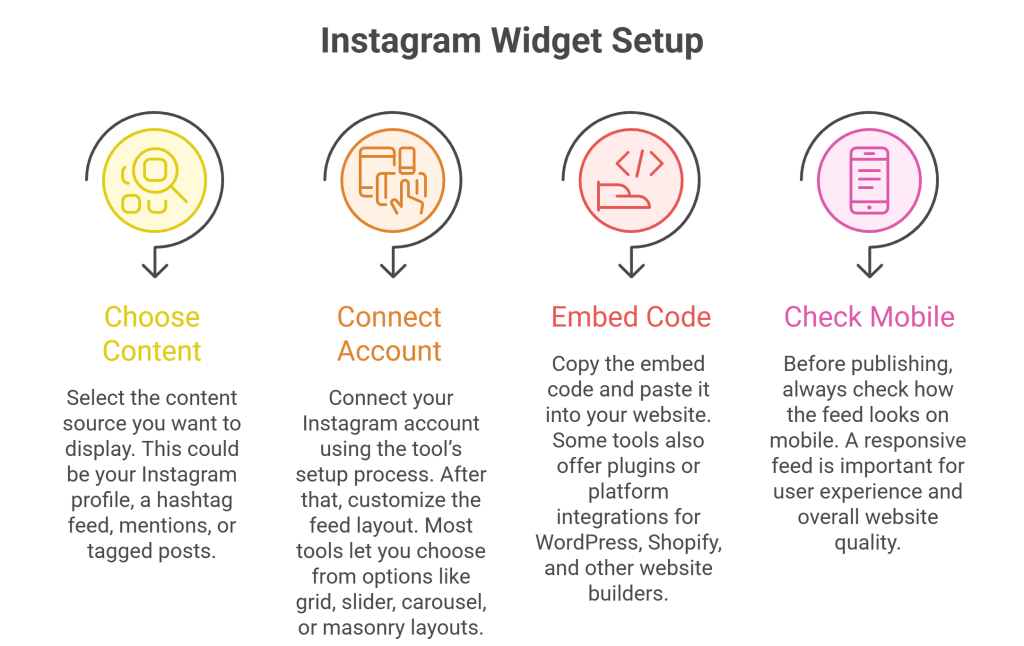
Most Instagram widget tools like Taggbox follow a similar setup process.
First, choose the content source you want to display. This could be your Instagram profile, a hashtag feed, mentions, or tagged posts.
Next, connect your Instagram account using the tool’s setup process. After that, customize the feed layout. Most tools let you choose from options like grid, slider, carousel, or masonry layouts.
Then copy the embed code and paste it into your website. Some tools also offer plugins or platform integrations for WordPress, Shopify, and other website builders.
Before publishing, always check how the feed looks on mobile. A responsive feed is important for user experience and overall website quality.
Final Thoughts
Instagram widget tools are more than just visual add-ons. The right tool can help you improve trust, keep your website fresh, show real customer or brand content, and support engagement and conversions.
For businesses that want the strongest all-around options, Taggbox stands out for its strong mix of content collection, moderation, and design flexibility. Tagembed is also a great choice for businesses that want simple setup, official API support, and room to expand into more social feed use cases later.
If your goal is to make your website look more active and engaging, choosing the right Instagram widget tool can make a real difference.
FAQs
Which Instagram widget tool is best for WordPress?
For WordPress users, Taggbox and Spotlight are strong choices because they are built specifically for WordPress. Tools like Curator and Tagembed can also work well.
Are there free Instagram widget tools?
Yes, some tools offer free plans or free versions, including Taggbox, Curator, Spotlight, Juicer, and Common Ninja. However, features and limits can vary.
Can I embed Instagram Reels and Stories on my website?
Yes, many tools support richer content formats like Reels and Stories. Examples include Taggbox, Tagembed.
Do Instagram widget tools support hashtag feeds?
Yes, many of them do. Tools like Taggbox, and Flockler support hashtag-based content collection or display.
Do I need coding skills to add an Instagram widget?
Usually no. Most Instagram widget tools are designed for easy setup and offer no-code installation or simple copy-paste embedding.
 Social Widget