Social Media Marketing

Top 3 Amazing Ways to Embed Instagram Widget on a Website

With a lot of buzz around social media networking sites nowadays, brands have turned their tables and have started using these social platforms to explore the hidden layers of the market.

Starting from marketing on these platforms to embedding it on the website, these social media platforms serve the most attractive and innovative way for brand promotion.
Out of all the major platforms, Instagram has turned out to be one of the fastest-growing networks with diverse functionalities. Embedding Instagram widget on the website not only looks attractive but also drives more sales for the brand.

Ways To Embed Instagram Widget On Website

Now since we know why it is important for the brands to embed Instagram widget on the website, let us explore different ways of embedding it. Here are 3 amazing ways to embed Instagram feeds on websites.

1.  Instagram’s embedding feature

Instagram itself provides an integrating option that allows you to have an easy embed process.

All you need to do is select the post that you want to embed, choose the embed option by clicking on the post, get the code and copy the code at the backend of your website building platform.

But the limitation that follows is that you can embed only one post at a time and that too using desktop i.e. using the Instagram website and not through the mobile application.  Also, it does not provide any functionalities such as personalizing the content, customizing it, interactive design, etc.

It is an excellent way to embed curated hashtag feed, or influencer feed that is relevant for your brand, on your website for free.

2. Using WordPress plugin

As we know, WordPress users rely on plugins to add any feature or functionality to their website and to enhance the interface of their website.

This is a reliable option for all the WordPress users that provides them with the easy integration option using the plugin. 

It provides you with an option of adjusting the number of rows and columns in your widget and customizing the number of posts that you want to embed.

Just copy the code and your desired Instagram post will get embedded on the WordPress website.

There are many WordPress plugins available that can help you integrate Instagram with your website. One such example is the Tagembed Plugin for embedding Instagram Widget that can easily be downloaded from the WordPress plugin library.

3. Social media aggregator tools

Social media aggregators are the tools that help you aggregate social media content to your website. They collect, curate and aggregate content on the website with more engaging and personalized feed. 

Not only websites, but these tools also help you to display this social feed as a social wall on large screens during events and on digital screens for indoor display. 

Some examples of amazing aggregator tools are Taggbox, Tagembed, etc.

These tools help the brands to customize their feed using different layouts, font styles, colours, themes, etc. Also, it provides the brands with the option of moderating the content to filter out the inappropriate content and display the relevant content.

Moreover, these tools come with the option of analytics to keep the track of user engagement, impressions, and performance graph. 

With real-time updates, you can display fresh and unique content on your website to enhance user engagement.

Conclusion 

Embed Instagram feed on your website is an amazing way to activate your users and convert potential customers into real customers.

We have discussed the top 3 amazing ways to embed it on website in a few simple steps.

So, embed your own Instagram widget on your website and ace your market with higher revenue and sales.

Content Originally Published @ https://bit.ly/3A9IUog

Social Media Marketing

How to Add Instagram Widget on a Website

Instagram – one of the most influential social media platforms, with a huge base and ample user-generated content, produces 46,740 photos every minute. Now, imagine the content it can provide in a day. So we can conclude that there can’t be any shortage of content. How about embedding Instagram Widget on the website? Sounds interesting, right? If you want to know the easiest way to do it, then you are at the right place. This blog will guide you to embed Instagram widget on website.

Steps to embed photos from Instagram on website 

As mentioned above, you just need to complete 2 easy steps, and your website will be ready to display Instagram feeds . Here is how you can do it.

Step #1 Collect Instagram posts using Tagembed

Step #2 Embed Instagram posts on the website 

Step #1 Collect Instagram posts using Tagembed

#1 Sign up to Tagembed for your free account or if you are an old user, log in to your account.

Login

#2 If you are a new user, your Widget will be ready and appear on your screen, just click on Open to proceed.

Edit Widget

OR

#3 If you already have an account and are looking to create a new widget, click on the Create Widget button that appears on the top right corner of your screen. Next, provide the desired name to your widget and click on the Create Widget button on the pop-up dialog box.

Create Widget

#4 Pick a source window that will appear on your screen, which will have 15+ social media platform options. Click on Instagram Business from the given options.

Choose Instagram

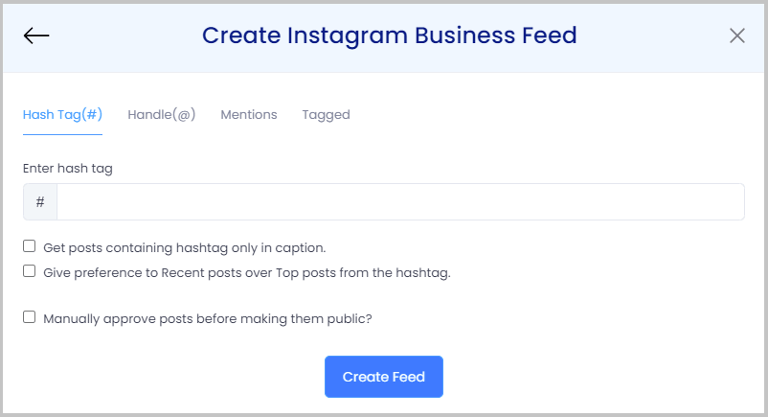
#5 Here you have 4 options that you can choose from to collect posts from Instagram. These options are – Hashtag, Handle, Mentions, Tagged. Next, click on Create Widget button and provide the needed credentials.

Create Feeds

Tagembed gives you the choice to modify the feed according to your need, as it adds beauty to your site and makes it look proficient. Simply click on the Personalize option, you can change the text dimension, textual style, foundation, and more to coordinate with the feed according to your site’s style.

In addition, you have the choice to direct the feed. You can physically eliminate the photographs you would prefer not to show on your site or settle on auto-balance. With auto-control the device will naturally impede every one of the posts containing given watchwords. Or then again stow away the posts from a chose Instagram handle.

Step#2 Embed Instagram posts on the website 

#1 Click on the Embed Widget button that appears on the bottom left corner of your screen.

Embed Widget

#2 Choose your platform pop-up window will appear in front of you, which will have various CMS options. Select the appropriate option.

Choose Platform

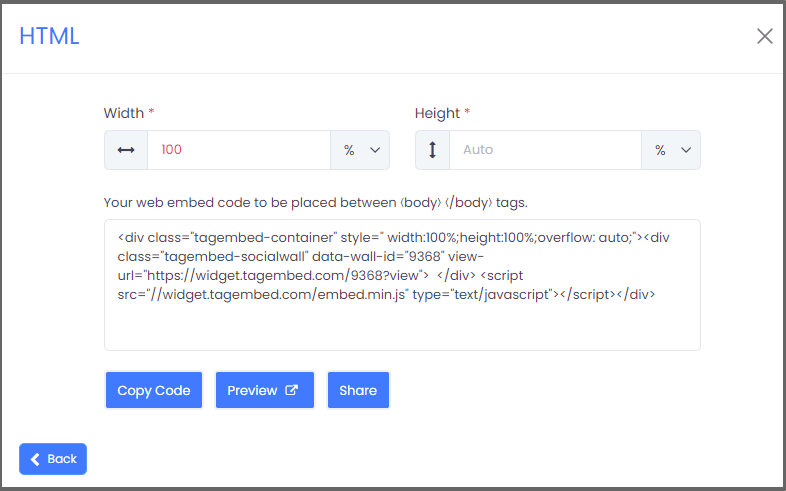
#3 Copy the embedding code (Here, you can adjust the height and width of the widget as well).

Embed Code

#4 Paste the embedding code at the backend of your website.

And that is it, with just a few easy steps, your website will be displaying Instagram Widget.

Benefits of Embedding Instagram Widget

A website plays an important role for a business, as it works as a representative for the business and helps create a good impression. There are several benefits of using Instagram widget

  • Engaging visitors on your website
  • Gaining new followers
  • Providing social proof for your business
  • Promote hashtag campaign
  • Increases the conversions and sales
  • Drive User-Generated Content from Instagram to the Website
  • Increases Dwell Time and Decreases Bounce Rate

Conclusion

Instagram comprises of inventive, brilliant, and energetic substance that conveys an incredible energy and stands out for people. You can carry a similar energy to your site by implanting Instagram feeds on website. Additionally, glad and lovely pictures on the site make an incredible impression and in the end help you in accomplishing your ideal objective.