Getting verified on Facebook is something many people and businesses aim for. It shows your audience that your page or profile is the real deal. Whether you’re a creator, public figure, brand, or business, being verified on Facebook builds trust and makes you stand out.
In this guide, we’ll explain everything you need to know about how to get verified on Facebook. We’ll also show you how tools like Facebook widgets and Facebook aggregators can help boost your visibility.
What Does it Mean to Be Verified on Facebook?
When you’re verified on Facebook, you get a blue or gray checkmark next to your name. The blue check is for public figures, celebrities, brands, or notable pages, while the gray check used to be for businesses and organizations (Facebook has since removed the gray check but may bring similar features again).
This checkmark means Facebook has confirmed that your page or profile is authentic. It helps prevent fake accounts from pretending to be you.
Why Get Verified on Facebook?
There are many benefits to being verified:
Builds Trust: Your audience knows you are the real deal.
Better Visibility: Verified accounts often rank higher in search results.
Boosts Credibility: People are more likely to follow and engage with verified accounts.
Prevents Impersonation: No one can easily pose as your brand or profile.
Who Can Get Verified on Facebook?
Facebook doesn’t just verify anyone. You need to meet certain requirements:
Authentic: Your account must represent a real person, business, or brand.
Complete: You must have a profile photo, bio, and at least one post.
Unique: You can’t have multiple verified accounts for the same person or brand (except in different languages).
Notable: Your account should represent a person, brand, or entity that is well-known and frequently searched.
How to Apply for Facebook Verification
Follow these steps to apply:
Go to your Facebook profile or page.
Click the menu icon (three dots).
Select Settings & Privacy > Settings.
Click on Account Verification (or search for “Verification”).
Fill in the required form:
Your full name.
Your account category (e.g., entertainment, sports, business).
A few sentences explaining why your account should be verified.
Official documents (like an ID or business license).
Click Send and wait for Facebook to review your request.
Tips to Increase Your Chances of Getting Verified
While applying is simple, getting approved is not guaranteed. Here are tips to improve your chances:
Be Consistent: Use the same name across all your social media accounts.
Post Regularly: Show that your account is active and relevant.
Build Your Online Presence: Be featured in news articles, blogs, or websites.
Engage With Followers: Interact and grow your community.
Avoid Fake Followers: Organic growth is key.
How Facebook Widget Helps Your Online Identity
A Facebook widget is a small tool you can add to your website to display your Facebook feed, likes, or posts. It helps in many ways:
Increase Trust: Visitors can see real-time activity from your Facebook page.
Grow Followers: People can like and follow your page directly from your site.
Keep Users Engaged: Show them what’s happening on your social media.
Adding a Facebook widget to your website not only improves engagement but also signals to Facebook that you are active and serious about your brand.
Common Reasons for Verification Rejection
If your verification request is denied, it could be because of:
Incomplete profile information
Lack of official documents
Not enough public presence or media coverage
Fake or misleading information
Don’t worry—if you’re denied, you can apply again in 30 days. Use that time to improve your profile and build your visibility.
Mistakes to Avoid
Avoid these mistakes while applying:
Submitting false documents
Using inconsistent names across platforms
Having a profile with no posts or low engagement
Not linking to your other verified platforms or sites
How Long Does Facebook Verification Take?
Facebook usually responds within a few days to a week, but in some cases, it might take longer. If you’re approved, you’ll see a checkmark next to your name. If not, you’ll receive a notification explaining why.
How Verified Status Impacts Engagement
Once verified, people are more likely to interact with your content. Facebook may also prioritize your posts in news feeds and comments. You’ll likely gain followers more quickly because your account looks trustworthy.
Final Thoughts
Getting verified on Facebook isn’t just about the blue checkmark—it’s about building a strong online identity. Stay consistent, be active, and use helpful tools like Facebook widgets and Facebook aggregators to show that you’re real and reputable.
Whether you’re a creator, business, or public figure, follow this guide step-by-step to improve your chances of success. Keep growing your brand, and soon enough, you might just see that verified badge next to your name!
With the digital revolution of our current era, social media is key to brand creation and audience building. Amongst all the social media platforms available, Facebook continues to be a giant with billions of active accounts. Nevertheless, increasing your base on Facebook isn’t simply having a page; it’s having the ongoing determination to discover how to gain increased Facebook page followers. More followers equal greater engagement, better credibility, and more business prospects. In this guide, we will lead you through time-tested methods to increase Facebook page followers naturally as well as by paid means.
Top tips increase Facebook Page Followers
Increase your Facebook Page followers with these top 12 tips for engagement and growth
1. Knowledge of Facebook’s Algorithm
First, let us know how the algorithm of Facebook works. Facebook gives priority to content based on:
Engagement (likes, shares, comments)
Relevance and quality of posts
Consistency and timing of posting
If your posts attract more interaction, Facebook will present them to a larger audience. Thus, high-quality and interactive content is crucial.
2. Optimize Your Facebook Page for Maximum Reach
An optimized page is the stepping stone for increased Facebook page follower growth. Make sure your page has:
A quality profile and cover photo
An interesting “About” section with key information
Keywords for improved searchability
Clean contact details and CTA buttons
An optimized page will not only assist you in promoting Facebook pages efficiently but also create a powerful first impression among potential followers.
3. Produce High-Quality, Engaging Content
Content is the monarch of social media. To increase Facebook page followers, you need to post useful and engaging content regularly, including:
Eye-catching images and graphics
Short and interesting videos
Live streams for real-time interaction
Polls and quizzes to encourage engagement
Using Facebook Hashtag strategically can also boost your content’s reach, making it more discoverable to a wider audience. The more interesting and well-optimized your content, the higher the chances of increasing Facebook page visibility and getting users to follow your page.
4. Use Facebook Groups & Communities
Facebook Groups are a great method to increase Facebook page followers. Tactics include:
Participating in and joining groups related to your niche
Sharing useful information rather than direct promotions
Building your own Facebook group for community building
An efficient group can assist you in interacting with prospective followers on a more personal level and improve Facebook page interaction through valuable discussions.
5. Host Contests & Giveaways
Having contests or giveaways is an infallible method to increase Facebook page followers. Best practices are as follows:
Inviting users to like, share, and tag friends to participate
Providing niche-related prizes
Having clear and equitable contest rules
Contests not only enhance Facebook page engagement but also boost brand loyalty and exposure. Additionally, encouraging participants to leave a Facebook review about their experience can further strengthen credibility and attract more potential followers.
6. Utilize Facebook Ads Wisely
Facebook advertising can greatly contribute to increase Facebook page followers. Successful ad tactics involve:
Targeting specific groups
Utilizing interactive ad formats such as video and carousel ads
Optimizing the budget for maximum ROI
A carefully planned Facebook ad campaign can effectively promote Facebook page growth and draw quality followers.
7. Work with Influencers and Other Pages
Working with influencers and related Facebook pages can give your follower base a huge boost. Consider:
Collaborating with influencers in your niche
Cross-promoting with other Facebook pages
Hosting joint live sessions or giveaways
A simple shoutout or shared post from a popular influencer can really boost Facebook page followers.
8. Encourage Engagement and User-Generated Content
Engaging a facebook page is an important factor in increase Facebook page followers. Successful strategies include:
Asking thought-provoking questions
Running interactive polls
Encouraging user-generated content (UGC) such as testimonials and photos
Featuring user content creates a sense of community and encourages more participation.
9. Post at Optimal Times and Stay Consistent
Posting at optimal times can help increase Facebook page followers. Best practices include:
Analyzing Facebook Insights for peak activity times
Creating a content calendar for consistency
Maintaining a steady posting schedule with engaging Facebook post ideas
Consistently sharing well-planned Facebook post ideas will boost your page’s credibility and keep your brand on top of your followers’ minds.
10. Leverage Facebook Live and Stories
embedding Facebook reel and Stories are excellent features to interact with your audience. Consider:
Using Facebook Live for Q&A sessions and product launches
Sharing behind-the-scenes content through Stories
Posting limited-time offers and exclusive updates
These features keep the audience engaged and increase Facebook page engagement.
11. Engage With Your Audience Proactively
Engagement is a two-way process. In order to boost Facebook page followers, you ought to:
Answer comments and messages in a timely manner
Show appreciation for shares and mentions
Start conversations with followers
A strong relationship with your audience generates loyalty and fuels Facebook page reach.
12. Track and Update Your Strategy Ongoing
Keeping track of how you’re performing is important in order to drive long-term growth. Utilize Facebook Insights to:
Measure post engagement and reach
Determine content that will resonate with your audience
Make adjustments to strategy for improved outcomes
A data-driven approach ensures your efforts effectively increase Facebook page followers over time.
Conclusion
Building a Facebook page involves strategic planning, compelling content, and ongoing audience interaction. By optimizing your page, taking advantage of Facebook’s features, and employing organic and paid tactics, you can effectively grow Facebook page followers. Through contests, collaborations, or targeted advertising, there are many methods to increase Facebook page engagement and drive Facebook page growth. Be consistent, try various strategies, and see your followers build steadily over time.
Facebook is the most effective medium for companies to reach out, establish connections, and get involved with their customers. Yet posting content isn’t sufficient—companies must prepare effective, engaging, and interactive content to become memorable. In this guide, numerous Facebook post ideas for business have been detailed in order to attain maximum exposure, interaction, and customer involvement.
Knowing What Engages a Facebook Post
The Facebook algorithm favors content that generates interactions, including comments, shares, and reactions. In order to produce engaging posts, companies must aim to offer value, authenticity, and interactivity. Customizing content based on audience interests and behaviors guarantees increased engagement and assists in building long-term relationships with followers.
Engaging Facebook Post Ideas For Every Business
a. Educational & Informative Facebook Post Ideas for Business
Individuals look to social media for information and insights. Producing informative posts makes your business a thought leader.
How-To Guides & Tutorials – Post step-by-step guides on matters pertaining to your business. Example: A beauty company can upload a tutorial on how to get a perfect makeup look.
Industry News & Updates – Keep the followers updated about related trends, regulatory updates, or new developments in your industry.
Quick Tips & Hacks – Offer bite-sized, actionable tips that can assist your audience in their everyday lives. Example: A digital marketing agency offering SEO tips.
b. Interactive & Engaging Facebook Post Ideas for Engagement
Get your audience to engage and interact with your posts directly.
Polls & Surveys – Seek opinions on products, services, or industry trends. Example: A restaurant can ask followers to vote for their favorite dish.
Q&A Sessions – Organize live or comment-based Q&A sessions where your followers can pose questions regarding your business or niche.
Quizzes & Challenges – Organize entertaining quizzes or social media challenges to make your audience participate. Example: A fitness brand introducing a 7-day workout challenge.
c. User-Generated Content & Social Proof Facebook Post Ideas for Small Business
Emphasizing customer content establishes credibility and community, which small businesses need to expand their audience and trust. Leveraging tools like a Facebook Widget can further enhance visibility by showcasing real-time interactions on your website.
Customer Testimonials & Reviews – Publish positive feedback with images to boost credibility, and consider embedding a Facebook Widget on your site to display recent reviews.
Feature Customer Stories – Highlight actual customers using your products or services. Example: A fashion brand showcasing a customer’s outfit styling.
Community Engagement Posts – Invite followers to share their experiences using your hashtag or mentioning your business, and use a Facebook Widget to display these interactions for added social proof.
d. Behind-the-Scenes & Company Culture Facebook Post Ideas for Business
Sharing a little behind-the-scenes action humanizes your brand and strengthens your Facebook Marketing strategy by creating more intimate connections with your audience.
Meet the Team – Introduce employees with brief bios and interesting facts to add a personal touch to your Facebook Marketing efforts.
Workplace Moments – Post pictures or videos of office gatherings, team-building sessions, or typical workdays to showcase your company culture.
Product Development Sneak Peeks – Offer teasers for upcoming products or services to generate anticipation and keep your audience engaged.
e. Promotional & Sales-Driven Facebook Post Ideas for Small Business
Although promotional material shouldn’t dominate your feed, it plays a crucial role in driving sales, especially for small businesses looking to boost revenue. Staying updated with the latest Facebook Updates can also help refine your strategy for maximum reach and engagement.
Exclusive Facebook Deals – Provide exclusive discounts or one-time offers for followers.
New Product Announcements – Post updates on product releases or service upgrades, ensuring they align with recent Facebook Updates to maximize visibility.
Contests & Giveaways – Organize giveaways that require followers to like, comment, or share to participate, leveraging new Facebook Updates to enhance engagement.
f. Fun & Trend-Based Facebook Post Ideas to Engage
Individuals enjoy having fun and shareable material. Adding personality to your posts drives reach and engagement.
Memes & Humor – Post relatable memes or funny material applicable to your niche.
Seasonal & Holiday-Themed Posts – Commemorate special days with themed material.
Trending Topics & Challenges – Take advantage of viral trends, challenges, or breaking news to remain timely.
Best Practices for Creating High-Engagement Facebook Posts
To get the most out of your Facebook posts, use these best practices:
Use Eye-Catching Visuals – Good photos and videos boost engagement.
Keep Captions Concise & Engaging – Keep text short and interesting while strategically incorporating a relevant Facebook Hashtags to increase discoverability.
Optimize Posting Times – Post at times when your audience is most active.
Encourage Interaction – Use powerful CTAs to elicit likes, comments, and shares.
Measuring Success & Adapting Your Facebook Post Strategy
Monitoring performance aids in enhancing your content strategy and boosting engagement. Incorporating Facebook Reviews into your analysis can provide valuable insights into customer sentiment and brand perception.
Measure Engagement Metrics – Monitor likes, shares, and comments using Facebook Insights, and consider tracking Facebook Reviews to understand audience feedback.
Testing Different Facebook Post Ideas for Engagement Using A/B – Experiment with various formats to determine what resonates most, including posts that highlight positive Facebook Reviews for added credibility.
Data-Driven Strategy Refining – Modify your content strategy based on audience reactions, analytics, and insights gathered from Facebook Reviews to improve engagement.
Conclusion
Developing good Facebook post ideas for business means combining useful, interactive, and visually engaging content. By utilizing these Facebook post ideas for engagement, companies are able to have a stronger relationship with their users, increase brand awareness, and eventually generate more conversions. When it comes to Facebook post ideas for small business, consistency and creativity are crucial—begin trying out today and see what performs best with your audience!
Facebook remains one of the most powerful platforms for digital marketing. However, like all social media networks, it evolves constantly, rolling out updates that impact how content is displayed, how users interact, and how businesses market their products or services. As a marketer, staying on top of Facebook updates marketing is crucial for your brand’s success.
In this article, we’ll explore why these updates matter, how they can impact your marketing efforts, and how to leverage them for better results. Plus, we’ll cover some essential strategies and tools to stay ahead of the game.
1. The Importance of Facebook Updates for Marketers
Facebook’s algorithm and tools are in a constant state of flux. These updates can affect everything from post reach to ad targeting, user engagement, and more. As a marketer, you need to be aware of these changes to ensure you’re using the platform effectively.
Here’s why Facebook updates matter:
Changes in Reach: Facebook periodically changes how it distributes organic content. What worked yesterday might not work today, so it’s essential to stay updated.
Ad Targeting: The platform regularly tweaks its ad algorithms, which can directly affect the performance of your campaigns.
New Features: Facebook often introduces new tools or features that could make a significant impact on your marketing strategy.
By keeping track of Essential Facebook UpdatesMarketers should know about, you can adapt quickly and stay relevant in an ever-changing digital landscape.
2. Driving Conversion Through Facebook Updates
One of the most important reasons to keep up with Facebook updates marketing is to drive conversions effectively. Facebook’s algorithm changes often focus on enhancing the user experience, which in turn impacts how businesses reach their target audience.
Here’s how the updates can help increase conversions:
Improved Ad Targeting: Updates to Facebook’s targeting options (e.g., lookalike audiences or advanced demographic filters) allow marketers to deliver ads to the right people at the right time.
Enhanced Mobile Experience: As mobile browsing continues to dominate, Facebook updates frequently improve its mobile app, making it easier for potential customers to make purchases or engage with content.
Better Call-to-Action Buttons: With updated call-to-action (CTA) options like “Shop Now,” “Learn More,” and “Book Now,” Facebook makes it easier for users to take the next step after engaging with your content.
These changes are designed to enhance the user experience and, by extension, drive conversion rates higher. Staying up to date on Facebook’s updates ensures that your brand can capitalize on these new features.
3. Social Proof and Its Impact on Marketing
Social proof is one of the most powerful tools in modern marketing. Facebook’s updates often enhance how social proof is displayed, allowing your brand to build credibility and trust with potential customers.
How can you leveragesocial proof with Facebook updates?
Customer Reviews: Facebook regularly updates how reviews are displayed, giving brands more visibility when users leave positive feedback. This social validation can help you gain new customers by showcasing positive experiences from real users.
User-Generated Content: With each update, Facebook improves the way user-generated content is shared and promoted. Encourage customers to share their experiences on Facebook and tag your brand, creating organic endorsements that work as powerful testimonials.
By incorporating social proof into your marketing strategy, you can build credibility and inspire trust with potential customers. Facebook updates can help you do this more effectively.
4. Promoting Your Facebook Page: Strategies and Updates
Facebook’s updates often focus on helping businesses promote their pages and increase engagement with followers. But staying ahead of these updates is key to maximizing the effectiveness of your promotion efforts.
Page Visibility: Facebook has tweaked its algorithm to prioritize more engaging and authentic content. Pages that post high-quality, engaging content tend to be prioritized over those that focus on self-promotion or clickbait.
Increased Interaction with Followers: Updates often enhance how businesses can interact with their followers, from responding to comments to sending personalized messages. These features allow businesses to build stronger relationships with their audience.
Facebook Groups Integration: Facebook has made it easier for brands to integrate their business pages with Facebook Groups. By creating a community around your brand, you can increase loyalty and organically promote your page.
Staying on top of these updates ensures that you can use Facebook’s full range of promotional tools to boost your brand visibility and grow your follower base.
5. Boosting Your Brand’s Reputation with a Facebook Review Widget
One feature that can significantly improve your marketing strategy is the Facebook widget. With frequent updates to how businesses can display reviews, it’s easier than ever to showcase social proof directly on your website.
Why should you consider adding a Facebook review widget to your website?
Instant Trust: Customer reviews build instant credibility. When visitors see positive feedback about your brand, they’re more likely to trust you and convert.
Seamless Integration: The Facebook review widget can be easily embedded Facebook feed on your website, allowing you to display the most recent and relevant reviews directly on your homepage or product pages.
Increased Engagement: Encouraging customers to leave reviews on Facebook and then showcasing them on your site can increase engagement both on Facebook and your website.
With Facebook regularly updating how reviews are displayed and interacted with, now is the perfect time to integrate a Facebook review widget into your website to improve customer trust and drive more conversions.
6. How to Embed Facebook Reviews on Your Website
Facebook has also improved how businesses can embed Facebook reviews on their websites. If you’re looking for a simple yet powerful way to show off positive customer feedback, embedding Facebook reviews directly into your site is a great option. Using tools like Tagbox, you can easily integrate and display Facebook reviews, creating a seamless and dynamic experience for visitors.
Here’s how embedding Facebook reviews can benefit your business:
Improved User Experience: Directly embedding reviews into your product or service pages provides immediate feedback to visitors, which helps them make quicker purchasing decisions.
Authenticity: Facebook reviews are perceived as more authentic and trustworthy because they come from real users on a widely recognized platform.
More Traffic to Your Facebook Page: By embedding reviews, you encourage visitors to engage with your Facebook page, which can increase traffic and foster a stronger relationship with your audience.
With Facebook making it easier to embed reviews directly from the platform, and with tools like Tagbox helping you integrate them effortlessly, this is an excellent way to leverage the power of social proof and increase engagement with both your website and your Facebook page.
7. Essential Facebook Updates Marketers Should Know
To stay ahead of the competition, it’s important for marketers to keep track ofessential Facebook updates. These updates can impact everything from how content is shown to how your ads perform.
Here are some of the most important recent updates for marketers to know:
Algorithm Changes: Facebook’s algorithm updates have a significant impact on organic reach. Marketers need to adapt their content strategies to align with the latest algorithm preferences.
New Ad Formats: Facebook regularly introduces new ad formats, including Stories Ads and interactive video ads. Staying on top of these changes will help marketers craft more effective ad campaigns.
Enhanced Targeting Options: As Facebook gathers more data on user behavior, marketers are gaining access to more advanced targeting features, such as improved lookalike audiences and predictive analytics.
By keeping an eye on essential Facebook updates marketers should be aware of, you can ensure your strategy stays competitive and effective.
Conclusion
Facebook updates are crucial for staying relevant and effective in your marketing strategy. From driving conversion and leveraging social proof to promoting your Facebook page and integrating features like a Facebook review widget or embed Facebook review options, these changes present opportunities for businesses to engage with their audiences in more meaningful ways.
By keeping up with the latest essential Facebook updates marketers need to know, you can ensure your brand thrives in the ever-changing world of social media marketing. Adapt, experiment, and use these updates to your advantage – your brand’s success depends on it.
Facebook is a powerhouse platform for e-commerce businesses looking to drive traffic, increase engagement, and ultimately boost conversions. With over 2.8 billion active users globally, it offers vast opportunities for small businesses to connect with potential customers. One of the most effective ways to harness Facebook’s potential is by integrating Facebook widgets into your e-commerce website.
In this article, we’ll explore how Facebook widgets can help promote a Facebook presence, increase engagement, and ultimately drive more conversions for your e-commerce business.
What Are Facebook Widgets?
Before diving into the details of how Facebook widgets can help increase conversions, let’s define what they are. Facebook widgets are small interactive elements that can be added to your website. These widgets typically allow your site visitors to interact with Facebook features, such as liking a page, sharing content, or leaving a comment.
Common Facebook widgets include:
Like button: Allows visitors to like a specific product or your business’s Facebook page.
Share button: Enables easy sharing of content from your website to Facebook.
Comment plugin: Lets users leave comments on products or content directly through their Facebook accounts.
Facebook Messenger: Provides live chat functionality with customers through Facebook Messenger.
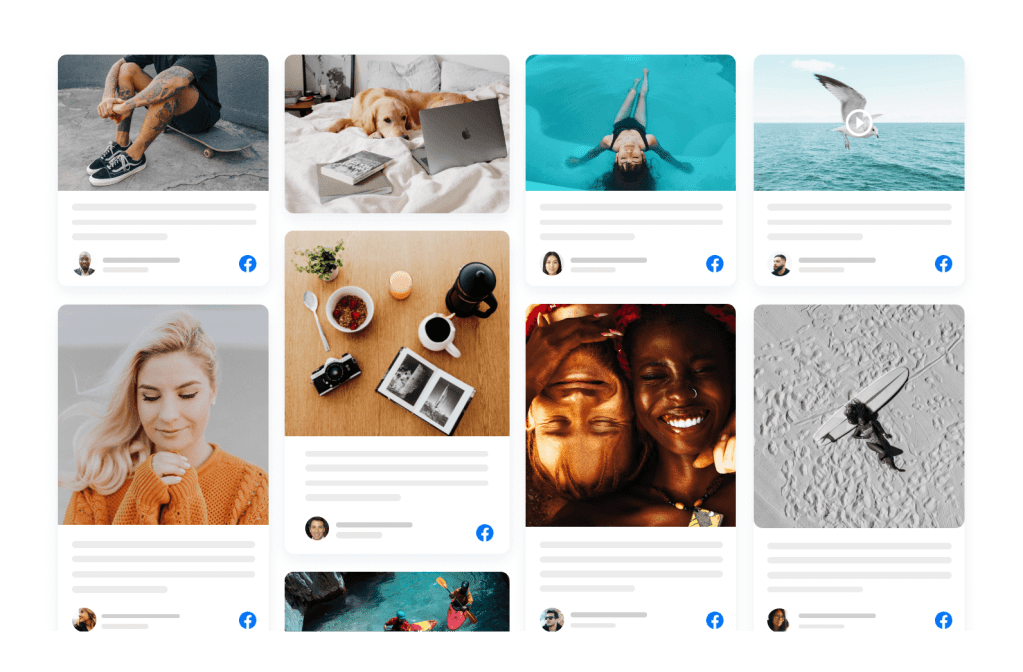
Facebook Feed: Displays recent posts from your Facebook page directly on your site.
Benefits of Facebook Widgets for E-Commerce Websites
Integrating Facebook widgets into your e-commerce site can provide numerous benefits. Here are the top advantages:
Promote a Facebook Presence
Adding Facebook widgets to your site encourages visitors to follow and engage with your business on Facebook. This helps build a stronger presence on social media and keep your customers connected.
Increase Engagement
Facebook widgets make it easy for visitors to interact with your content, whether by liking, sharing, or commenting. This increases user engagement, which in turn can lead to more interactions and conversions.
Improve Social Proof
Widgets like the Facebook Like and Share buttons can act as powerful social proof. When users see that others have liked or shared your product, they are more likely to trust your business and make a purchase.
Enhance User Experience
Facebook widgets improve the overall user experience by offering seamless integration with Facebook features. This means your visitors can engage without leaving your site, resulting in a more fluid shopping experience.
Increase Traffic
Sharing products or content directly to Facebook can help drive additional traffic to your e-commerce site. It helps expand your reach beyond your website’s visitors and into your followers’ networks.
Key Facebook Widgets to Drive Conversions
Now that we know why Facebook widgets are important, let’s dive into the specific widgets you should consider integrating into your e-commerce website to maximize conversions.
1. Facebook Like Button
The Facebook Like button is one of the most popular and recognizable Facebook widgets. This simple tool allows users to show support for your products or content, which can encourage more visitors to make a purchase.
How it helps drive conversions:
Builds Trust: A “like” indicates that others approve of a product, making it more likely that visitors will trust your brand and convert.
Encourages Social Proof: The more likes your products receive, the more social proof you gather. This can influence potential customers to make a purchase.
2. Facebook Share Button
The Share button allows visitors to share content from your website, such as product pages or blog posts, to their Facebook profiles. This widget can increase the visibility of your products and bring in new customers.
How it helps drive conversions:
Increases Reach: When users share your product with their network, they are exposing your business to a wider audience. This could lead to more potential customers and higher conversion rates. Additionally, when users embed Facebook reviews on your site, they bring positive social proof, which can further enhance credibility and attract new customers.
Promotes Word-of-Mouth Marketing: Social shares are an effective form of word-of-mouth marketing, which has a significant impact on consumer decisions. Embedding Facebook reviews also contributes to this by showcasing authentic customer experiences, influencing potential buyers to make confident purchasing decisions.
3. Facebook Comment Plugin
The Facebook Comment plugin lets users comment on your product pages using their Facebook accounts. Comments can create a conversation around your products and help foster a community around your brand.
How it helps drive conversions:
Facilitates Social Proof: When users leave comments or reviews on your product pages, it builds trust for future customers.
Encourages Interaction: Comments give your customers an opportunity to ask questions and engage directly with your brand. Responding to these interactions helps build relationships, which can increase conversions.
4. Facebook Messenger Chat Plugin
The Facebook Messenger chat plugin allows your website visitors to communicate directly with your business via Facebook Messenger. This real-time communication is a great way to answer questions and address concerns that may be preventing a customer from completing their purchase.
How it helps drive conversions:
Instant Support: Providing immediate responses to customer questions or concerns can increase the likelihood of a successful sale.
Builds Relationships: Direct communication with potential customers helps build trust and can make them more comfortable completing a transaction.
5. Facebook Page Feed
The Facebook Page Feed widget lets you display your latest Facebook posts on your website. It helps keep your website content fresh and encourages visitors to follow you on Facebook for updates.
How it helps drive conversions:
Showcases New Products: You can promote new products, special offers, or sales directly on your website.
Encourages Social Following: By displaying your social media activity on your website, visitors are more likely to follow you on Facebook, leading to long-term engagement and potential future purchases.
6. Facebook Reviews Plugin
Customer reviews are a powerful tool in driving e-commerce conversions. The Facebook Reviews plugin allows you to display user reviews from your Facebook page directly on your website. Additionally, by integrating a Facebook feed, you can showcase real-time updates and interactions from your Facebook page, further enhancing social proof and engagement. This combination of reviews and live feed can help build trust and encourage visitors to convert into customers.
How it helps drive conversions:
Social Proof: Positive reviews from real customers build trust and make it easier for potential buyers to make purchasing decisions.
Encourages User-Generated Content: When customers see that their reviews could be showcased on your website, they may be more likely to leave feedback, which can improve future conversions.
How to Integrate Facebook Widgets into Your E-Commerce Website
Integrating Facebook widgets into your e-commerce website is relatively simple and can be done in a few steps. Here’s how:
Step 1: Sign Up for a Facebook Developer Account
To integrate Facebook widgets into your site, you’ll need a Facebook Developer account. Visit the Facebook Developers site and create an account if you don’t already have one.
Step 2: Choose the Widget You Want to Add
Navigate to the Facebook for Developers page and choose the widget you want to add to your website. Facebook offers various tools and resources to customize widgets, from Like buttons to Messenger plugins.
Step 3: Customize Your Widget
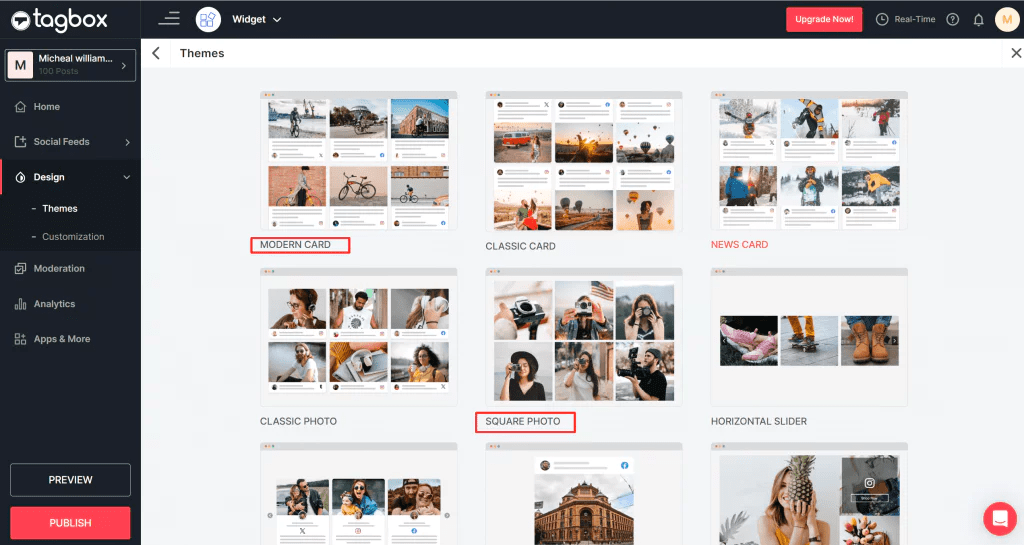
Once you’ve selected a widget, customize it according to your needs. This can include choosing colors, size, layout, and other settings to match your website’s design.
Step 4: Copy the Code
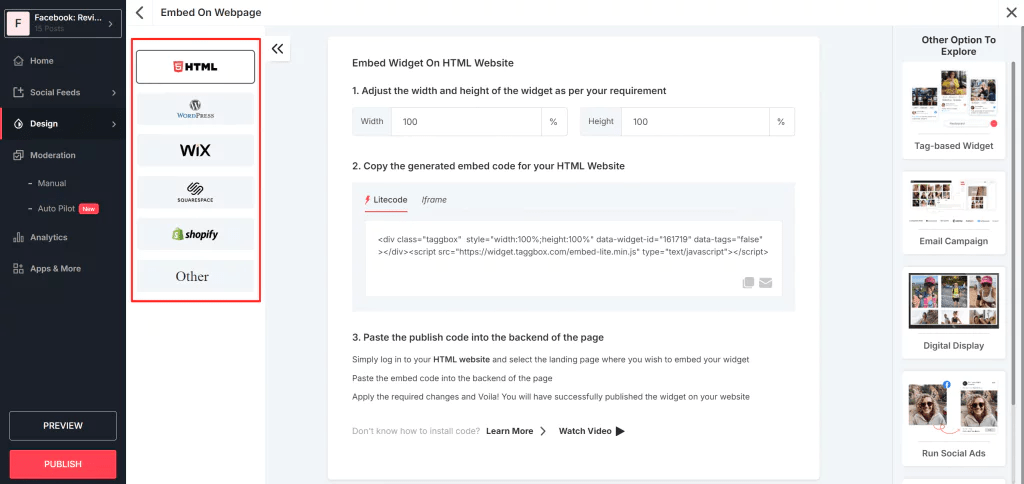
After customizing your widget, Facebook will provide you with a piece of HTML code that you need to embed Facebook feed into your website.
Step 5: Paste the Code into Your Website
Paste the code into the appropriate section of your website’s HTML. This is typically done within the source code of the page where you want the widget to appear.
Step 6: Test and Optimize
Once the widget is installed, test it to ensure it’s working properly. Monitor how your audience is interacting with the widget, and optimize it based on engagement and conversion data.
Best Practices for Using Facebook Widgets to Drive Conversions
To get the most out of Facebook widgets, keep these best practices in mind:
1. Place Widgets Where They’re Easy to Find
Ensure that your widgets are placed in visible and strategic locations on your website, such as product pages, checkout pages, or blog posts. This increases the chances that your visitors will interact with them.
2. Make Widgets Mobile-Friendly
Since many Facebook users access the platform via mobile devices, ensure that the widgets are optimized for mobile. Facebook provides mobile-friendly versions of most widgets to ensure a seamless user experience.
3. A/B Test Widget Placement and Design
Try testing different widget placements and designs to see which ones result in the highest engagement and conversion rates. A/B testing can help you find the best combination for your e-commerce business.
4. Use Widgets in Combination
Combine multiple Facebook widgets on your site for maximum impact. For example, use the Like and Share buttons together to encourage social sharing and increase the visibility of your products.
5. Encourage Customers to Leave Reviews
Prompt customers to leave reviews on your Facebook page by offering incentives or making it easy for them to do so. Displaying these reviews on your website can greatly influence potential buyers.
Incorporating Facebook widgets into your e-commerce website is a powerful strategy to drive conversions, engage visitors, and increase your brand’s visibility. These widgets not only encourage social interaction but also help build trust with your audience through social proof, reviews, and direct communication. By promoting a Facebook presence on your site and increasing reach and engagement through interactive features, you can create a seamless experience that boosts conversions and ultimately grows your small business.
So, whether you’re just starting out or looking for ways to optimize your existing e-commerce site, Facebook widgets are a simple yet effective way to take your business to the next level.
Promoting a Facebook page for free in 2025 is still one of the best ways to reach a wider audience, build your brand, and grow your business. While Facebook’s paid ads offer great targeting options, it’s entirely possible to create a thriving page and engage with your audience without spending a dime. In this guide, we’ll walk you through the best strategies to promote your Facebook page for free, including helpful tips like embedding your Facebook feed to maximize visibility.
Whether you’re a small business owner, content creator, or entrepreneur, this step-by-step approach will help you take full advantage of Facebook’s tools.
1. Optimize Your Facebook Page
Before diving into promotional strategies, make sure your Facebook page is set up for success. An optimized page will not only help you stand out but also make it easier for users to find and engage with your business.
Create an attention-grabbing profile and cover photo: Your profile picture and cover photo should represent your business, whether it’s a logo, product shot, or a unique design. Use high-quality images that reflect your brand.
Complete the ‘About’ section: Fill out all the necessary details, including your business description, location, contact info, and website link. An informative ‘About’ section builds trust and makes it easy for people to connect with you.
Add a Call to Action (CTA): Facebook lets you set up a CTA button (e.g., “Shop Now,” “Contact Us,” or “Sign Up”). This can encourage visitors to take the next step and engage with your business.
2. Post Engaging Content Regularly
Creating valuable and shareable content is one of the most effective ways to organically promote your Facebook page. Here’s how you can maximize the impact of your posts:
Post consistently: Aim to post regularly, whether it’s daily or a few times a week. Consistency keeps your brand top-of-mind for followers.
Mix up your content: Don’t rely solely on text updates. Use a mix of videos, images, infographics, and links. Experiment with live videos, which often receive higher engagement than standard posts.
Craft compelling captions: Your captions should encourage action. Ask questions, share personal stories, or share industry tips. Captivating captions prompt users to comment, like, or share, expanding your reach.
Embed Facebook feed on your website: For added exposure, consider embedding your Facebook feed on your website. This not only keeps your site dynamic but also encourages website visitors to follow your page.
3. Encourage Interaction and Build Engagement
The more people interact with your posts, the more Facebook will show your content to others. Fostering engagement can be done in many ways:
Ask questions: Get your audience involved by asking questions that spark conversations. For example, ask for opinions on a product or a recent trend.
Host giveaways and contests: These are great for boosting engagement. Encourage followers to tag friends, share your posts, or comment for a chance to win a prize.
Use Facebook Stories: Stories are a powerful way to engage users in real-time. Use polls, quizzes, or behind-the-scenes content to keep your followers interested.
Respond to comments: Make sure to reply to comments on your posts. Engaging with your audience shows that you care and helps build a loyal community.
4. Join Relevant Facebook Groups
Facebook Groups are a great way to network with people in your niche, share valuable content, and grow your audience organically. Here’s how to make the most of them:
Find and join relevant groups: Search for groups where your target audience is likely to hang out. These could be industry-specific groups, local business communities, or groups based on shared interests.
Add value, don’t just promote: Become an active participant in these groups. Share your expertise, help others with questions, and provide valuable insights. Avoid spamming the group with constant self-promotion; instead, focus on contributing meaningful content.
Share your page when appropriate: If a group allows self-promotion or has a dedicated day for sharing, use this opportunity to invite members to follow your Facebook page.
5. Collaborate with Other Pages and Influencers
Collaboration is one of the most effective ways to expand your reach on Facebook, especially when you partner with businesses or influencers who already have an established audience.
Partner with complementary businesses: Find businesses that share your target audience but aren’t direct competitors. You can collaborate on content, co-host events, or run joint promotions.
Collaborate with influencers: Micro-influencers are particularly effective for small businesses. Reach out to influencers whose followers would resonate with your brand and propose a mutually beneficial partnership.
Cross-promote on social media: Promote each other’s Facebook pages on your other social media accounts. You can share a post about your partnership or tag each other in relevant posts.
6. Host Facebook Live Events
Live video is one of the most engaging forms of content on Facebook, and it’s completely free to use. Facebook Live helps you connect with your audience in real-time, answer questions, and showcase your business or products.
Plan engaging live sessions: Consider hosting Q&A sessions, product demonstrations, or behind-the-scenes tours of your business. Encourage viewers to participate by asking questions or sharing their opinions.
Promote your live events in advance: Let your audience know when you’ll be going live, and remind them to tune in. This increases the chances of getting more viewers and engagement during the broadcast.
Save your live videos: After your live session, make sure to save and share the video on your Facebook feed for those who may have missed it.
7. Utilize Facebook’s Free Advertising Features
While Facebook ads are a paid option, you can still leverage some of the free advertising tools Facebook offers.
Pin important posts: Pinning a post to the top of your page ensures it’s the first thing new visitors see. This is a great way to highlight promotions, new products, or important updates.
Invite friends to like your page: Facebook allows you to invite your friends to like your business page. Don’t hesitate to ask your friends and family to help promote your page to their networks.
Encourage reviews and recommendations: Ask satisfied customers to leave reviews or recommendations on your page. Positive feedback serves as social proof and helps build trust with new potential followers.
8. Optimize Your Page for Local Search
If you’re a local business, making sure that your Facebook page appears in local search results can help you attract nearby customers.
Complete your address and business hours: Add your business location and operating hours to your page. This makes it easy for people to find you when they search for businesses in their area.
Use location tags in your posts: When sharing photos or content related to your physical location, use location tags. This can increase the chances of your page showing up in local searches.
9. Embed Your Facebook Feed on Your Website
To increase the visibility of your Facebook page, consider embedding your Facebook feed directly onto your website. This tactic does several things for your business:
Increases visibility: Visitors to your site will be able to see your latest Facebook posts, which encourages them to follow your page.
Promotes engagement: Displaying your Facebook feed on your website can lead to more interactions as people see your content and engage with it directly on Facebook.
Builds social proof: When people see that others are interacting with your posts, it adds credibility and trust to your brand.
10. Encourage User-Generated Content (UGC)
User-generated content (UGC) is a powerful form of social proof. It not only helps you promote your page organically, but it also strengthens the relationship with your audience.
Ask your followers to share their experiences: Encourage customers to post photos or videos of your products in use. Offer incentives like discounts or prizes to motivate them to participate.
Share UGC on your page: Reposting content created by your customers gives them recognition and shows that you value their support. Plus, it introduces your business to their audience.
Final Thoughts
Promoting a Facebook page for free in 2025 is entirely possible if you leverage the right strategies. From optimizing your page to embedding your Facebook feed on your website, these tactics will help you grow your audience and boost engagement without spending money on ads.
Stay consistent with your efforts, engage with your followers, and be proactive in finding opportunities for collaboration and networking. With patience and dedication, your Facebook page will become a powerful tool for growing your business and reaching new customers.




 Social Widget