

YouTube has Billion of users around the world. So presently you should feel that it will be not difficult to acquire sees on the recordings with a particularly immense client base, correct? However, there is a trick : 62% of organizations use YouTube to post video content. Subsequently, you need some astonishing techniques that increment sees on your perspectives and advance your YouTube channel.
And peoples have started using YouTube videos on their website to improve their business. If you think adding videos to the website is a difficult task and somehow decreases the performance or speed of the website, you are highly mistaken. There are amazing social media aggregation tools like Tagembed is available in the market through which you can embed YouTube videos on website without any hassle.
Below are the steps to embed Youtube videos on websites using Tagembed:=
Steps to Embed Yotube Videos on Websitw
1. Sign Up to create a Free Tagembed account or Login if you already have an account.

2. You’ll be redirected towards the Tagembed dashboard.

3. Your First Widget will be already created, just click on the Edit button to proceed.
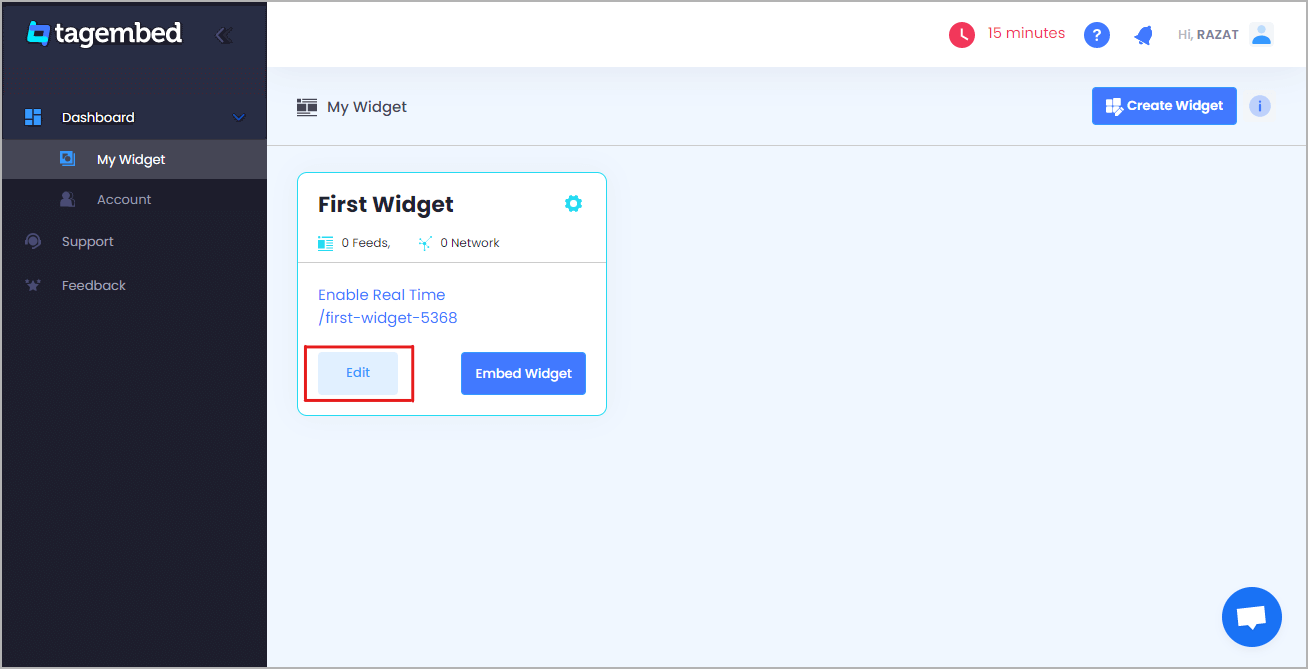
4. A screen “Pick a source” will appear, here select YouTube from the list of networks.

5. YouTube Widget lets you aggregate feeds using multiple methods, such as:
- Channel URL – Enter the URL of the channel you wish to embed on your website.
- Playlist – Copy and paste the URL of the YouTube Playlist that you’d like to display on your website.
- Keywords – Input the relevant keyword that you want in a video.
- Location – Enter the location and keyword using which you want to embed YouTube videos.
Here, select Playlist as your preferrable method to aggregate YouTube Playlist Feeds.

6. Finally, click on the Create Feed button to start aggregation.
7. On the bottom-left menu panel, click on the Embed Widget button.

Also Read: Embed Instagram Feeds
8. A new pop-up “Choose Your Platform” will appear with the list of different website CMS.

9. Choose your website CMS as OTHER (for blogger CMS users) and adjust the height & width of the widget,
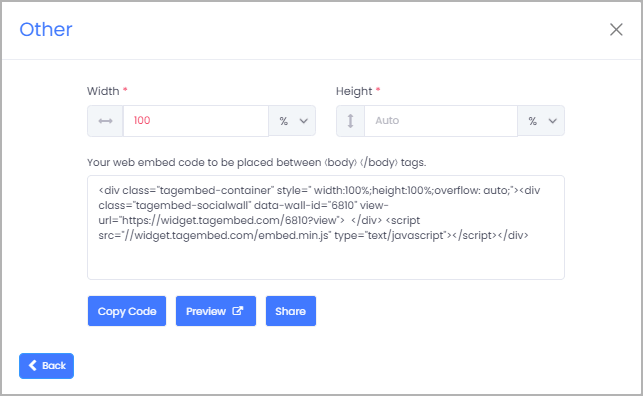
10. Finally, click on the Copy Code button to copy the embed code and paste it on the backend of the website.

 Social Widget